AI Wearable Glass
Introduction
AI Wearable glass is an easy-to-program platform powered with RTL8735B and BT SoC, which designed to enable a wide range of IoT applications.
This advanced wearable technology integrates multiple peripheral interfaces, including WiFi, Bluetooth Low Energy (BLE), I2S, I2C, and UART, making it versatile and suitable for diverse use cases.
AI Wearable Glass supports several key functions. The figure below illustrates the system architecture and hardware capabilities of the AI Wearable Glass.
AI Wearable Glass System Block Diagram
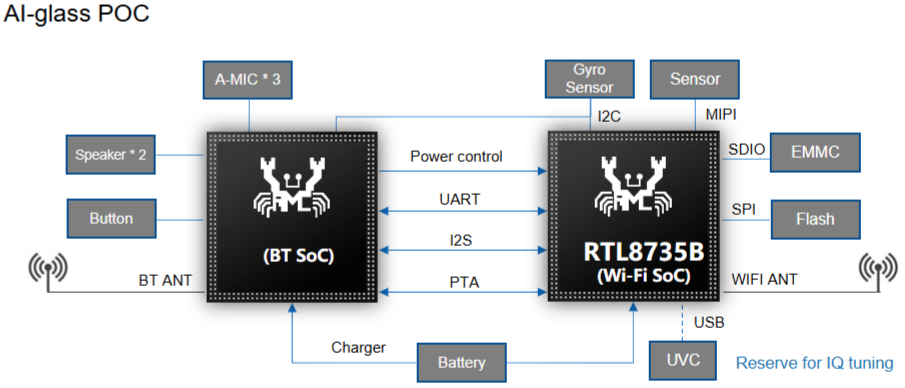
The platform features two SoCs that cooperate through UART, I2S, and PTA communication interfaces.
The Wi-Fi SoC (RTL8735B) serves as the main processor, responsible for managing the MIPI camera sensor, eMMC storage (via SDIO), SPI Flash, USB (reserved for UVC IQ tuning), and Wi-Fi antenna.
The BT SoC handles audio processing functions, including three microphones, two speakers, button inputs, and Bluetooth antenna, as well as power control.
Both SoCs share the same battery power source. The gyroscope sensor communicates via I2S and can interact with both the Wi-Fi and BT SoCs, supporting synchronized motion and audio data.
System Operation Overview
The data collected through the AI Wearable Glass can be uploaded via Bluetooth, enabling integration with smart device applications and supporting complete IoT implementations.
Powering the device is simple and convenient through a standard Micro USB connection, ensuring compatibility and ease of use.
To better understand the operating modes and feature combinations of the AI Wearable Glass, refer to the diagrams below.
AI Wearable Glass Functional Scenarios

The AI Wearable Glass platform supports multiple operating scenarios to meet different application needs:
Bluetooth Audio Only – Supports audio-related use cases such as Bluetooth audio playback and voice chat through the BT SoC.
Bluetooth Audio + Video/Wi-Fi Application – Combines Bluetooth audio with Wi-Fi video and AI functions for multi-modal interaction, OTA updates, and live streaming capabilities.
Video / Wi-Fi Application Only – Operates purely on the Wi-Fi SoC, supporting photo capture (up to 12 MP), video recording (up to 2K resolution), and data transmission over the network.
Feature Workflows
To better understand the features of the AI Wearable Glass, the following flow charts illustrate the operation of different application modes.
Lifetime Snapshot Flow
The Lifetime Snapshot flow chart illustrates the process by which the AI Wearable Glass captures and stores an image when triggered by a button or mobile application. This operation involves coordination between the BT SoC and the Wi-Fi SoC (RTL8735B).
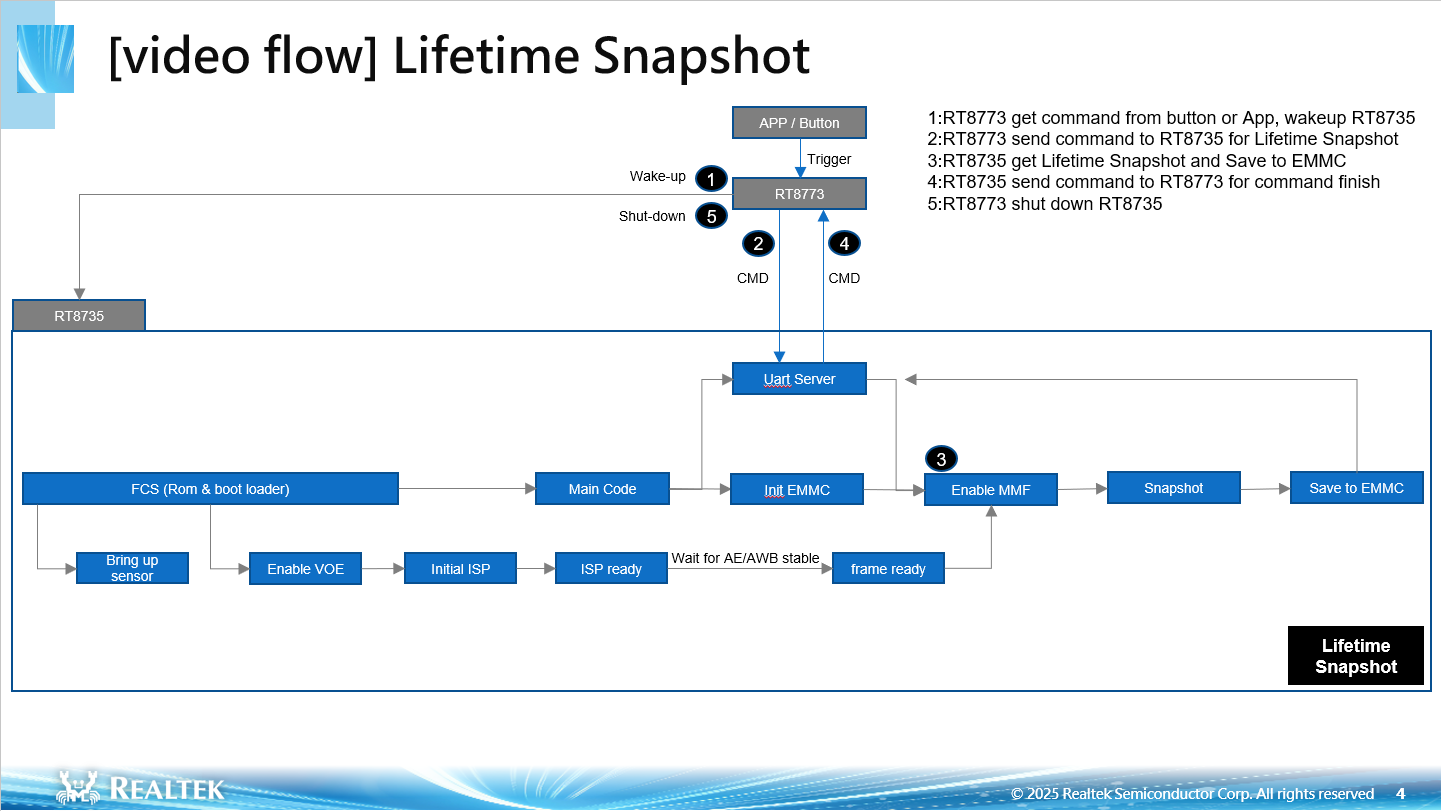
In this workflow:
BT SoC receives a trigger command from the button or mobile application and wakes up RTL8735B.
BT SoC sends a command to RTL8735B to initiate the Lifetime Snapshot process.
RTL8735B performs the image capture sequence — initializing the sensor, enabling the VOE (Video Offload Engine), running the ISP pipeline, and capturing the frame.
The captured snapshot is saved to external storage.
Once the operation completes, RTL8735B notifies BT SoC, which then powers down RTL8735B to conserve energy.
This flow demonstrates how the system performs efficient on-demand image capture, ensuring low power consumption while maintaining synchronized operation between the two SoCs.
Lifetime Snapshot Time Measurement:
Descriptor |
Time(ms) |
|---|---|
RTL8735B wakes up and performs image capture sequence |
341ms |
Uart server initialization |
7ms |
Capture Raw |
1795ms |
Response Tone |
1436ms |
Raw to NV12 |
1279ms |
NV12 to JPEG |
224ms |
Save external disk |
300ms |
Lifetime Snapshot Burst Mode Flow
The Lifetime Snapshot burst mode flow chart illustrates the process by which the AI Wearable Glass captures and stores multiple images when triggered by multiple button pressing. This operation involves coordination between the BT SoC and the Wi-Fi SoC (RTL8735B).
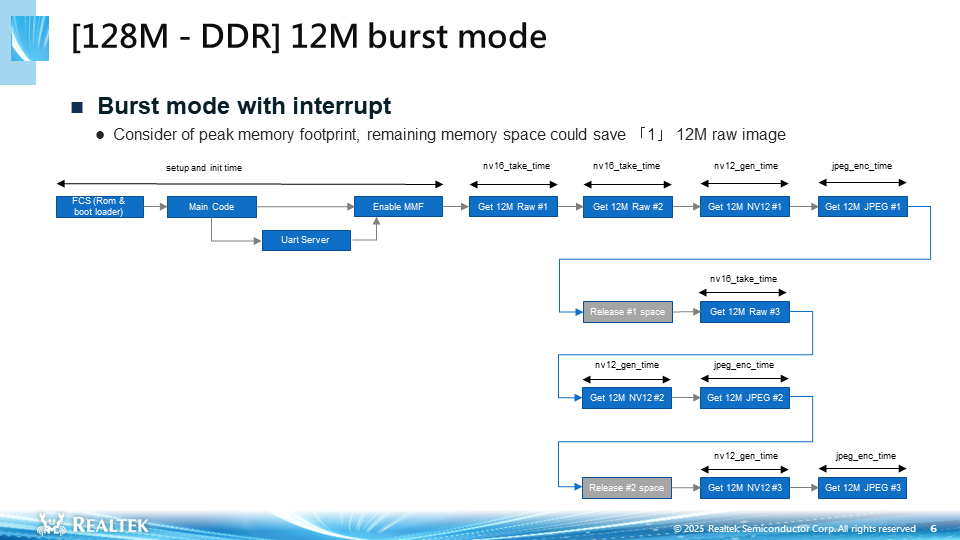
In this workflow:
BT SoC receives a trigger command from the button and wakes up RTL8735B.
BT SoC sends a command to RTL8735B to initiate the Lifetime Snapshot process.
RTL8735B performs the image capture sequence — initializing the sensor, enabling the VOE (Video Offload Engine), running the ISP pipeline, and capturing the frame.
During 12M snapshot capturing process, BT SoC will send another command to RTL8735B if another button press is triggered by user.
Depending on trigerring point, the snapshot raw file can be captured before or after encoding process begins.
For 128M DDR spec, the maximum number of raw image file stored in memory space is 2. Hence, encoding and saving process must be completed before the third image is captured.
The captured snapshot is saved to external storage.
Once the operation completes, RTL8735B notifies BT SoC, which then powers down RTL8735B to conserve energy.
This flow demonstrates how the system performs efficient on-demand image capture with burst mode, ensuring low power consumption while maintaining synchronized operation between the two SoCs.
Lifetime Snapshot Time Measurement:
Descriptor |
Time(ms) |
|---|---|
Setup and init time |
341ms |
Uart server initialization |
7ms |
Capture Raw (1) |
1795ms |
Capture Raw (2) |
1796ms |
Raw to NV12 (1) |
1278ms |
NV12 (1) to JPEG and save to ext disk |
539ms |
Capture Raw (3) |
1796ms |
Raw to NV12 (2) |
1278ms |
NV12 (2) to JPEG and save to ext disk |
542ms |
Raw to NV12 (3) |
1280ms |
NV12 (3) to JPEG and save to ext disk |
535ms |
AI Snapshot Flow
The AI Snapshot flow chart illustrates the process by which the AI Wearable Glass captures and transmit an image when triggered by a mobile application. This operation involves coordination between the BT SoC and the Wi-Fi SoC (RTL8735B).
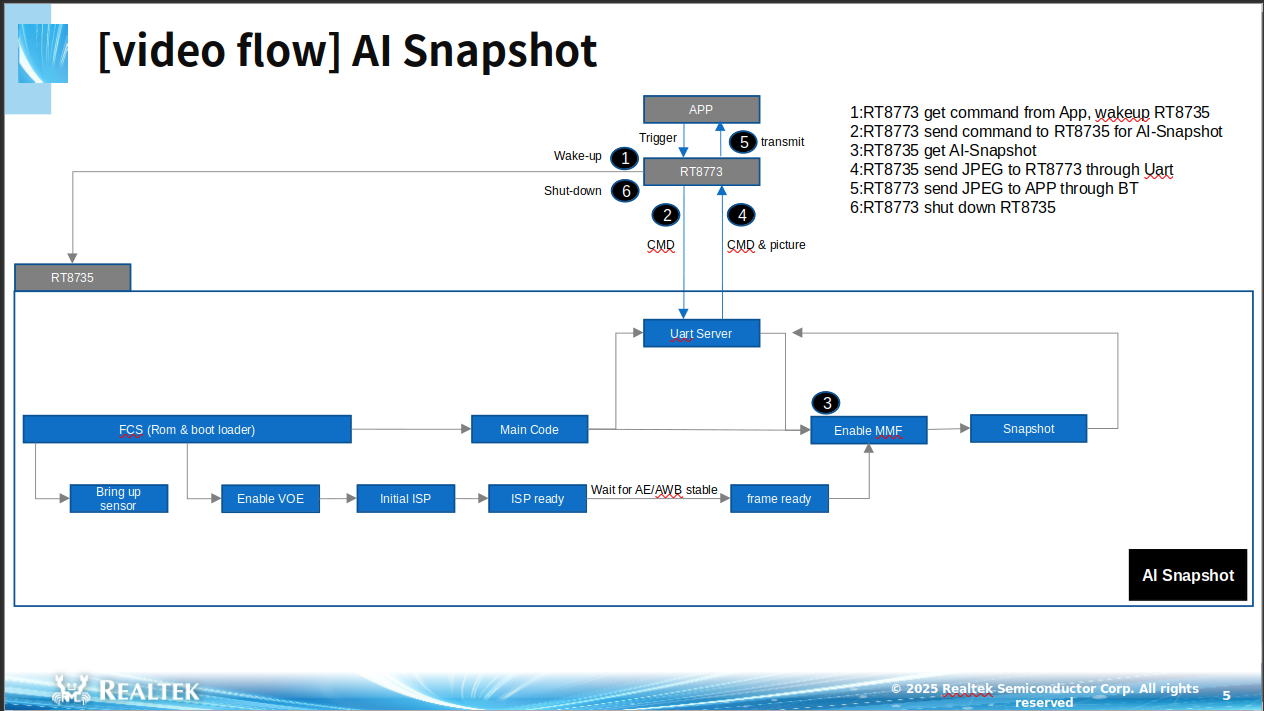
In this workflow:
BT SoC receives a trigger command from the mobile application and wakes up RTL8735B.
BT SoC sends a command to RTL8735B to initiate the AI Snapshot process.
RTL8735B performs the image capture sequence — initializing the sensor, enabling the VOE (Video Offload Engine), running the ISP pipeline, and capturing the frame.
The captured snapshot is transmitted from RTL8735B to BT SoC via UART, and then from BT SoC to the mobile application via Bluetooth.
Once the operation completes, RTL8735B notifies BT SoC, which then powers down RTL8735B to conserve energy.
This flow demonstrates how the system performs efficient on-demand image capture, ensuring low power consumption while maintaining synchronized operation between the two SoCs.
AI Snapshot Time Measurement:
Descriptor |
Time(ms) |
|---|---|
RTL8735B wakes up and performs image capture sequence |
341ms |
Uart server initialization |
28ms |
Get AI Snapshot |
112ms |
Transmission AI Snapshot to App |
2847ms |
Lifetime Recording Flow
The Lifetime Recording flow chart illustrates the process by which the AI Wearable Glass captures and store an MP4 video when triggered by a button or mobile application. This operation involves coordination between the BT SoC and the Wi-Fi SoC (RTL8735B).
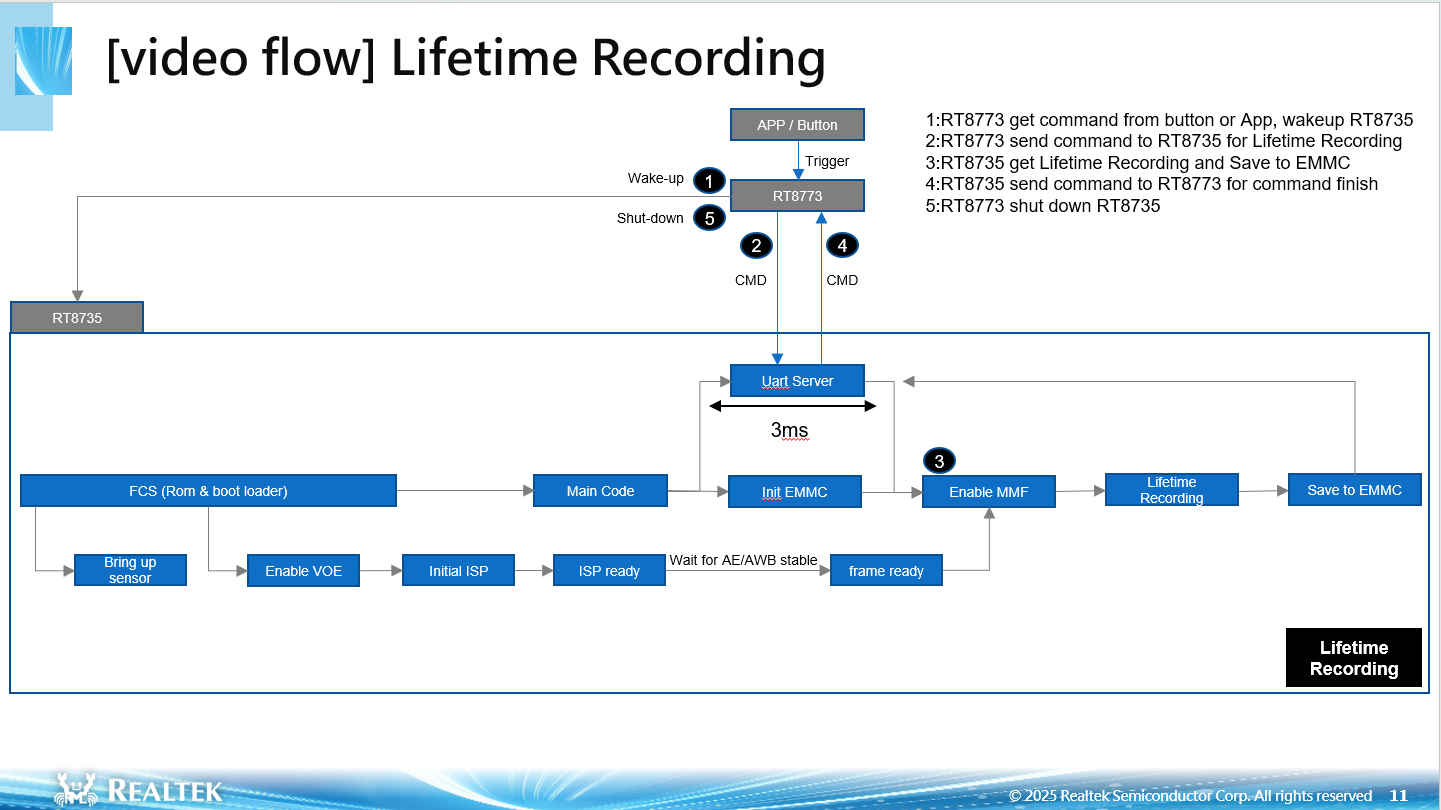
In this workflow:
BT SoC receives a trigger command from the mobile application and wakes up RTL8735B.
BT SoC sends a command to RTL8735B to initiate the Lifetime Recording process.
RTL8735B performs the image capture sequence — initializing the sensor, enabling the VOE (Video Offload Engine), running the ISP pipeline, and capturing the video frame.
The captured video is encoded and saved directly to external storage.
Once the operation completes, RTL8735B notifies BT SoC, which then powers down RTL8735B to conserve energy.
This flow demonstrates how the system performs efficient on-demand image capture, ensuring low power consumption while maintaining synchronized operation between the two SoCs.
Lifetime Recording Time Measurement:
Note
This measurement is based on a 30-second video recording duration.
Descriptor |
Time(ms) |
|---|---|
RTL8735B wakes up and performs image capture sequence |
341ms |
Uart server initialization |
7ms |
Get Lifetime Recording |
30508ms |
Lifetime Audio Recording Flow
The Lifetime Audio Recording flow chart illustrates the process by which the AI Wearable Glass captures and store an MP4 Audio only when triggered by mobile application. This operation involves coordination between the BT SoC and the Wi-Fi SoC (RTL8735B).
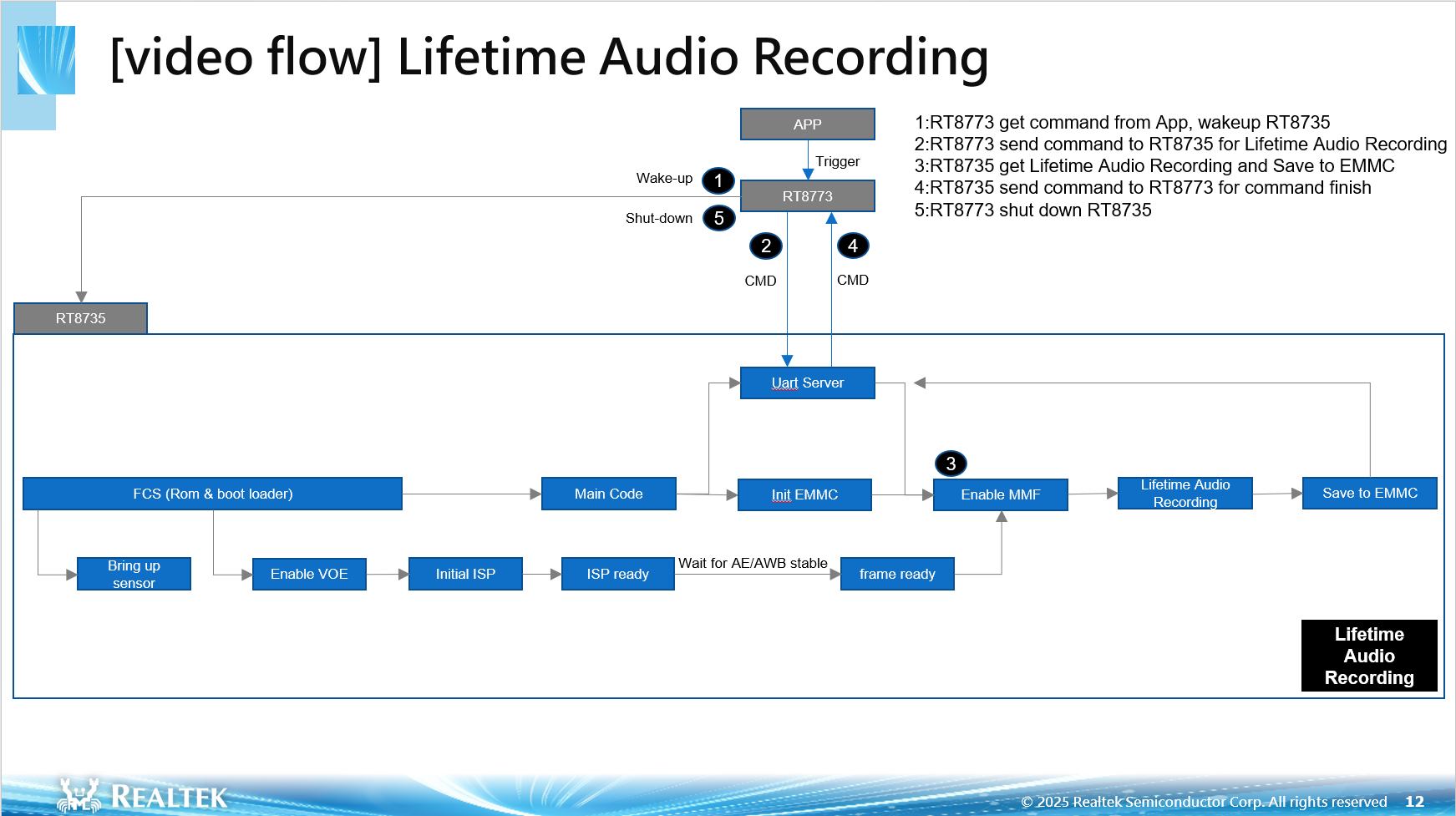
In this workflow:
BT SoC receives a trigger command from the mobile application and wakes up RTL8735B.
BT SoC sends a command to RTL8735B to initiate the Lifetime Audio Recording process.
RTL8735B initializes the audio input (either internal audio interface or I2S).
Audio data is captured, encoded using the Opus codec, and packaged into MP4 format.
-The MP4 audio file is saved directly to external storage.
Once the operation completes, RTL8735B notifies BT SoC, which then powers down RTL8735B to conserve energy.
This flow demonstrates how the system performs efficient on-demand image capture, ensuring low power consumption while maintaining synchronized operation between the two SoCs.
Lifetime Audio Recording Time Measurement:
Note
This measurement is based on a 1-minute audio recording duration.
Descriptor |
Time(ms) |
|---|---|
RTL8735B wakes up and performs audio capture sequence |
346ms |
Uart server initialization |
5ms |
Get Lifetime Audio Recording |
60870ms |
Non-Video Wi-Fi Transmission Flow
The Non-Video Wi-Fi Transmission Flow flow chart illustrates how the AI Wearable Glass transmits non-video data (e.g., snapshots) via Wi-Fi when triggered by the mobile application. The operation involves coordination between the BT SoC and the Wi-Fi SoC (RT8735).
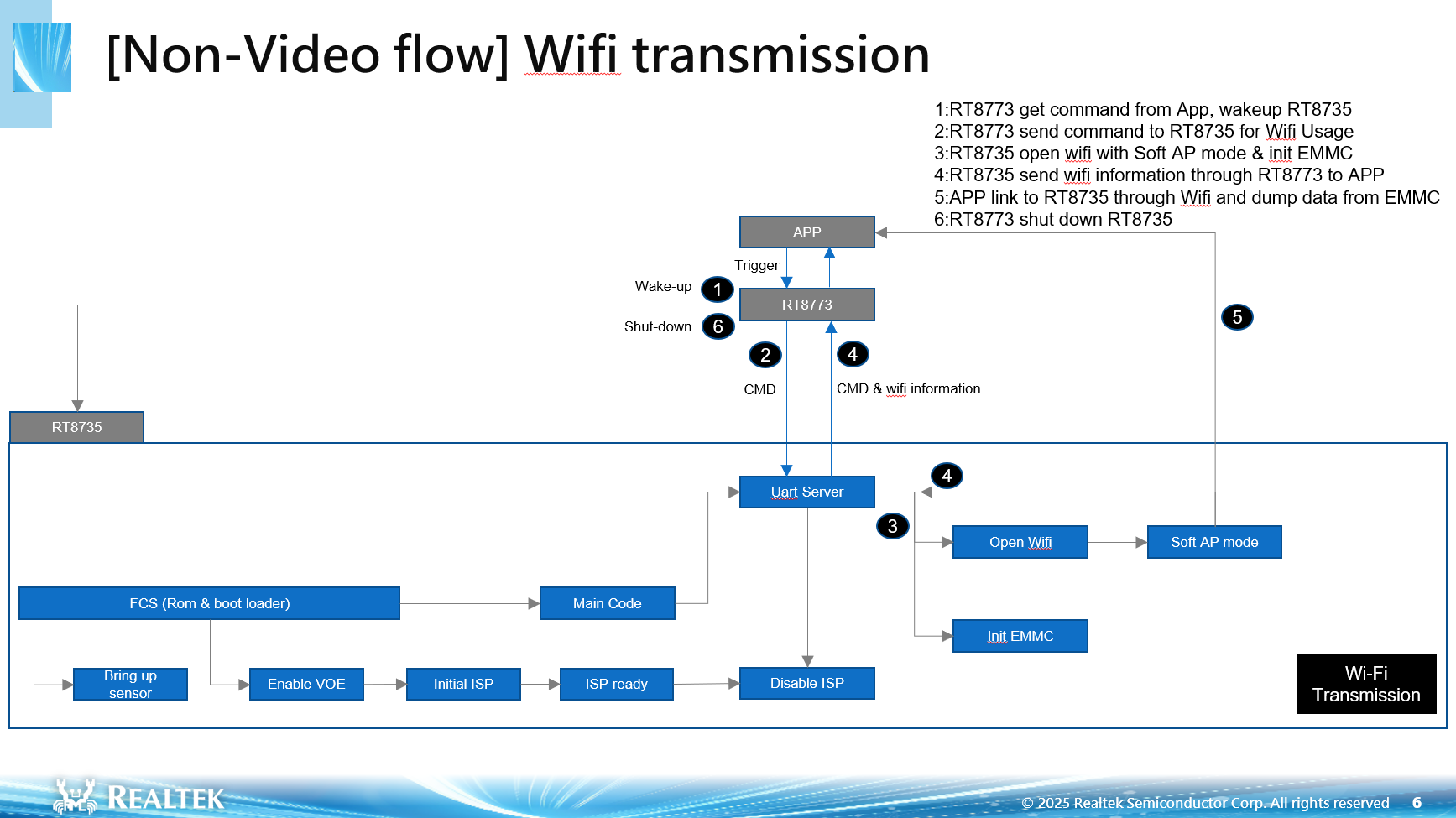
In this workflow:
BT SoC receives a trigger command from the mobile application and wakes up RTL8735B.
BT SoC sends a command to RTL8735B to initiate the Wi-Fi usage.
RTL8735B performs the Wi-Fi in Soft AP mode and initializes the eMMC storage.
RT8735 sends Wi-Fi information and command acknowledgment back to BT SoC via the UART server.
The mobile application connects to RT8735 over Wi-Fi and reads the snapshot or other data stored in eMMC.
Once the operation completes, RTL8735B notifies BT SoC, which then powers down RTL8735B to conserve energy.
This flow demonstrates how the system performs efficient on-demand data transmission, ensuring low power consumption while maintaining synchronized operation between the two SoCs.
Wi-Fi Transmission Time Measurement:
Note
This measurement is based on a total of 8 files with a combined size of 25.01 MB.
Descriptor |
Time(ms) |
Average Time(ms) (Time/8) |
|---|---|---|
RTL8735B wakes up and performs image capture sequence |
341ms |
NA |
Uart server initialization |
7ms |
NA |
Start and connect to AP |
497ms |
NA |
Connection test (PingPong) |
338ms |
NA |
Get Media file list |
272ms |
NA |
Files transmisson time |
13610ms |
1701ms |
Files deletion time |
2587ms |
223.4ms |
Total transmission time |
22396ms |
NA |
Non-EMMC Wi-Fi OTA 1 flow
The Non-EMMC Wi-Fi OTA 1 flow chart illustrates how the BT SoC triggers the Wi-Fi SoC (RT8735) to perform the initial stage of OTA firmware transfer through Wi-Fi Soft AP mode.
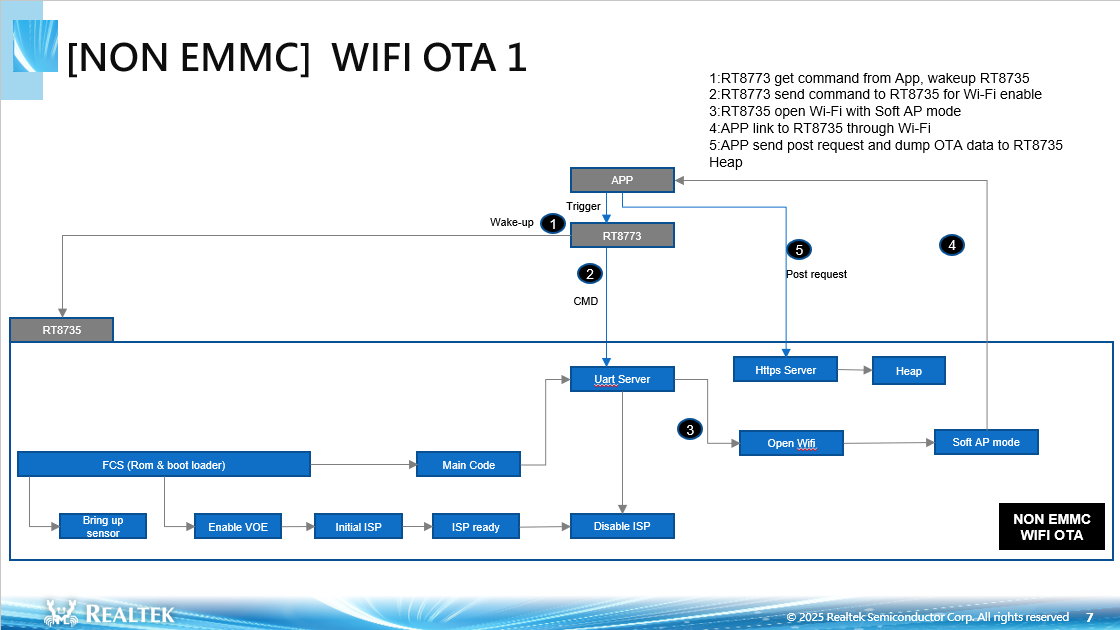
In this workflow:
BT SoC receives a command from the APP and wakes up RT8735.
BT SoC sends a command to RT8735 to enable Wi-Fi.
RT8735 opens Wi-Fi in Soft AP mode.
The APP connects to RT8735 through Wi-Fi.
The APP sends an HTTPS POST request to transfer OTA data to RT8735’s heap memory.
During this process, RT8735 initializes the required services such as UART and HTTPS servers, manages the heap, and prepares for OTA data reception. Once data transmission is complete, the system transitions to the next OTA stage handled by the Wi-Fi OTA 2 process.
Non-EMMC Wi-Fi OTA 1 Time Measurement:
Descriptor |
Type of OTA Flow |
||||||||||||||
|---|---|---|---|---|---|---|---|---|---|---|---|---|---|---|---|
Wi-Fi only |
BT only |
Wi-Fi + Boot |
Wi-Fi + BT |
Wi-Fi + NN |
Wi-Fi + BT + NN |
Wi-Fi + Boot + NN |
Wi-Fi + BT + Boot |
Wi-Fi + Boot + NN + BT |
Wi-Fi + ISP_IQ |
Wi-Fi + Boot + ISP_IQ |
Wi-Fi + NN + ISP_IQ |
Wi-Fi + BT + ISP_IQ |
Wi-Fi + Boot + NN + ISP_IQ |
Wi-Fi + Boot + NN + ISP_IQ + BT |
|
RTL8735B wakes up and performs image capture sequence |
341ms |
341ms |
341ms |
341ms |
341ms |
341ms |
341ms |
341ms |
341ms |
341ms |
341ms |
341ms |
341ms |
341ms |
341ms |
Uart server initialization |
7ms |
7ms |
7ms |
7ms |
7ms |
7ms |
7ms |
7ms |
7ms |
7ms |
7ms |
7ms |
7ms |
7ms |
7ms |
Start and connect to AP |
499ms |
495ms |
499ms |
500ms |
498ms |
502ms |
510ms |
501ms |
506ms |
492ms |
466ms |
484ms |
482ms |
468ms |
478ms |
Connection test (PingPong) |
500ms |
499ms |
498ms |
504ms |
500ms |
500ms |
504ms |
501ms |
505ms |
504ms |
480ms |
498ms |
501ms |
488ms |
597ms |
Transfer OTA data to RT8735’s heap memory |
1845ms |
1987ms |
2275ms |
3870ms |
2424ms |
4433ms |
2801ms |
4387ms |
4843ms |
2406ms |
2803ms |
3129ms |
4452ms |
3445ms |
5495ms |
Non-EMMC Wi-Fi OTA 2 flow
The Non-EMMC Wi-Fi OTA 2 flow chart describes the second phase of OTA, where RT8735 performs the actual firmware update operation using the received OTA data.
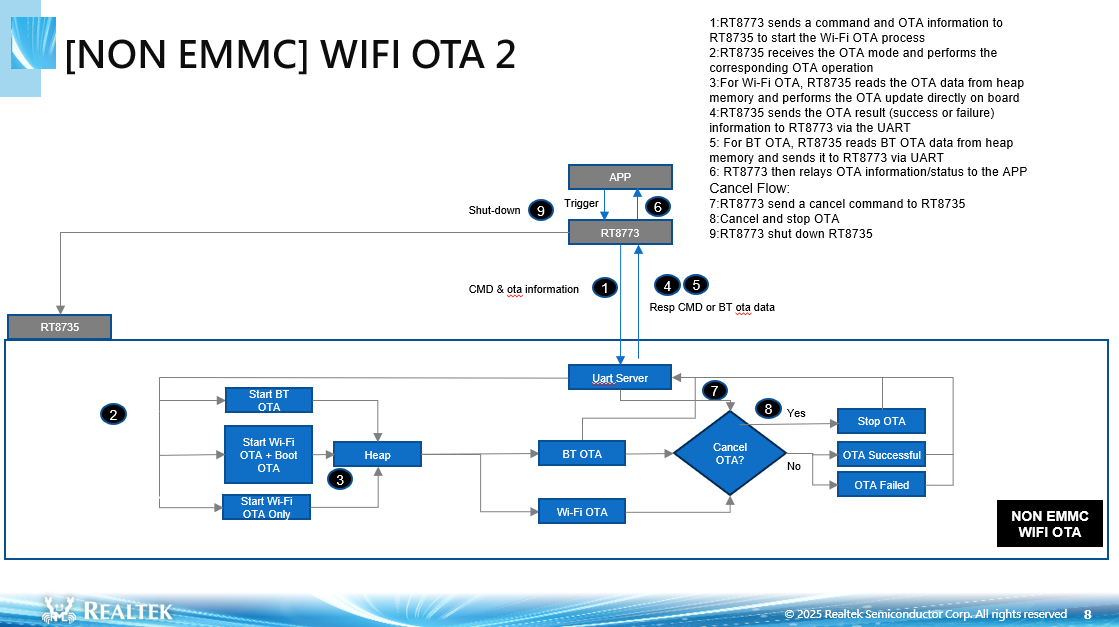
In this workflow:
BT SoC sends OTA initiation commands and related data to RT8735.
RT8735 starts the corresponding OTA operation mode (BT OTA, Wi-Fi OTA + Boot OTA, or Wi-Fi OTA only, etc).
IF Wi-Fi OTA, Boot OTA, NN, ISP_IQ, or Wi-Fi OTA only flow, RT8735 reads the OTA data from heap memory and performs the firmware update directly.
RT8735 sends OTA status (success or failure) responses to BT SoC.
If BT OTA flow, RT8735 sends BT OTA to BT SoC via UART.
BT SoC relays OTA information and results to the APP.
Cancel OTA Flow:
If a cancel command is received, BT SoC instructs RT8735 to stop OTA.
After OTA completion or cancellation, BT SoC shuts down RT8735 to conserve power.
This phase ensures reliable firmware update execution, error handling, and coordinated shutdown between RT8735 and BT SoC to maintain system integrity.
Non-EMMC Wi-Fi OTA 2 Time Measurement:
Descriptor |
Type of OTA Flow |
||||||||||||||
|---|---|---|---|---|---|---|---|---|---|---|---|---|---|---|---|
Wi-Fi only |
BT only |
Wi-Fi + Boot |
Wi-Fi + BT |
Wi-Fi + NN |
Wi-Fi + BT + NN |
Wi-Fi + Boot + NN |
Wi-Fi + BT + Boot |
Wi-Fi + Boot + NN + BT |
Wi-Fi + ISP_IQ |
Wi-Fi + Boot + ISP_IQ |
Wi-Fi + NN + ISP_IQ |
Wi-Fi + BT + ISP_IQ |
Wi-Fi + Boot + NN + ISP_IQ |
Wi-Fi + Boot + NN + ISP_IQ + BT |
|
Perform Wi-Fi OTA |
123369ms |
NA |
121607ms |
122324ms |
121781ms |
121746ms |
121808ms |
121795ms |
121928ms |
122282ms |
120278ms |
123373ms |
121578ms |
122401ms |
122084ms |
Transfer BT OTA |
NA |
177919ms |
NA |
177335ms |
NA |
177304ms |
NA |
177403ms |
177140ms |
NA |
NA |
NA |
177565ms |
NA |
177587ms |
Perform Boot OTA |
NA |
NA |
2165ms |
NA |
NA |
NA |
2883ms |
2166ms |
2855ms |
NA |
1518ms |
NA |
1565ms |
1543ms |
|
Perform NN Model OTA |
NA |
NA |
NA |
NA |
3339ms |
4052ms |
2613ms |
NA |
2685ms |
NA |
NA |
5114ms |
5004ms |
5103ms |
|
Perform ISP_IQ OTA |
NA |
NA |
NA |
NA |
NA |
NA |
NA |
NA |
NA |
5344ms |
5441ms |
5463ms |
5453ms |
5369ms |
5406ms |
Total OTA Time |
120298ms |
177919ms |
123772ms |
299659ms |
125120ms |
303102ms |
127304ms |
301364ms |
304608ms |
127626ms |
127237ms |
133950ms |
304596ms |
134339ms |
311723ms |
BT Streaming Flow
The BT Streaming flow chart illustrates how the AI Wearable Glass transmits live video data through Bluetooth when triggered by the APP. This process involves tight coordination between the BT SoC and the Wi-Fi SoC (RT8735) to ensure seamless real-time streaming with minimal power consumption.
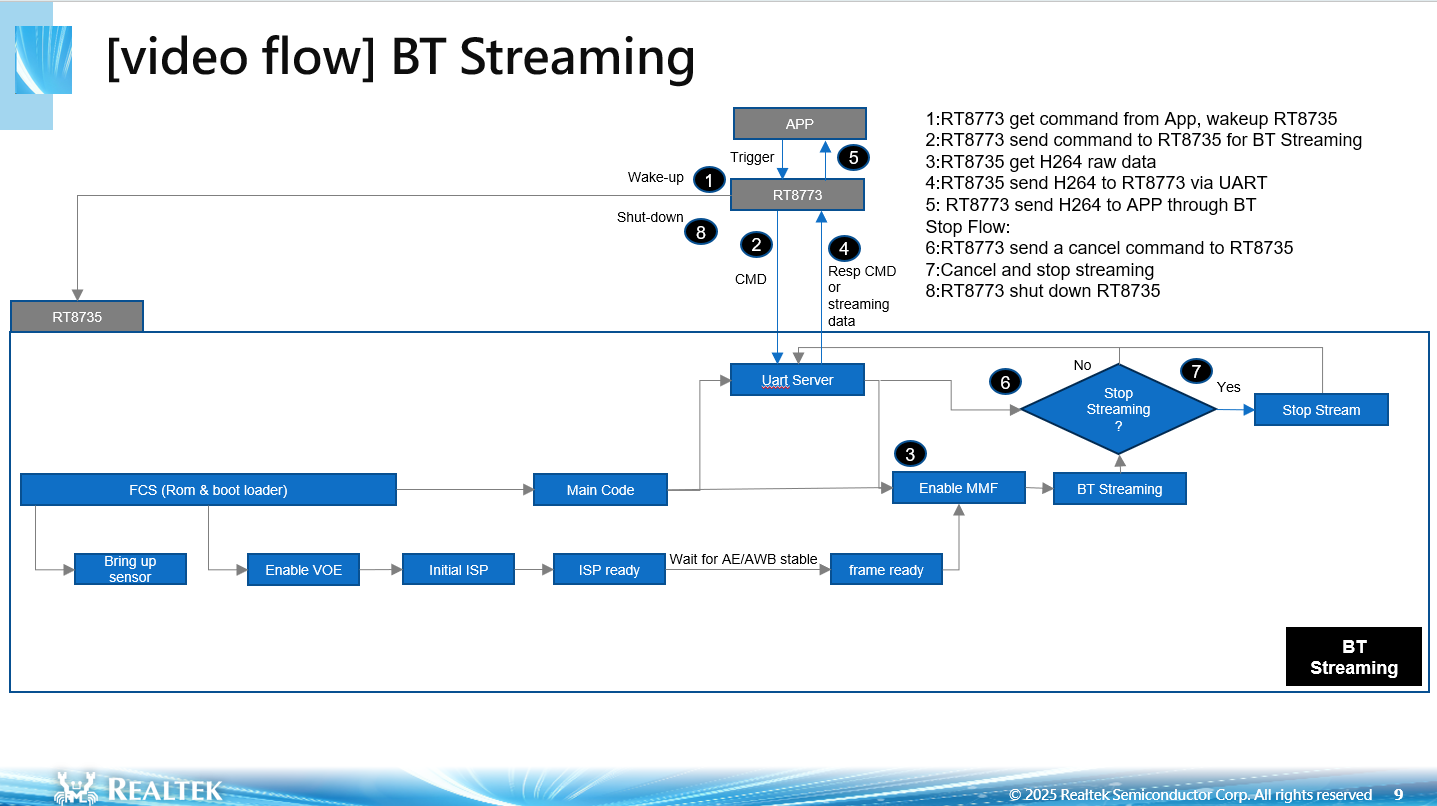
In this workflow:
BT SoC receives a command from the APP and wakes up RT8735.
BT SoC sends a streaming command to RT8735 to start BT Streaming.
RT8735 start BT streaming and capture encoded data.
RT8735 transmits the encoded data to BT SoC via UART.
BT SoC forwards the received stream to the APP through the Bluetooth link.
Stop Streaming Flow:
BT SoC sends a cancel command to RT8735 to stop the streaming process.
RT8735 stops the stream and halts transmission.
Once the operation is complete, BT SoC powers down RT8735 to conserve energy.
Wi-Fi Streaming Flow
The Wi-Fi Streaming flow chart illustrates how the AI Wearable Glass enables live video transmission through the Wi-Fi SoC (RT8735) when triggered by the APP. This process ensures real-time streaming while maintaining synchronized operation with the BT SoC.
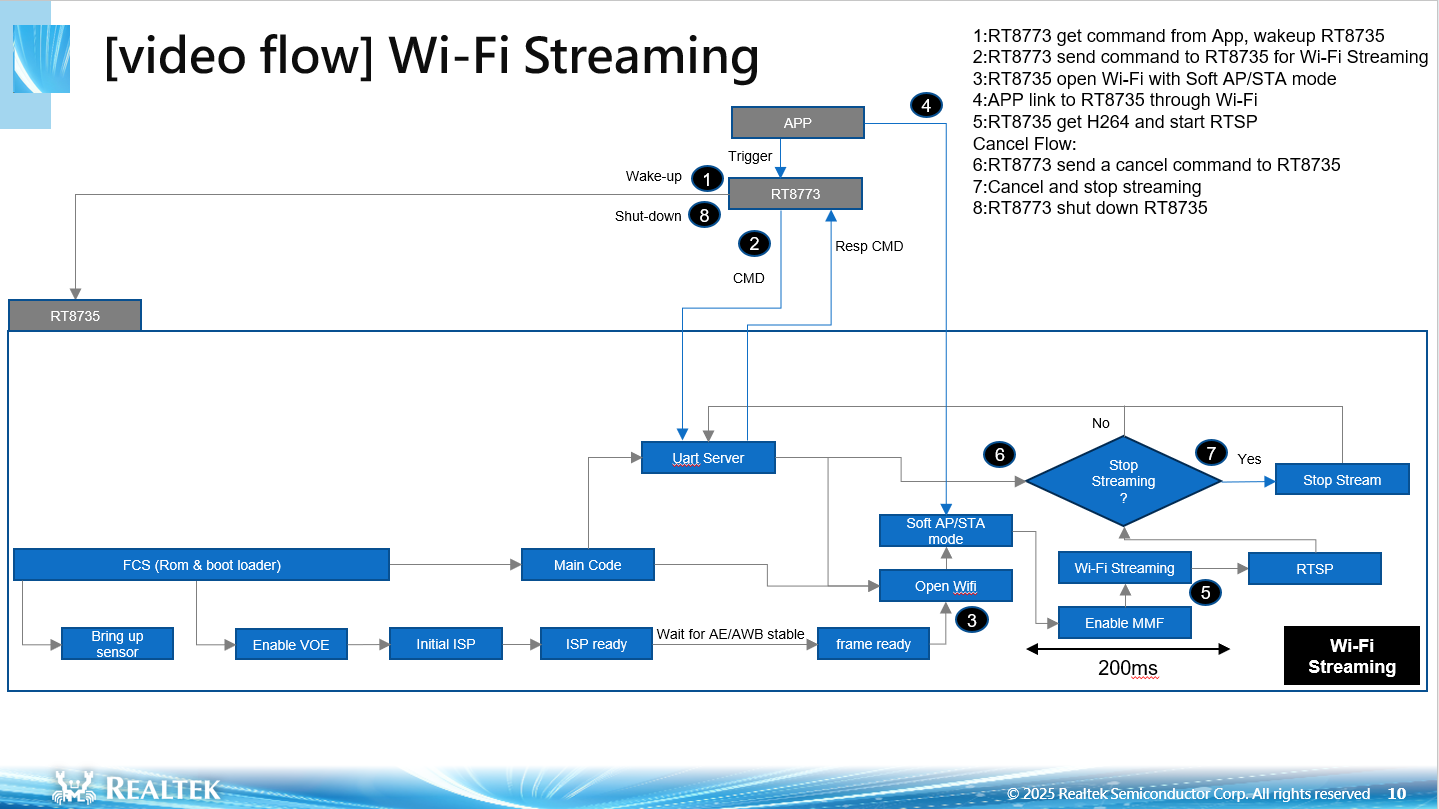
In this workflow:
BT SoC receives a command from the APP and wakes up RT8735.
BT SoC sends a streaming command to RT8735 to start Wi-Fi Streaming.
RT8735 opens Wi-Fi in Soft AP/ STA mode and waits for the APP to connect.
The APP connects to RT8735 over Wi-Fi.
RT8735 starts Wi-Fi streaming and capture encoded H.264
RT8735 transmits the encoded data to RTSP over Wi-Fi.
Stop Streaming Flow:
BT SoC sends a cancel command to RT8735 to stop the streaming process.
If a stop command is received, BT SoC instructs RT8735 to stop streaming.
BT SoC shuts down RT8735 to reduce power consumption once the streaming process is complete.
This workflow demonstrates an efficient video streaming process with power-saving shutdown after streaming ends.
Wi-Fi Streaming Time Measurement:
Descriptor |
Time(ms) |
|---|---|
RTL8735B wakes up and performs image capture sequence |
579ms |
Uart server initialization |
4ms |
Start and connect to AP |
617ms |
Start Wi-Fi streaming |
200ms |
Get Started
This guide will help you set up and configure AI Wearable Glass for building and compilation. Follow these steps to modify the necessary parameters and settings.
Modify File System Configuration
Modify FATFS for SD Card
File: \component\file_system\fatfs\fatfs_sdcard_api.c
Comment out fatfs_sd_close in the function fatfs_sd_init.
Update Module_MP4 Configuration
File: \component\media\mmfv2\module_mp4.c
Update macro definitions:
Undefine
FATFS_SD_CARDUndefine
FATFS_RAMDefine
VFS_ENABLE
Modify mp4_destroy function:
Comment out:
// vfs_user_unregister("sd", VFS_FATFS, VFS_INF_SD);Modify mp4_create function:
Comment out and replace:
//vfs_init(NULL);
memcpy(ctx->mp4_muxer->_drv, "aiglass:/", strlen("aiglass:/")); // Set tag
ctx->mp4_muxer->vfs_format_enable = 1; // Enable the VFS format
// if (vfs_user_register("sd", VFS_FATFS, VFS_INF_SD) < 0) {
//     goto mp4_create_fail;
// }
Modify System Boot Configuration
Update User Boot Configuration
File: \component\soc\8735b\misc\platform\user_boot.c
set bl_log_cust_ctrl to DISABLE
uint8_t bl_log_cust_ctrl = DISABLE;
Modify Video Boot Stream Configuration
File: \component\video\driver\RTL8735B\video_user_boot.c
Update ISP Pre-Setting
Open flag ISP_CONTROL_TEST
#define ISP_CONTROL_TEST
Modify Video Boot Stream Configuration
Modify the following parameters while keeping others unchanged
Modify video_boot_stream_t video_boot_stream Settings by replacing:
Video Channel 0
.video_enable[STREAM_V1] = 1,
.video_snapshot[STREAM_V1] = 0,
.video_drop_frame[STREAM_V1] = 0,
.video_params[STREAM_V1] = {
    .stream_id = STREAM_ID_V1,
    .type = CODEC_H264,
    .resolution = 0,
    .width = 176,
    .height = 144,
    .bps = 1024 * 1024,
    .fps = 15,
    .gop = 15,
    .rc_mode = 2,
    .minQp = 25,
    .maxQp = 48,
    .jpeg_qlevel = 0,
    .rotation = 0,
    .out_buf_size = V1_ENC_BUF_SIZE,
    .out_rsvd_size = 0,
    .direct_output = 0,
    .use_static_addr = 0,
    .fcs = 1 // Enable FCS for channel 0
},
Video Channel 1
.video_enable[STREAM_V2] = 1,
.video_snapshot[STREAM_V2] = 1,
.video_drop_frame[STREAM_V2] = 0,
.video_params[STREAM_V2] = {
    .stream_id = STREAM_ID_V2,
    .type = CODEC_H264,
    .resolution = 0,
    .width = sensor_params[USE_SENSOR].sensor_width,
    .height = sensor_params[USE_SENSOR].sensor_height,
    .bps = 2 * 1024 * 1024,
    .fps = sensor_params[USE_SENSOR].sensor_fps,
    .gop = sensor_params[USE_SENSOR].sensor_fps,
    .rc_mode = 2,
    .minQp = 25,
    .maxQp = 48,
    .jpeg_qlevel = 0,
    .rotation = 0,
    .out_buf_size = V2_ENC_BUF_SIZE,
    .out_rsvd_size = 0,
    .direct_output = 0,
    .use_static_addr = 0,
    .fcs = 0,
},
Disable Video Stream 4
.video_enable[STREAM_V4] = 0,
Modify user_boot_config_init Settings by adding:
video_boot_stream.init_isp_items.enable = 1;
video_boot_stream.init_isp_items.init_brightness = 0;
video_boot_stream.init_isp_items.init_contrast = 50;
video_boot_stream.init_isp_items.init_flicker = 1;
video_boot_stream.init_isp_items.init_hdr_mode = 0;
video_boot_stream.init_isp_items.init_mirrorflip = 0xf3; // Mirror and flip
video_boot_stream.init_isp_items.init_saturation = 50;
video_boot_stream.init_isp_items.init_wdr_level = 50;
video_boot_stream.init_isp_items.init_wdr_mode = 0;
video_boot_stream.init_isp_items.init_mipi_mode = 0
Modify Sensor Configuration
Sensor Init Configuration
File: \project\realtek_amebapro2_v0_example\inc\sensor.h
Modify in sensor_params entry by replacing:
[SENSOR_SC5356] = {2592, 1944, 24},
Modify sen_id entry by replacing:
SENSOR_GC2053 to SENSOR_SC5356
static const unsigned char sen_id[SENSOR_MAX] = {
    SENSOR_DUMMY,
    SENSOR_SC5356,
    SENSOR_GC4653,
    SENSOR_GC4023,
    SENSOR_SC2333
};
Set USE_SENSOR to SENSOR_SC5356
#define USE_SENSOR SENSOR_SC5356
Modify manual_iq entry by replacing:
iq_gc2053 to iq_sc5356
static const      char manual_iq[SENSOR_MAX][64] = {
    "iq",
    "iq_sc5356",
    "iq_gc4653",
    "iq_gc4023",
    "iq_sc2333",
};
Set ENABLE_FCS to 1
#define ENABLE_FCS 1
12M Sensor Init Configuration
For example, using IMX681:
Modify sen_id entry according to the following seqeunce:
static const unsigned char sen_id[SENSOR_MAX] = {
    SENSOR_DUMMY,
    SENSOR_IMX681,
    SENSOR_IMX681_12M,
    SENSOR_IMX681_12M_SEQ,
};
Set USE_SENSOR to SENSOR_IMX681
#define USE_SENSOR SENSOR_IMX681
Modify manual_iq entry according to the following sequence:
static const      char manual_iq[SENSOR_MAX][64] = {
    "iq",
    "iq_imx681",
    "iq_imx681_12m",
    "iq_imx681_12m_seq",
};
For example, using IMX471:
Modify sen_id entry according to the following seqeunce:
static const unsigned char sen_id[SENSOR_MAX] = {
    SENSOR_DUMMY,
    SENSOR_IMX471,
    SENSOR_IMX471_12M,
    SENSOR_IMX471_12M_SEQ,
};
Set USE_SENSOR to SENSOR_IMX471
#define USE_SENSOR SENSOR_IMX471
Modify manual_iq entry according to the following sequence:
static const      char manual_iq[SENSOR_MAX][64] = {
    "iq",
    "iq_imx471",
    "iq_imx471_12m",
    "iq_imx471_12m_seq",
};
For example, using OV13B10:
Modify sen_id entry according to the following seqeunce:
static const unsigned char sen_id[SENSOR_MAX] = {
    SENSOR_DUMMY,
    SENSOR_OV13B10,
    SENSOR_OV13B10_12M,
    SENSOR_OV13B10_12M_SEQ,
};
Set USE_SENSOR to SENSOR_OV13B10
#define USE_SENSOR SENSOR_OV13B10
Modify manual_iq entry according to the following sequence:
static const      char manual_iq[SENSOR_MAX][64] = {
    "iq",
    "iq_ov13b10",
    "iq_ov13b10_12m",
    "iq_ov13b10_12m_seq",
};
Set ENABLE_FCS to 1
#define ENABLE_FCS 1
Please enable video high resolution settings
File: component\video\driver\RTL8735B\video_api.h
#define USE_VIDEO_HR_FLOW 1
Modify RAM Disk Size
File: \component\file_system\fatfs\fatfs_ramdisk_api.c
Set RAM Disk Size:
#define RAM_DISK_SIZE (1024 * 1024 * 2)
Note
This allocates 2MB to store a 720P JPEG image (~1.3MB required).
Modify FAT Time Function
File: \component\file_system\fatfs\r0.14\diskio.c
Modify DWORD get_fattime(void) function:
attribute((weak)) DWORD get_fattime(void)
Modifications for 12M Burst Mode Snapshot
File: \project\realtek_amebapro2_v0_example\scenario\ai_glass\src\lifetime_snapshot_initialize.c
Enable burst mode:
#define BURST_MODE_MAX_COUNT 2
Disable AINR:
#define ENABLE_AINR 0
File: File: \project\realtek_amebapro2_v0_example\scenario\ai_glass\src\lifetime_snapshot_initialize.c, project\realtek_amebapro2_v0_example\GCC-RELEASE\bootloader\rtl8735b_boot_mp.ld
NN_SIZE = 4
release more space for raw snapshot file temporary storage
Set up GCC Building Environment (window)
Installing mingw with ASDK and setting up the CMake
Download and extract msys64_v10_3.7z from https://github.com/Ameba-AIoT/ameba-tool-rtos-pro2/releases/tag/msys64_v10_3
Double click “msys2_shell.cmd” from mysys64 folder
After setting up mingw, you need to install cmake. Download cmake in https://github.com/Kitware/CMake/releases/download/v3.20.0-rc1/cmake-3.20.0-rc1-windows-x86_64.msi and install it
Add location of cmake.exe to PATH of msys2_shell by using vim ~/.bashrc and appending path of cmake.exe to environment variable PATH or using editor to directly append the path to file “msys64/home/<USER_FOLDER>/.bashrc”
export PATH=/c/Program\ Files/CMake/bin:$PATH
Caution
If your PATH contains space characters, remember to use “\” to escape
Note
For the first time adding the CMake PATH, after adding the PATH, you need to re-open the msys2_shell and check the version by:
$ cmake --version
cmake version 3.20.0-rc1

CMake suite maintained and supported by Kitware (kitware.com/cmake).
Adding toolchain to msys2
Download and extract asdk-10.3.0-mingw32-newlib-build-3633-x86_64.zip from https://github.com/Ameba-AIoT/ameba-toolchain/releases/download/V10.3.0-amebe-rtos-pro2/asdk-10.3.0-mingw32-newlib-build-3633-x86_64.zip
Like adding PATH for cmake, user can add or change the toolchain in “msys64/home/<USER_FOLDER>/.bashrc”.
Add toolchain PATH by “export PATH=<path to toolchain>:$PATH”.
if [ -d "../../asdk-10.3.0" ]; then
    echo "asdk-10.3.0 exist"
    export PATH=/asdk-10.3.0/mingw32/newlib/bin:$PATH
Note
Recommand to use the latest provided toolchain or use the version after 10.3.0
Building the project
Open mingw by double clicking “msys2_shell.cmd”.
Create folder “build” in project/realtek_amebapro2_v0_example/GCC-RELEASE.
Enter the project location: project/realtek_amebapro2_v0_example/GCC-RELEASE/build.
Run “cmake .. -G”Unix Makefiles” -DCMAKE_TOOLCHAIN_FILE=../toolchain.cmake -DSCENARIO=ai_glass -DVERSION=x.x.x.x” to create the makefile. Please note that developers have to keep track of their own software version consisting of 4 numbers. Max version is given to be 255.255.255.255.
Run
cmake --build . --target flashto build and generate flash binary.
Note
If building the project successfully, you can see flash_ntz.bin in the ‘build’ folder
Set up GCC Building Environment (LINUX)
Add toolchain to the linux PATH
Dowload and extract asdk-10.3.0-linux-newlib-build-3638-x86_64.tar.bz2 from https://github.com/Ameba-AIoT/ameba-toolchain/releases/download/V10.3.0-amebe-rtos-pro2/asdk-10.3.0-linux-newlib-build-3638-x86_64.tar.bz2
tar -jxvf <PATH_TO_YOUR_TOOLCHAIN.tar.bz2> -C <DIR_TO_EXTRACT>
Add toolchain to PATH:
export PATH=<PATH_TO_YOUR_TOOLCHAIN>/asdk-10.3.0/linux/newlib/bin:$PATH
Note
You can add PATH to ~/.bash_profile
Installing cmake for linux
Install cmake using terminal (like “sudo apt-get -y install cmake”), if the installation is successful, you can get the version by
cmake
--version
.
Building the project
Create folder “build” in project/realtek_amebapro2_v0_example/GCC-RELEASE.
Open linux terminal and enter the project location: project/realtek_amebapro2_v0_example/GCC-RELEASE/build.
Run “cmake .. -G”Unix Makefiles” -DCMAKE_TOOLCHAIN_FILE=../toolchain.cmake -DSCENARIO=ai_glass” to create the makefile.
Run
cmake --build . --target flashto build and generate flash binary.
Note
If building the project successfully, you can see flash_ntz.bin in the ‘build’ folder
If the ‘build’ folder has been used by others, you can remove ‘build’ folder first to have clean build
If there’s some permission issues, you can do “chmod -R 777 <PATH_TO_YOUR_SDK>”
Media Scenarios
This section describes the different Media Scenarios supported by the AI Wearable Glass.
Supported Media Features
Lifetime Snapshot
This feature allows the AI Wearable Glass to capture a JPEG image from the on-board camera sensor and save it on the EMMC.
Image Capture: High-resolution JPEG image capture using the camera sensor.
The life snapshot is triggered each time the push button is pressed.
The image is saved on the EMMC with a unique filename in the format: PICTURE_0_0_xxxxxxxx_xxxxxx_x.jpg.
Lifetime Recording
This feature allows the AI Wearable Glass to record video and audio data using the on-board camera sensor and audio codec.
Video Capture: Up to 2K video capture using the camera sensor.
Audio Capture: High-quality audio input through the onboard microphone.
A lifetime recording is initiated when the push button is pressed and held.
The recorded data is saved as an MP4 file on the EMMC with a unique filename in the format: VIDEO_0_0_xxxxxxxx_xxxxxx_x.mp4.
Lifetime Audio Recording
This feature allows the AI Wearable Glass to record audio data only using the onboard microphone and audio codec.
Audio Capture: Up to 2K video capture using the camera sensor.
Storage: The recorded audio is packaged into an MP4 container and saved directly to the EMMC.
A lifetime audio recording is initiated when the push button is pressed and held or APP button is pressed.
The recorded data is saved as an MP4 file on the EMMC with a unique filename in the format: AUDIO_0_0_xxxxxxxx_xxxxxx_x.mp4.
AI Snapshot
This feature allows the AI Wearable Glass to capture a JPEG image from the on-board camera sensor save it on the EMMC and RAM, and transmit it from RAM to a connected application.
AI Processing: Captured images are sent to a mobile app, which process them on an AI server for tasks like AI analysis.
The AI snapshot is triggered each time the push button is “tbc”.
The image is saved on the EMMC with a unique filename in the format: ai_snapshot.jpg.
The image is sent to the application from RAM and processes the image on an AI server for tasks like AI analysis.”tbc: facial recognition or object detection”
Wi-Fi Streaming
This feature allows the AI Wearable Glass to continuously capture video frames from the built-in camera sensor and encode them into H.264 format. The encoded video is streamed through an RTSP server, allowing the APP connected to the same Wi-Fi network (either in AP or STA mode) to view the live video in real time.
Video Capture: 720p video capture using the camera sensor.
Audio Capture: High-quality audio input through the onboard microphone.
The Wi-Fi Streaming is triggered each time when APP send start streaming.
The encoded video is streamed through an RTSP server, , allowing the APP connected to the same Wi-Fi network to view the live video in real time.
Media Scenarios Public API reference
Lifetime Snapshot API
Non-12M Flow
1. - Function
int lifetime_snapshot_initialize(isp_info_sync_t *isp_info);
Description:
Initializes the lifetime snapshot system with ISP synchronization info. Depending on sensor configuration, the function will branch into either Non-12M Flow or 12M Flow initialization.
Parameters:
isp_info — pointer to ISP synchronization information.
Return:
0 – the needed modules for lifetime snapshot set up successfully.
-1 – the needed modules for lifetime snapshot set up fail.
-2 – the modules has already been set up.
Key Call:
if (lfsnap_status != LIFESNAP_IDLE)
If lfsnap_status is not LIFESNAP_IDLE, return an error (ret = -2).
if (ls_filesaver_ctx)
If ls_filesaver_ctx is true, assigns lifetime_normal_snapshot_file_save as its handler.
media_get_life_snapshot_params(&life_snap_param)
To retrieve the desired snapshot width, height, and quality.
Configure Video Parameters
If the requested resolution is within sensor limits, no scaling is required (need_scaleup = 0).
If the requested resolution exceeds sensor width or height, scaling is needed (need_scaleup = 1).
Video module configuration
5.1. mm_module_ctrl(ls_snapshot_ctx, CMD_VIDEO_SET_PARAMS, (int) & (ls_video_params.params));
Trigger a command to the video module to set video parameters.
5.2. mm_module_ctrl(ls_snapshot_ctx, MM_CMD_SET_QUEUE_LEN, 2)
Trigger a command to the video module to set the length of the video queue to 2.
5.3. mm_module_ctrl(ls_snapshot_ctx, MM_CMD_INIT_QUEUE_ITEMS, MMQI_FLAG_DYNAMIC)
Trigger a command to the video module to initializes the queue for dynamic handling of video frames.
Create SISO (Single Input Single Output) Link
6.1. siso_ctrl(ls_siso_snapshot_filesaver, MMIC_CMD_SET_SECURE_CONTEXT, 1, 0)
Trigger a command to ensure that the data processing inside the SISO pipeline is handled securely, which prevent unauthorized access or tampering.
6.2. siso_ctrl(ls_siso_snapshot_filesaver, MMIC_CMD_ADD_INPUT, (uint32_t)ls_snapshot_ctx, 0)
Trigger a command to connect video module (ls_snapshot_ctx) as Input, which tells the pipeline where to get the lifetime snapshot from.
6.3. siso_ctrl(ls_siso_snapshot_filesaver, MMIC_CMD_ADD_OUTPUT, (uint32_t)ls_filesaver_ctx, 0)
Trigger a command to connect file saver (ls_filesaver_ctx) as Output, which tells the pipeline where to send the lifetime snapshot after capturing.
6.4. siso_ctrl(ls_siso_snapshot_filesaver, MMIC_CMD_SET_TASKPRIORITY, LIFE_SNAP_PRIORITY, 0)
Trigger a command to set processing priority, which sets how important this process is compared to others running on the system.
6.5. siso_start(ls_siso_snapshot_filesaver)
Trigger a command to activate the pipeline, allowing lifetime snapshots to flow from the video module to the file saver.
mm_module_ctrl(ls_snapshot_ctx, CMD_VIDEO_APPLY, ls_video_params.params.stream_id)
Trigger a command to start video stream.
lfsnap_status = LIFESNAP_START
Updates the status to LIFESNAP_START, which indicates that the lifetime snapshot process has started successfully.
goto endoflifesnapshot
If any step fails, the function calls lifetime_snapshot_deinitialize() and returns an error.
2. - Function
int lifetime_snapshot_take(const char *file_name, uartcmdpacket_t *param);
Description:
Initiates a lifetime snapshot process in Non12M mode. Saves the captured image to a specified file and waits for completion. Only valid if the system is in LIFESNAP_START state.
Parameters:
file_name – Pass in the unique filename.
param – UART command packet with snapshot options.
Return:
0 – take snapshot successfully.
-1 – take snapshot fail.
Key Call:
if (lfsnap_status == LIFESNAP_START)
Ensures that a lifetime snapshot can only be taken if the system is in the correct state (LIFESNAP_START).
snprintf(snapshot_name, MAXIMUM_FILE_SIZE, “%s”, file_name)
Saves the provided file name into snapshot_name (ensuring it does not exceed MAXIMUM_FILE_SIZE).
mm_module_ctrl(ls_filesaver_ctx, CMD_FILESAVER_SET_SAVE_FILE_PATH, (int)snapshot_name)
Trigger a command to set file path for saving.
lfsnap_status = LIFESNAP_TAKE
Updates the status to LIFESNAP_TAKE, which indicates that the lifetime snapshot is in progress.
mm_module_ctrl(ls_snapshot_ctx, CMD_VIDEO_YUV, 1)
Trigger a command to the video module (ls_snapshot_ctx) to capture a one shot lifetime snapshot.
Wait for Snapshot Completion
Ensures that the lifetime snapshot has been processed.
The function returns
0 if the lifetime snapshot taken successfully.
-1 Lifetime snapshot was not taken because the system was not in the correct state (LIFESNAP_START).
param usage
If param contains extra snapshot options, they are applied before capture.
3. - Function
int lifetime_snapshot_deinitialize(void);
Description:
The lifetime_snapshot_deinitialize function is responsible for deinitializing the lifetime snapshot module. It ensures that no lifetime snapshot is in progress before releasing resources such as filesaver, video snapshot module, and the linker.
Parameters:
NA
Return:
0 – de-initialize lifetime snapshot modules successfully.
Key Call:
if (lfsnap_status != LIFESNAP_TAKE)
Ensures that lifetime snapshot is not in progress before proceeding with deinitialization.
siso_pause(ls_siso_snapshot_filesaver)
Ensures that ls_siso_snapshot_filesaver module is not empty before pausing the data flow between modules.
mm_module_ctrl(ls_snapshot_ctx, CMD_VIDEO_STREAM_STOP, 0)
Ensures that ls_snapshot_ctx module is not empty before triggering a command to stops video module from capturing limetime snapshots.
siso_delete(ls_siso_snapshot_filesaver)
Ensures that ls_siso_snapshot_filesaver module is not empty before removing the pipeline handling lifetime snapshot transfers.
ls_siso_snapshot_filesaver = NULL
Reset ls_siso_snapshot_filesaver context.
ls_snapshot_ctx = mm_module_close(ls_snapshot_ctx)
Ensures that ls_snapshot_ctx module is not empty before freeing the video module.
ls_filesaver_ctx = mm_module_close(ls_filesaver_ctx)
Ensures that ls_filesaver_ctx module is not empty before freeing the file-saving module.
Reset Lifetime Snapshot Status
lfsnap_status = LIFESNAP_IDLE
4. - Function
int lifetime_highres_save(const char *file_name, uartcmdpacket_t *param);
Description:
For Non-12M sensors, this function does not perform high-resolution saving. It simply returns success without additional processing.
Parameters:
file_name – Path or filename reference.
param – UART command packet with snapshot options.
Return:
0 – success (no high-res save required).
-1 – not applicable.
Key Call:
Check sensor type
If sensor is not IMX681, IMX471, or OV13B10 → return 0 immediately.
No buffer allocation or save logic is executed.
12M Flow
1. - Function
int lifetime_snapshot_initialize(isp_info_sync_t *isp_info);
Description:
Initializes the lifetime snapshot system with ISP synchronization info. Depending on sensor configuration, the function will branch into either Non-12M Flow or 12M Flow initialization. For 12M sensors, this function will redirect to lifetime_hr_snapshot_initialize(isp_info) to perform the high-resolution setup.
Parameters:
isp_info — pointer to ISP synchronization information.
Return:
0 – the needed modules for lifetime snapshot set up successfully.
-1 – the needed modules for lifetime snapshot set up fail.
-2 – the modules has already been set up.
Key Call:
Check current status
If lfsnap_status != LIFESNAP_IDLE, return error (ret = -2) immediately.
Detect sensor type
2.1. If sensor is 12M, call lifetime_hr_snapshot_initialize(isp_info). - This performs the dedicated 12M initialization flow.
Else (Non-12M)
Run the Non-12M initialization steps (configure video params, queue, SISO, apply stream).
Update snapshot status
Set lfsnap_status = LIFESNAP_START to indicate initialization success.
Error handling
If any step fails, call lifetime_snapshot_deinitialize() and return an error.
2. - Function
int lifetime_hr_snapshot_initialize(isp_info_sync_t *isp_info);
Description: Initializes the lifetime snapshot system with ISP synchronization info for 12M high-resolution mode. Configures video parameters, registers callbacks, and prepares the pipeline for high-resolution capture.
Parameters: - isp_info — pointer to ISP synchronization information.
- Return:
0 – modules set up successfully.
-1 – setup failed.
-2 – modules already set up.
Key Call:
Load ISP pre-init data
media_get_preinit_isp_data(&init_params) loads AE/AWB defaults.
Enable AE and AWB, set brightness, contrast, flicker, saturation, mirrorflip, etc.
Adjust isp_ae_init_exposure, isp_ae_init_gain, isp_awb_init_rgain, isp_awb_init_bgain, and isp_gain based on thresholds.
Update sensor ID
lifetime_hr_snapshot_sensor_id_update() ensures the correct 12M sensor is selected.
If update fails, jump to endoflifesnapshot.
Configure video parameters for 12M raw
ls_video_params.params.stream_id = JPEG_CHANNEL.
ls_video_params.params.type = VIDEO_NV16.
Set width, height, fps from sensor_params[sen_hr_drv_id].
ls_video_params.params.out_mode = 2 (continuous mode).
ls_video_params.params.use_static_addr = 1.
Mark ls_video_params.is_high_res = 1.
Disable direct output, set ext_fmt = 0.
Enable meta_enable = 1 if Exif metadata is required.
Open video module
ls_snapshot_ctx = mm_module_open(&video_module).
CMD_VIDEO_SET_SENSOR_ID with sen_hr_drv_id.
CMD_VIDEO_PRE_INIT_PARM with init_params.
CMD_VIDEO_SET_PARAMS with ls_video_params.params.
MM_CMD_SET_QUEUE_LEN to fps.
MM_CMD_INIT_QUEUE_ITEMS with dynamic flag.
If fail: log error and jump to endoflifesnapshot.
Open file saver module
ls_filesaver_ctx = mm_module_open(&filesaver_module).
If success: CMD_FILESAVER_SET_TYPE_HANDLER = save_high_resolution_raw.
If fail: log error and jump to endoflifesnapshot.
Create SISO pipeline
ls_siso_snapshot_filesaver = siso_create().
MMIC_CMD_SET_SECURE_CONTEXT (if TrustZone enabled).
MMIC_CMD_ADD_INPUT = ls_snapshot_ctx.
MMIC_CMD_ADD_OUTPUT = ls_filesaver_ctx.
MMIC_CMD_SET_TASKPRIORITY = LIFE_SNAP_PRIORITY.
siso_start(ls_siso_snapshot_filesaver).
If fail: log error and jump to endoflifesnapshot.
Finalize status
Print debug info for lfsnap_status and burst_count.
If lfsnap_status == LIFESNAP_DONE and burst_count == 0, set lfsnap_status = LIFESNAP_START and total_burst = 1.
Return 0 on success.
Error handling
endoflifesnapshot: call lifetime_snapshot_deinitialize() and return -1.
3. - Function
int lifetime_snapshot_take(const char *file_name, uartcmdpacket_t *param);
Description:
Initiates a high-resolution (12M) snapshot save process. Captures raw tiles, merges them into NV12, encodes to JPEG, and saves to the specified file. Only valid if the system is in LIFESNAP_GET state.
Parameters:
file_name – Pass in the unique filename.
param – UART command packet with snapshot options.
Return:
0 – take snapshot successfully.
-1 – take snapshot fail.
Key Call:
if (lfsnap_status == LIFESNAP_START)
Ensures that a lifetime snapshot can only be taken if the system is in the correct state (LIFESNAP_START).
Allocate buffers
For each burst index, call alloc_split_raw_item(&splited_raw_image[i], tiled_img_size).
Allocate hr_nv12_image if not already allocated.
Allocate file_save_path if not already allocated.
Set burst filenames
For each burst index, if burst_names[i] is set, build snapshot_name = burst_names[i].jpg.
Parse file_name into img_date and img_time, build img_datetime.
Configure file saver
mm_module_ctrl(ls_filesaver_ctx, CMD_FILESAVER_SET_SAVE_FILE_PATH, (int)snapshot_name).
Update status
Set lfsnap_status = LIFESNAP_TAKE.
Update raw_index = i for burst.
Trigger high-resolution capture
high_resolution_snapshot_take(snapshot_name, param).
Recurring capture (LIFESNAP_GET)
If lfsnap_status == LIFESNAP_GET and jpg_index less than total_burst, repeat burst capture with updated snapshot_name and call high_resolution_snapshot_take again.
Return result
0 if capture triggered successfully.
-1 if not in correct state or allocation failed.
3. - Function
int lifetime_highres_save(const char *file_name, uartcmdpacket_t *param);
Description:
Performs high-resolution (12M) snapshot saving. Iterates through burst images, builds filenames, triggers high‑resolution save, and cleans up buffers. Only valid if the system is in LIFESNAP_GET state.
Parameters:
file_path – Pass in the file path.
param – UART command packet with snapshot options.
Return:
0 – save snapshot successfully.
-1 – save snapshot fail.
Key Call:
Check sensor type
If sensor is IMX681, IMX471, or OV13B10, proceed. Otherwise, return 0.
Check status - If lfsnap_status == LIFESNAP_GET, proceed. Otherwise, return -1.
Iterate burst images
For each index i less than total_burst:
Build active_name:
If burst_names[i] exists, use it.
Else, parse file_name and increment suffix.
Log snapshot start and indices. 1. Set jpg_index = i. 2. Call high_resolution_snapshot_save(active_name, i%2, i, param). 3. If lfsnap_status == LIFESNAP_FAIL, return -1. 4. If last image saved, set lfsnap_status = LIFESNAP_DONE and break. 5. If not done and raw_taken < total_burst, re‑initialize with lifetime_hr_snapshot_initialize() and call lifetime_snapshot_take() again.
Cleanup after save
Reset raw_taken, jpg_index, save_count, total_burst.
Clear burst_names[] and reset burst_count, next_cmd_seen.
Free hr_nv12_image, init_params.v_cfg, splited_raw_image[], and file_save_path.
Return result
0 if all images saved successfully.
-1 if save failed.
Exif Metadata Related API
1. - Function
static void video_meta_cb(void *parm);
Description:
This callback function is called to insert Exif metadata to JPEG image.
Parameters:
parm – the memory address of the JPEG image.
Return:
Key Call:
video_jpeg_exif(video_meta_t *m_parm)
To insert pre-set metadata to JPEG image.
2. - Function
static void video_jpeg_exif(video_meta_t *m_parm);
Description:
This function is called to update some Exif metadata (exposure_time, iso and white_balance) before inserting them to JPEG image.
Parameters:
parm – the memory address of the JPEG image.
Return:
Key Call:
video_insert_jpeg_exif(m_parm)
To insert updated metadata to JPEG image.
Lifetime Recording API
1. - Function
int lifetime_recording_initialize(uint8_t record_filename_length, const char *filename);
Description:
Initializes the lifetime recording process. Sets video and audio parameters, prepares encoding modules, and starts MP4 recording to EMMC storage. Supports either auto-generated filenames or user-provided filenames.
Parameters:
record_filename_length – length of the provided filename string.
If 0 → generate a unique timestamped filename.
If >0 → use the provided filename.
filename – pointer to filename string (used only if record_filename_length > 0).
Return:
0 – recording initialized successfully.
-1 – initialization failed.
Key Call:
Generates a unique filename for the recording
Uses extdisk_generate_unique_filename() to create a timestamped MP4 filename.
Initialize G-sensor (optional)
Calls lr_gyro_init().
If GSENSOR_RECORD_FAST is enable:
Calls start_gyro_to_exdisk_process().
Fetch & Set Recording Parameters
Calls media_get_record_params() to get members of ai_glass_record_param_t.
Updates MP4 parameters and video encoding parameters.
Initialize Audio Module
Opens the audio module (audio_module or i2s_module).
Sets sample rate, queue length, and parameters.
Initialize AAC Module
Opens Opens the aac_module and configures it.
Sets sample rate, queue length, and parameters.
Initialize MP4 Recording
Opens mp4_module and sets parameters.
Assigns callbacks for stop, end, and error handling.
Starts MP4 recording with CMD_MP4_START.
Initialize Video Module
Opens video_module and configures encoding.
Adjusts queue size to prevent data loss.
Create & Start Pipelines
SISO (Single Input Single Output) for Audio to AAC.
MISO (Multiple Input Single Output) for Video & Audio to MP4.
Apply Settings & Start Recording
Sets current state to STATE_RECORDING.
Calls CMD_VIDEO_APPLY and (CMD_AUDIO_APPLY or CMD_I2S_APPLY).
Error handling
On failure, free allocated ai_record_param.
Call lifetime_recording_deinitialize().
Return -1.
2. - Function
void lifetime_recording_deinitialize(void);
Description:
The lifetime_recording_deinitialize function is responsible for deinitializing the lifetime recording module. It ensures that no lifetime recording is in progress before releasing resources such as audio module, video snapshot module, and the linker.
Parameters:
NA
Return:
NA
Key Call:
siso_pause(lr_siso_audio_aac)
Pausing the audio AAC SISO linker.
miso_pause(lr_miso_video_aac_mp4, MM_OUTPUT0)
Pauses the MP4 recording/RTSP stream MISO linker.
mm_module_ctrl(lr_video_ctx, CMD_VIDEO_STREAM_STOP, lr_video_params.stream_id)
Ensures that lr_video_ctx module is not empty before triggering a command to stops video stream.
If AUDIO_SRC==AUDIO_INTERFACE
mm_module_ctrl(lr_audio_ctx, CMD_AUDIO_SET_TRX, 0)
Ensures that lr_audio_ctx module is not empty before triggering a command to stop audio transmission.
If AUDIO_SRC!=AUDIO_INTERFACE
mm_module_ctrl(lr_audio_ctx, CMD_I2S_SET_TRX, 0)
Ensures that lr_audio_ctx module is not empty before triggering a command to stop I2S transmission.
mm_module_ctrl(lr_aac_ctx, CMD_AAC_STOP, 0)
Ensures that lr_aac_ctx module is not empty before triggering a command to stops AAC encoding.
mm_module_ctrl(lr_mp4_ctx, CMD_MP4_STOP_IMMEDIATELY, 0)
Ensures that lr_mp4_ctx module is not empty before triggering a command to immediately stops MP4 recording.
siso_delete(lr_siso_audio_aac)
Deletes the audio SISO linker and sets it to NULL.
miso_delete(lr_miso_video_aac_mp4)
Deletes the video MISO linker and sets it to NULL.
Close All Active Modules and set to null
mm_module_close(lr_audio_ctx)
lr_audio_ctx = NULL
mm_module_close(lr_aac_ctx)
lr_aac_ctx = NULL
mm_module_close(lr_mp4_ctx)
lr_mp4_ctx = NULL
mm_module_close(lr_video_ctx)
lr_video_ctx = NULL
Sets current_state = STATE_IDLE
3. - Function
int lr_gyro_init(void);
Description: Initializes the gyro sensor FIFO, resets buffers, and starts a timer to periodically read gyro data.
Parameters: NA
Return: - 0 – success - -1 – failure
Key Call:
gyroscope_fifo_init() → initialize FIFO.
delete_whole_list(&gyro_list) → clear old data.
gyroscope_reset_fifo() → reset sensor.
xTimerCreate / xTimerStart → start periodic read callback.
4. - Function
int lr_gyro_deinit(void);
Description: Stops and deletes the gyro read timer, deinitializes the gyro sensor, and resets state.
Parameters: NA
Return: - 0 – success
Key Call:
xTimerStop / xTimerDelete → stop timer.
gyroscope_is_inited() → check sensor state.
Lifetime Audio Recording API
1. - Function
void lifetime_audio_initialize(uint8_t record_filename_length, const char *filename);
Description:
The lifetime_audio_initialize function is responsible for the full process of audio recording. It sets audio parameters, initializes the audio capture module (Audio or I2S), encodes audio data with the Opus codec, and stores the result as an MP4 file on the external disk (EMMC/SD).
Parameters:
record_filename_length: Length of the filename string. If zero, a timestamped filename is generated automatically.
filename: Optional custom filename string.
Return:
0 on success
-1 on failure
Key Call:
Generates a unique filename for the audio recording
Uses extdisk_generate_unique_filename() to create a timestamped MP4 filename.
Initialize Audio Module
Opens audio_module or i2s_module.
Sets sample rate, queue length, and parameters.
Initialize OpusC Encoder - Opens opusc_module. - Configures bitrate, complexity, and frame size. - Applies encoder settings.
Initialize MP4 Recording - Opens mp4_module. - Sets audio format = AUDIO_OPUS. - Assigns callbacks for stop, end, and error handling. - Starts MP4 recording with CMD_MP4_START.
Create & Start Pipelines - SISO (Single Input Single Output) for Audio → OpusC. - SISO for OpusC → MP4.
Apply Settings & Start Recording - Sets current_state = STATE_RECORDING. - Calls CMD_AUDIO_APPLY or CMD_I2S_APPLY.
2. - Function
void lifetime_audio_deinitialize(void);
Description:
The lifetime_recording_deinitialize function is responsible for deinitializing the lifetime recording module. It ensures that no lifetime recording is in progress before releasing resources such as audio module, video snapshot module, and the linker.
Parameters:
NA
Return:
NA
Key Call:
siso_pause(lr_siso_audio_aac)
Pausing the audio AAC SISO linker.
miso_pause(lr_miso_video_aac_mp4, MM_OUTPUT0)
Pauses the MP4 recording/RTSP stream MISO linker.
mm_module_ctrl(lr_video_ctx, CMD_VIDEO_STREAM_STOP, lr_video_params.stream_id)
Ensures that lr_video_ctx module is not empty before triggering a command to stops video stream.
If AUDIO_SRC==AUDIO_INTERFACE
mm_module_ctrl(lr_audio_ctx, CMD_AUDIO_SET_TRX, 0)
Ensures that lr_audio_ctx module is not empty before triggering a command to stop audio transmission.
If AUDIO_SRC!=AUDIO_INTERFACE
mm_module_ctrl(lr_audio_ctx, CMD_I2S_SET_TRX, 0)
Ensures that lr_audio_ctx module is not empty before triggering a command to stop I2S transmission.
mm_module_ctrl(lr_aac_ctx, CMD_AAC_STOP, 0)
Ensures that lr_aac_ctx module is not empty before triggering a command to stops AAC encoding.
mm_module_ctrl(lr_mp4_ctx, CMD_MP4_STOP_IMMEDIATELY, 0)
Ensures that lr_mp4_ctx module is not empty before triggering a command to immediately stops MP4 recording.
siso_delete(lr_siso_audio_aac)
Deletes the audio SISO linker and sets it to NULL.
miso_delete(lr_miso_video_aac_mp4)
Deletes the video MISO linker and sets it to NULL.
Close All Active Modules and set to null
mm_module_close(lr_audio_ctx)
lr_audio_ctx = NULL
mm_module_close(lr_aac_ctx)
lr_aac_ctx = NULL
mm_module_close(lr_mp4_ctx)
lr_mp4_ctx = NULL
mm_module_close(lr_video_ctx)
lr_video_ctx = NULL
Sets current_state = STATE_IDLE
AI Snapshot API
1. - Function
int ai_snapshot_initialize(void);
Description:
This function initializes the AI snapshot module by allocating memory for the AI snapshot context, configuring video parameters, initializing synchronization mechanisms (semaphore and mutex), and setting up the video snapshot module. If the initialization is successful, it registers the snapshot callback and applies the necessary parameters. If any step fails, it deinitializes the snapshot context and returns an error.
Parameters:
NA
Return:
0 – the needed modules for ai recognition set up successfully.
-1 – the needed modules for ai recognition snapshot set up fail.
-2 – the modules has already been set up.
Key Call:
Allocating memory for snapshot context and configuring video parameters
rtw_init_sema(&ai_snap_ctx->snapshot_sema, 0)
Initializes a semaphore for synchronizing snapshot operations.
rtw_mutex_init(&ai_snap_ctx->snapshot_mutex)
Initializes a mutex for thread-safe access.
ai_snap_ctx->snapshot_write = aisnapshot_write_picture
Assigns a function for writing snapshots.
Video module configuration
5.1. mm_module_ctrl(ai_snap_ctx->video_snapshot_ctx, CMD_VIDEO_SNAPSHOT_CB, (int)video_snapshot_cb)
Trigger a command to the video module to registers the snapshot callback.
5.2. mm_module_ctrl(ai_snap_ctx->video_snapshot_ctx, CMD_VIDEO_SET_PARAMS, (int) & (ai_snap_ctx->video_snapshot_params))
Trigger a command to the video module to set video parameters.
5.3. mm_module_ctrl(ai_snap_ctx->video_snapshot_ctx, CMD_VIDEO_APPLY, ai_snap_ctx->video_snapshot_params.stream_id)
Trigger a command to the video module to applies configuration.
If video module initialization fails
Deinitialize AI snapshot.
The function returns
0 if successful.
-1 if video module fails.
-2 if AI snapshot is already in processing.
2. - Function
int ai_snapshot_take(const char *file_name);
Description:
This function captures an AI snapshot and saves it to the specified file. It ensures thread safety using a mutex and controls the video snapshot module.
Parameters:
file_name – Pass in the filename, “ai_snapshot.jpg”.
Return:
0 – take snapshot successfully.
-1 – take snapshot fail.
Key Call:
if (ai_snap_ctx)
Ensures that the snapshot context exists before proceeding.
rtw_mutex_get(&ai_snap_ctx->snapshot_mutex)
This function obtains a mutex semaphore.
ai_snap_ctx->take_snapshot = 1
Set to 1, indicates that an AI snapshot is on process.
mm_module_ctrl(ai_snap_ctx->video_snapshot_ctx, CMD_VIDEO_SNAPSHOT, 1)
Trigger a command to the video module to take a snapshot.
video_capture_snapshot(file_name)
Passes file_name to the function to proceed with image saving
Returns the success (0) or failure (-1) status.
ai_snap_ctx->take_snapshot = 0
Set to 0, indicates the snapshot process as complete.
rtw_mutex_put(&ai_snap_ctx->snapshot_mutex)
This function releases a mutex semaphore.
The function returns
0 if successful.
-1 if the AI snapshot context is not initialized.
3. - Function
int ai_snapshot_deinitialize(void);
Description:
The ai_snapshot_deinitialize function is responsible for deinitializing the AI snapshot module. It ensures that no AI snapshot is in progress before releasing resources such as semaphores, mutexes, and the video snapshot module.
Parameters:
NA
Return:
0 – de-initialize ai snapshot modules successfully.
Key Call:
if (ai_snap_ctx)
Ensures that the AI snapshot context exists before proceeding.
if (ai_snap_ctx->take_snapshot)
Ensures that the function does not deinitialize the AI snapshot module if an AI snapshot is currently in progress.
Clears and stops all configuration
3.1. rtw_free_sema(&ai_snap_ctx->snapshot_sema)
This function deletes the semaphore
3.2. rtw_mutex_free(&ai_snap_ctx->snapshot_mutex)
This function deletes the mutex semaphore.
3.3. mm_module_ctrl(ai_snap_ctx->video_snapshot_ctx, CMD_VIDEO_STREAM_STOP, ai_snap_ctx->video_snapshot_params.stream_id)
Trigger a command to stops the video stream for the AI snapshot.
3.4. mm_module_close(ai_snap_ctx->video_snapshot_ctx)
Closes the video snapshot module.
3.5. Free allocated memory and reset the context
free(ai_snap_ctx).
ai_snap_ctx = NULL.
The function returns
0 if AI snapshot module deinitialized successfully.
-1 if AI snapshot is currently in progress, deinitialization aborted.
Wi-Fi Streaming
1. - Function
int wifi_streaming_initialize(void);
Description:
This function initializes the Wi-Fi streaming pipeline for real-time video and audio transmission over RTSP. It allocates memory for the streaming parameters, configures video and audio modules, sets up the RTSP server, and connects all multimedia components (video, audio, and encoder modules) through SISO/MISO pipelines. If initialization succeeds, the video and audio data will be streamed over Wi-Fi through the RTSP server. If any component fails during initialization, the function releases allocated resources and performs a clean deinitialization.
Parameters:
NA
Return:
0 – Wi-Fi streaming modules initialized successfully.
1 – Module initialization failed and resources were deinitialized.
Key Call:
Allocate and Configure Streaming Parameters
Allocates memory for
ai_glass_stream_param_tand retrieves default stream parameters usingmedia_get_stream_params().Updates video and RTSP parameters (bitrate, framerate, resolution, and encoding type).
Initialize Audio Input Module
Depending on configuration, opens the
audio_moduleori2s_module.Sets audio parameters (sample rate, queue length, and mode) using
mm_module_ctrl().
Initialize Audio Encoder Module
Opens the
opusc_modulefor OPUS encoding.Sets encoder parameters and applies configuration.
Initialize RTSP Server
Opens the
rtsp2_module.Configures RTSP video and audio streams using
CMD_RTSP2_SET_PARAMSand enables streaming withCMD_RTSP2_SET_STREAMMING.
Initialize Video Module
Opens the
video_module.Retrieves ISP pre-initialization parameters and applies video configuration such as resolution, framerate, and bitrate.
Create and Start Data Pipelines
SISO (Single Input Single Output): Links audio input → OPUS encoder.
MISO (Multiple Input Single Output): Links video input + encoded audio → RTSP output.
Start Streaming
Applies configuration to all modules using
CMD_AUDIO_APPLY,CMD_I2S_APPLY, andCMD_VIDEO_APPLY.If all components start successfully, video and audio data are streamed to the connected RTSP client.
Failure Handling
If any module fails to initialize,
wifi_streaming_deinitialize()is called to free resources and clean up.
2. - Function
void wifi_streaming_deinitialize(void);
Description:
This function deinitializes the Wi-Fi streaming process. It stops all active video and audio streaming components, releases related resources, and closes all modules involved in the RTSP streaming pipeline.
Parameters:
NA
Return:
NA
Key Call:
miso_pause(miso_streaming_video_opusc_rtsp, MM_OUTPUT)
Pauses the video MISO linker to safely stop video output before shutdown.
siso_pause(siso_streaming_audio_opusc)
Pauses the audio SISO linker to stop audio data transmission.
mm_module_ctrl(streaming_rtsp2_ctx, CMD_RTSP2_SET_STREAMMING, OFF)
Stops the RTSP server streaming function.
mm_module_ctrl(streaming_video_ctx, CMD_VIDEO_STREAM_STOP, streaming_video_params.stream_id)
Stops the video streaming process for the current stream ID.
mm_module_ctrl(streaming_audio_ctx, CMD_AUDIO_SET_TRX, 0)
Stops the audio transmission.
mm_module_ctrl(streaming_opusc_ctx, CMD_OPUSC_STOP, 0)
Stops the OPUS codec processing.
miso_delete(miso_streaming_video_opusc_rtsp) / siso_delete(siso_streaming_audio_opusc)
Deletes all active linkers for video and audio paths.
video_voe_release()
Frees the hardware video engine (VOE) resources used for encoding and streaming.
Media Scenarios Internal Functions reference
Lifetime Snapshot Internal Functions
Non-12M Flow
1. - Function
static void lifetime_normal_snapshot_file_save(char *file_path, uint32_t data_addr, uint32_t data_size);
Description:
This function captures and saves a lifetime snapshot image to a file. It processes raw NV12 image data, optionally scales it up, encodes it into a JPEG format, and writes it to an external storage file.
Parameters:
file_path – a pointer to the path of the file where the JPEG image will be saved.
data_addr – the memory address of the raw image data.
data_size – the size of the raw image data.
Return:
Key Call:
if (lfsnap_status == LIFESNAP_TAKE)
Ensures that the function only proceeds when a snapshot capture request has been made.
If (ls_video_params.need_scaleup)
If scaling is needed, it allocates memory with new buffer (uint32_t nv12_size = ls_video_params.jpg_width * ls_video_params.jpg_height / 2 * 3) and resizes the image using custom_resize_for_nv12.
If scaling is not needed, it directly assigns data_addr to input_nv12_buf.
output_jpg_buf = malloc(nv12_size)
The output JPEG buffer (output_jpg_buf) is always the same size, regardless of scaling requirement.
FILE *life_snapshot_file = extdisk_fopen(file_path, “wb”)
Opens the output file for writing the JPEG data.
custom_jpegEnc_from_nv12(input_nv12_buf, ls_video_params.jpg_width, ls_video_params.jpg_height, output_jpg_buf, ls_video_params.jpg_qlevel, nv12_size, &jpg_size)
Converts the NV12 image to JPEG format.
fwrite(output_jpg_buf + i, 1, ((i + BSIZE) >= jpg_size) ? (jpg_size - i) : BSIZE, life_snapshot_file).
Writes the encoded JPEG data in chunks.
Close File and Free Buffers
extdisk_fclose(life_snapshot_file)
free(input_nv12_buf)
input_nv12_buf = NULL
free(output_jpg_buf)
output_jpg_buf = NULL
Update Lifetime Snapshot Status
lfsnap_status = LIFESNAP_FAIL: If any step fails (e.g., memory allocation, file opening, or encoding), ret is set to -1.
lfsnap_status = LIFESNAP_DONE: If everything is successful, ret remains 0.
12M Flow (IMX681 / IMX471 / OV13B10)
1. - Function
static void save_high_resolution_raw(char *file_path, uint32_t data_addr, uint32_t data_size);
Description:
Captures a 12M raw snapshot, optionally applies AINR, and splits into 4×3M raw tiles for later NV12 merge.
Parameters:
file_path – a pointer to the path of the file where the JPEG image will be saved.
data_addr – the memory address of the raw image data.
data_size – the size of the raw image data.
Return:
2. - Function
static void save_high_resolution_yuv(char *file_path, uint32_t data_addr, uint32_t data_size);
Description:
This function merges two 6M NV12 images into one 12M NV12 image.
Parameters:
file_path – a pointer to the path of the file where the JPEG image will be saved.
data_addr – the memory address of the raw image data.
data_size – the size of the raw image data.
Return: NA
Key Call:
cap_raw_tiling_with_remosaic_4c → split raw into tiles.
get_raw_data = 1 → mark raw ready.
3. - Function
static void save_high_resolution_yuv(char *file_path, uint32_t data_addr, uint32_t data_size);
Description: Merges multiple 3M NV12 tiles into one 12M NV12 image.
Parameters: - file_path — reference name. - data_addr — NV12 tile buffer. - data_size — tile size.
Key Call: - yuv420stitch_step_4c → stitch tiles line-by-line. - file_proc_stat updated until PROCESS_DONE.
4. - Function
static void lifetime_high_resolution_snapshot_save(char *file_path, uint32_t data_addr, uint32_t data_size, int proc_raw_idx, int img_idx);
Description:
This function saves the 12M NV12 image to a specified JPEG file, insert Exif metadata and waits for the process to complete.
Parameters:
file_path – a pointer to the path of the file where the JPEG image will be saved.
data_addr – the memory address of the NV12 image data.
data_size – the size of the NV12 image data.
proc_raw_idx – raw tile index.
img_idx – burst image index.
Return:
NA
Key Call:
CMD_VIDEO_SET_PARAMS → configure JPEG encode.
CMD_VIDEO_SNAPSHOT_CB = jpeg_encode_done_cb.
CMD_VIDEO_META_CB = video_meta_cb (if enabled).
CMD_VIDEO_SET_EXT_INPUT → feed NV12 buffer.
xSemaphoreTake(jpeg_get_sema, 3000) → wait ≤3s.
lfsnap_status = FAIL if timeout or error.
CMD_VIDEO_STREAM_STOP → stop channel.
5. - Function
static int jpeg_encode_done_cb(uint32_t jpeg_addr, uint32_t jpeg_len);
Description:
This callback function is called to write jpeg image into file system when jpeg encoding process is completed, update lfsnap_status to (LIFESNAP_DONE).
Parameters:
jpeg_addr – the memory address of the JPEG image.
jpeg_len – the size of the JPEG image data.
Return:
0 – save JPEG successfully.
-1 – save JPEG fail.
Key Call:
if (!life_snapshot_file)
Ensures that the JPEG save path exists and writable.
6. - Function
static void high_resolution_snapshot_take(char *file_path, uartcmdpacket_t *param);
Description:
Captures 12M NV16 raw image. Allocates buffers, triggers VOE capture, and waits until raw data is ready.
Parameters:
file_path – Pass in the file path.
param – UART command packet.
Return:
0 – take snapshot successfully.
-1 – take snapshot fail.
Key Call:
while (!get_raw_data)
Ensures that the raw image is captured within 10s, if not, timeout process will take place.
raw_index
-updated for burst sequence.
7. - Function
static void high_resolution_snapshot_save(char *file_path, int proc_raw_idx, int img_idx, uartcmdpacket_t *param);
Description:
Switches to verify sequence driver, sends raw tiles into VOE, merges NV12 outputs into one 12M NV12 image, and applies ISP parameters.
Parameters:
file_path – Pass in the file path.
proc_raw_idx – raw tile index.
img_idx – burst image index.
param – UART command packet.
Return:
NA
Key Call:
config_verification_path_buf_4c
configure VOE verification buffers.
CMD_VIDEO_PRE_INIT_PARM
set ISP init params.
CMD_VIDEO_SET_PARAMS
configure NV12 output.
CMD_FILESAVER_SET_TYPE_HANDLER = save_high_resolution_yuv.
while (file_proc_stat != PROCESS_DONE)
wait until merge completes (≤10s).
isp_set_drc_mode / isp_set_drc_blending_rate
apply DRC settings.
Lifetime Recording Internal Functions
1. - Function
static audio_sr audio_samplerate2index(int samplerate);
Description:
This function converts an audio sample rate (Hz) into a corresponding audio sample rate index (ASR_XXKHZ). If an invalid sample rate is provided, it defaults to ASR_16KHZ (16 kHz) and prints a warning.
Parameters:
samplerate – an audio sample rate in Hz
Return:
the index format of audio interface for the corresponding sample rate
2. - Function
static int i2s_samplerate2index(int samplerate);
Description:
This function converts an I2S sample rate (Hz) to an I2S sample rate index (SR_XXKHZ). If an invalid sample rate is provided, it defaults to SR_16KHZ (16 kHz) and prints a warning.
Parameters:
samplerate – an audio sample rate in Hz
Return:
the index format of i2s interface for the corresponding sample rate
3. - Function
static int start_gyro_to_exdisk_process(void);
Description: Starts a background thread to save gyro data to external disk in CSV format during recording.
Parameters: NA
Return: - 0 – thread started successfully - -1 – failed to start
Key Call: - xTaskCreate(save_gyro_to_exdisk_thread, …) → create save thread. - exdisk_gyro_status updated to GYRO_SAVE_START.
4. - Function
static void save_gyro_to_exdisk_thread(void *param);
Description: Thread function that writes gyro data to external disk in CSV format, aligned with video timestamps.
Parameters: - param – unused
Return: NA
Key Call: - extdisk_fopen/fwrite/fclose → write CSV file. - read_gyro_data(&gyro_list) → fetch gyro samples. - align_gyro_data_by_timestamp() → align with video start. - vTaskDelete(NULL) → terminate thread.
5. - Function
static int lr_mp4_end_cb(void *parm);
Description:
This function is a callback that is executed when MP4 recording ends. It manages gyro sensor data and updates the recording state.
Parameters:
NA
Return:
NA
Key Call:
If GSENSOR_RECORD_FAST is enabled:
Waits for GYRO_SAVE_STOP state before proceeding.
Deletes the entire gyro data list (delete_whole_list(&gyro_list)).
If GSENSOR_RECORD_FAST is disable:
Saves gyro data to a CSV file (save_gyro_data_to_file()).
Sets current_state = STATE_END_RECORDING.
6. - Function
static int lr_mp4_stop_cb(void *parm);
Description:
This function is a callback that is executed when MP4 recording stops. It updates the recording state, manages gyro sensor data, and retrieves the video timestamp.
Parameters:
NA
Return:
NA
Key Call:
If ENABLE_GET_GSENSOR_INFO is enabled:
Sets recording state to STATE_IDLE.
Deinitializes gyro sensor.
Prints stored gyro data.
Retrieves and prints the MP4 video timestamp.
If ENABLE_GET_GSENSOR_INFO is disable:
Sets recording state to STATE_IDLE.
7. - Function
static int lr_mp4_error_cb(void *parm);
Description:
This function is a callback that gets triggered when an error occurs during MP4 recording. It updates the system state to an error state and deinitializes the gyro sensor if enabled.
Parameters:
NA
Return:
NA
Key Call:
If ENABLE_GET_GSENSOR_INFO is enabled:
Sets recording state to STATE_ERROR.
Deinitializes gyro sensor.
If ENABLE_GET_GSENSOR_INFO is disable:
Sets recording state to STATE_ERROR.
AI Snapshot Internal Functions
1. - Function
static int video_snapshot_cb(uint32_t jpeg_addr, uint32_t jpeg_len);
Description:
This function is registered as a callback and is triggered when an AI snapshot is captured by the video module. It allocates memory to store the JPEG image, copies the captured data, and signals the completion of the AI snapshot using a semaphore.
Parameters:
jpeg_addr – The memory address where the JPEG image data starts.
jpeg_len – The length (size) of the JPEG image data in bytes.
Return:
NA
Key Call:
ai_snap_ctx->take_snapshot = 1
Set the snapshot flag to 1.
ai_snap_ctx->dest_addr = (uint32_t) malloc(jpeg_len)
Memory is allocated for storing the JPEG image.
memcpy((void *)ai_snap_ctx->dest_addr, (const void *)jpeg_addr, jpeg_len)
Copies the JPEG data from jpeg_addr to ai_snap_ctx->dest_addr.
ai_snap_ctx->dest_actual_len = jpeg_len
Stores the actual size of the AI snapshot.
rtw_up_sema(&ai_snap_ctx->snapshot_sema)
Signals the semaphore to notify that the AI snapshot is ready.
The function returns 0.
2. - Function
static int video_snapshot_get_buffer(jpeg_buffer_t *video_buf, uint32_t timeout_ms);
Description:
This function retrieves the captured AI snapshot buffer. It waits for the semaphore snapshot_sema to be signaled within the specified timeout. If the AI snapshot is ready, it assigns the stored JPEG data and size to video_buf. Otherwise, it sets the buffer to NULL and returns an error.
Parameters:
video_buf – a pointer to a structure where the function will store the snapshot buffer and its size.
timeout_ms – the maximum number of milliseconds to wait for the snapshot to be available.
Return:
0 – upon successful buffer acquisition, indicating that the snapshot buffer information is now stored in video_buf.
-1 – when the operation fails, either due to a timeout or some other issue in acquiring the semaphore.
Key Call:
rtw_down_timeout_sema(&ai_snap_ctx->snapshot_sema, timeout_ms)
Waits for the semaphore snapshot_sema to be signaled within the given timeout.
If the AI snapshot is ready, execution continues. Otherwise, it times out.
video_buf->output_buffer = (uint8_t *) ai_snap_ctx->dest_addr
Assigns the AI snapshot memory address to video_buf->output_buffer.
video_buf->output_size = ai_snap_ctx->dest_actual_len
Stores the actual AI snapshot size in video_buf->output_size.
If the semaphore times out
The video_buf->output_buffer is set to NULL.
The video_buf->output_size is set to 0.
The function returns
0 if the AI snapshot is successfully retrieved.
-1 if the operation fails due to a timeout.
3. - Function
static int video_capture_snapshot(const char *filename);
Description:
This function captures an AI snapshot and saves it to a file. It first retrieves the snapshot buffer using video_snapshot_get_buffer().
If successful, it writes the snapshot data to the specified file using snapshot_write(). Once completed, it resets the AI snapshot flag and returns the result.
Parameters:
filename – The name of the file where the snapshot data will be saved.
Return:
0 – success
-1 – failure.
Key Call:
!video_snapshot_get_buffer(&ai_snap_ctx->video_buf, SNAPSHOT_TIMEOUT)
Attempts to retrieve the AI snapshot buffer within the defined timeout.
If successful, the AI snapshot data and size are stored in ai_snap_ctx->video_buf.
ai_snap_ctx->snapshot_write(ai_snap_ctx->video_buf.output_buffer, ai_snap_ctx->video_buf.output_size, filename)
Writes the captured AI snapshot data to the specified file.
If successful, ret is set to 0 (success).
ai_snap_ctx->take_snapshot = 0
Resets the AI snapshot flag after saving the image.
If video_snapshot_get_buffer() fails
The function returns -1 indicating failure.
The function returns
0 if the AI snapshot is successfully captured and saved.
-1 if the AI snapshot retrieval fails.
4. - Function
static int aisnapshot_write_picture(uint8_t *buf, uint32_t len, const char *filename);
Description:
Firsty, this function pointer snapshot_write is assigned to aisnapshot_write_picture (ai_snap_ctx->snapshot_write = aisnapshot_write_picture;), allowing indirect calls to this function for writing AI snapshots.
This function writes a captured AI snapshot (JEG image) to a file in RAM disk storage.
Parameters:
buf – a pointer to the buffer containing the JPEG data.
len – the length of the JPEG data in bytes.
filename – The name of the file where the JPEG data should be written.
Return:
0 – success
-1 – failure.
Key Call:
if (ai_snap_ctx->dest_addr)
Ensures that a valid buffer exists before opening the file.
m_file = ramdisk_fopen(filename, “w”)
Opens a file in RAM disk storage with the given filename in write mode.
if (m_file)
Checks if the file was successfully opened.
fwrite(buf, 1, len, m_file)
Writes the JPEG data buf to the file.
fclose(m_file)
Closes the file to ensure data is properly saved.
free((void *)ai_snap_ctx->dest_addr)
Frees the allocated memory for the AI snapshot buffer after writing.
ai_snap_ctx->dest_addr = 0
Resets the buffer address to 0.
The function returns
0 if the file image is opened and written successfully.
-1 if the file opening fails.
WiFi Scenario
This section describes the WiFi scenario supported by AI Wearable Glass. In the WiFi usage scenario, the main process involves enabling AP mode to allow the app to connect, using HTTP or HTTPS protocol as the primary means of transmission.
WiFi Scenario Public API reference
WiFi Scenario Common API
1. - Function:
int wifi_enable_ap_mode(const char *ssid, const char *password, int channel, int timeout);
Description:
This function is used to start the AP mode and the also the http/https server. User can customize their SSID, password, channel and timeout.
Parameters:
ssid – a const string represents the Service Set Identifier (SSID) that other devices will see when they scan for available WiFi networks. Should not be a null pointer.
password – a const string represents password required to connect to the WiFi network. Should not be a null pointer.
channel – specifies the WiFi channel to be used.
timeout – this denote the time duration in milliseconds for which the AP mode.
Return:
WLAN_SET_OK – the ap mode and the http/https server is opened correctly.
WLAN_SET_FAIL – the ap mode and the http/https server is not opened correctly.
Key Call:
This function can be called via AT command using AT+AIGLASSSETAPMODE=1.
2. - Function:
int wifi_disable_ap_mode(void);
Description:
This function is used to stop the AP mode.
Parameters:
NA
Return:
WLAN_SET_OK – close http/https server and wifi correctly.
WLAN_SET_FAIL – fail to close http/https server and wifi.
Key Call:
This function can be called via AT command using AT+AIGLASSSETAPMODE=0.
3. - Function:
int wifi_get_ap_setting(rtw_softap_info_t *wifi_cfg);
Description:
This function is to retrieve the AP wifi configuration.
Parameters:
wifi_cfg – a pointer to a allocated structure rtw_softap_info_t, which is use to store current ap information include ssid, password, secure type and channel.
Return:
WLAN_SET_OK – get the ap mode inofrmation successfully.
WLAN_SET_FAIL – fail to get the ap mode inofrmation successfully.
Key Call:
This function is usually called after the AP mode has been triggered to find out what is the existing wifi configuration such as SSID, password.
4. - Function:
int wifi_get_connect_status(void);
Description:
This function is get the current wifi status. There are three possible status: WLAN_STAT_IDLE, WLAN_STAT_HTTP_IDLE and WLAN_STAT_HTTP_CONNECTED. WLAN_STAT_IDLE means that the HTTPD server is not running and AP mode is OFF. WLAN_STAT_HTTP_CONNECTED means that the HTTPD server is running, AP mode ON and there are at least 1 connected clients. WLAN_STAT_HTTP_IDLE means that the HTTPD server is running, AP mode is ON and there is no connected clients.
Parameters:
NA
Return:
WLAN_STAT_HTTP_IDLE – the ap mode is on and the http/https server is on, but no client has connected to the http/https server.
WLAN_STAT_HTTP_CONNECTED – the ap mode is on and the http/https server is on, and at least one client has connected to the http/https server.
WLAN_STAT_IDLE – both ap mode and http/https server is off.
Key Call:
This function is called to retrieve what is the current connection status.
5. - Function:
void wifi_set_up_file_delete_flag(uint8_t flag);
Description:
This function is use to set to the flag which represents the file will be deleted or remained after download process.
Parameters:
flag – 0 means the file will be remained while others means the file will be deleted after download process.
Return:
Key Call:
This function is called to retrieve what is the current connection status.
6. - Function:
int wifi_enable_sta_mode(rtw_network_info_t *connect_param, int timeout, int retry);
Description:
This function enables the Station (STA) mode of the AI Wearable glass, allowing it to connect to an external WiFi Access Point (AP). The connection parameters such as SSID, password, security type, and channel are provided through the rtw_network_info_t structure. The timeout and retry values are used to control the connection process.
Parameters:
connect_param: a pointer to an rtw_network_info_t structure containing WiFi connection parameters:
ssid - target AP’s SSID.
bssid - MAC address of the AP (optional).
security_type - WiFi security protocol (e.g., OPEN, WPA2, etc.).
password - pointer to the password string.
password_len - length of the password string.
channel - WiFi channel to connect (0 = full scan, non-zero = fixed channel).
pscan_option - partial scan option (0 = normal scan, PSCAN_FAST_SURVEY = fast scan).
roam_en - enable roaming if supported.
band - WiFi band selection (0 = auto, 1 = 2.4GHz only, 2 = 5GHz only).
joinstatus_user_callback - optional callback for join status updates.
detail_joinstatus_user_callback - optional callback for detailed join status updates.
timeout: maximum time in milliseconds to attempt connection before failing.
retry: number of times to retry connecting if initial attempt fails.
Return:
WLAN_SET_OK – STA mode enabled and connected to AP successfully.
WLAN_SET_FAIL – STA mode failed to connect to the AP.
Key Call:
This function can be called via AT command using AT+AIGLASSSETSTAMODE followed by connection parameters:
Note
AT+AIGLASSSETSTAMODE=<mode>,<ssid_len>,<ssid>,<security_type>,<channel>,<pwd_len>,<password>
mode → 1 to enable STA mode, 0 to disable STA mode.
ssid_len → length of SSID string.
ssid → WiFi SSID.
security_type → security type (e.g., 4194308 = WPA2-PSK with AES).
channel → WiFi channel (0 = auto/full scan).
pwd_len → length of WiFi password.
password → WiFi password.
Note
AT+AIGLASSSETSTAMODE=1,4,TEST,4194308,3,8,password
SSID = TEST
Security = WPA2-PSK (AES)
Channel = 3
Password = password
7. - Function:
int wifi_disable_sta_mode(void);
Description:
This function disables the Station (STA) mode of the AI Wearable glass. It terminates any ongoing WiFi operations, shuts down the HTTP/HTTPS service if active, and powers off the WiFi subsystem. This is typically called when the device should stop acting as a WiFi client and disconnect from the AP.
Parameters:
NA
Return:
WLAN_SET_OK – STA mode disabled successfully, WiFi subsystem powered off.
WLAN_SET_FAIL – Failed to disable STA mode.
Key Call:
This function can be called via AT command using AT+AIGLASSSETSTAMODE=0
WiFi Scenario Internal Functions reference
WiFi Scenario Internal Function
1. - Function:
static void pingpong_cb(struct httpd_conn *conn);
Description:
This function handles http/https requests of the http/https page /pingpong using a connection object (denoted as conn), checking the http/https request method and responding with appropriate http/https headers.
Parameters:
conn – a pointer to a structure representing an http/https connection.
Return:
NA
Key Call:
“httpd_request_get_header_field”
retrieve the “User-Agent” header from the http/https request.
If successful, it logs the User-Agent value and then frees the allocated memory for the header value and use httpd_request_is_method to check the http/https method.
“httpd_request_is_method”
If the http/https method is “GET”, the server responds with a 200 OK status and content type text/plain, which will also set the Access-Control-Allow-Origin header to *, allowing any origin to access the resource for typical behavior for CORS policies.
If the http/https method is “OPTIONS”, it typically suggests a pre-flight CORS request to check supported methods and headers. The server responds with a 204 No Content status.
If the http/https is not http/https method other than “GET” and “OPTIONS”, the server returns a 405 Method Not Allowed status, indicating the request method is recognized but not supported by the server.
“httpd_conn_close”:
Regardless of the request method, the server closes the connection using httpd_conn_close, finishing the client’s request-response transaction.
2. - Function:
static void media_list_cb(struct httpd_conn *conn);
Description:
This function handles http/https requests of the http/https page /media-list using a connection object (denoted as conn), checking the http/https request method and responding with appropriate http/https headers.
Parameters:
conn – a pointer to a structure representing an http/https connection.
Return:
NA
Key Call:
“httpd_request_get_header_field”
retrieve the “User-Agent” header from the http/https request.
If successful, it logs the User-Agent value and then frees the allocated memory for the header value and use httpd_request_is_method to check the http/https method.
“httpd_request_is_method”
If the http/https method is “GET”, the server will call function “extdisk_get_filelist” to get the file list and then use “cJSON_Print” to covert the json object to string.
After getting the file list, it will respond with a 200 OK status and content type text/plain, which will also set the Access-Control-Allow-Origin header to *, allowing any origin to access the resource for typical behavior for CORS policies. The body will be the file list in the file system.
If the http/https method is “OPTIONS”, it typically suggests a pre-flight CORS request to check supported methods and headers. The server responds with a 204 No Content status.
If the http/https is not http/https method other than “GET” and “OPTIONS”, the server returns a 405 Method Not Allowed status, indicating the request method is recognized but not supported by the server.
“httpd_conn_close”:
Regardless of the request method, the server closes the connection using httpd_conn_close, finishing the client’s request-response transaction.
3. - Function:
static int httpd_request_get_path_key(struct httpd_conn *conn, const char *key, char **value);
Description:
This function aims to parse the http/https request path to locate a specific key and extract its associated value.
Parameters:
conn – a pointer to a structure representing an http/https connection.
key – a constant character string representing the key to search for within the request path.
value – a pointer to a character pointer, which will be used to return the extracted value associated with the specified key. The function allocates memory dynamically for this value, which should be freed by the caller.
Return:
0 – if the path have some string matched the key string.
-1 – the path do not have words match the key string.
4. - Function:
static void media_getfile_queue_cb(struct httpd_conn *conn);
Description:
This function handles http/https requests of the http/https page /media/* (like /media/123.mp4, /media/456.jpg) using a connection object (denoted as conn), checking the http/https request method and responding with appropriate http/https headers.
Parameters:
conn – a pointer to a structure representing an http/https connection.
Return:
Key Call:
“httpd_request_get_header_field”
retrieve the “User-Agent” header from the http/https request.
If successful, it logs the User-Agent value and then frees the allocated memory for the header value and use httpd_request_is_method to check the http/https method.
“httpd_request_is_method”
If the http/https method is “GET”, the server will open the file in the file system and send via http.
After getting the file list, it will respond with a 200 OK status and content type text/plain, which will also set the Access-Control-Allow-Origin header to *, allowing any origin to access the resource for typical behavior for CORS policies. The body will be the file list in the file system.
If the http/https method is “OPTIONS”, it typically suggests a pre-flight CORS request to check supported methods and headers. The server responds with a 204 No Content status.
If the http/https is not http/https method other than “GET” and “OPTIONS”, the server returns a 405 Method Not Allowed status, indicating the request method is recognized but not supported by the server.
“httpd_conn_close”:
Regardless of the request method, the server closes the connection using httpd_conn_close, finishing the client’s request-response transaction.
5. - Function:
static void transfer_file_normal_internal(struct httpd_conn *conn, char *filename);
Description:
This function reads a file from an external disk and sends its contents over an http/https connection.
Parameters:
conn – a pointer to a structure representing the http/https connection through which data will be sent to the client.
filename – a string specifying the name of the file to be transferred.
Return:
NA
Key Call:
“extdisk_fopen(filename, “r”)”
open the file in read mode. If the file cannot be opened, it returns immediately, preventing further processing.
Data Reading and Sending Loop:
2.1 A loop repeatedly reads chunks from the file and sends them over the http/https connection:
extdisk_fread reads data into the buffer data_buf with a size defined by HTTP_DATA_BUF_SIZE.
if the read (br) returns less than zero, it logs an error and breaks the loop.
a send timeout (send_timeout) of 3000 milliseconds is set to ensure that the socket doesn’t block indefinitely.
the read data is then sent over the network using httpd_response_write_data.
if the send operation returns zero or negative, an error is logged, and the loop exits.
if the number of bytes read (br) is less than HTTP_DATA_BUF_SIZE, it indicates the end of the file, so the loop breaks.
File closure
After the loop completes, it ensures the file is closed.
6. - Function:
static void http_file_send_thread(void *pvParameters);
Description:
This function acts as a “reader task” that reads data from a specified file and sends it through a message queue. It communicates status (such as errors or end-of-file conditions) to a “writer task” using task notifications.
Parameters:
pvParameters – point to a character string containing the filename to be processed.
Return:
NA
Key Call:
File Opening:
The file specified by filename is opened using extdisk_fopen in read mode.
If opening fails, error messages are logged, and a task notification is sent to signal an error (TASK_NOTIFY_ERROR).
Data Reading and Queueing Loop:
The task sets the file position to the start and enters a loop to read data into message.message (presumably a buffer within the Message_t structure), up to QUEUE_ITEM_SIZE.
Error handling and EOF detection:
If reading returns a negative value, an error is recorded, and the loop exits.
If zero bytes are read, indicating EOF, EOF status is recorded, and the loop exits. The number of bytes read (br) is used as message.id. Each read chunk is sent to the queue with xQueueSend. If queueing fails, an error is logged, and the loop breaks.
Notification and Message Handling:
4.1 When reading terminates, either by error or EOF:
Errors result in logging and a task notification to signal the error.
EOF results in logging, followed by sending a special zero-length message to indicate the end of the data stream to the queue.
Notifications are sent using xTaskNotify, differentiating between EOF and errors.
File and Task Cleanup:
The file is closed with extdisk_fclose if it is open.
Delete itself using vTaskDelete(NULL).
7. - Function:
static void http_file_read_thread(void *pvParameters);
Description:
This function receives data from a queue, which acts as an intermediary between this “receiver task” and a file reading task. It sends the received data over an http/https connection and manages communication with a main task through task notifications.
Parameters:
pvParameters – point to struct httpd_conn, which represents the http/https connection to the client.
Return:
NA
Key Call:
Initialization:
The conn pointer is initialized from the task parameters, representing the http/https client connection.
Variables writer_status and total_bw are initialized to track the writer task status and total bytes written, respectively.
Queue Receiving Loop:
Continuously waits and receives messages from the file_queue using xQueueReceive, blocking indefinitely until a message is available.
Upon receiving a message:
If receivedMessage.id is greater than zero, it increments total_bw to count the total bytes processed.
A zero receivedMessage.id indicates EOF, setting the writer status and breaking the loop, logging the total bytes processed.
Sending Data over HTTP:
Prior to sending, sets a send timeout on the socket to manage network delays.
Uses httpd_response_write_data to send the message data over the http/https connection.
If sending fails (returns zero or negative), it sets the writer status to indicate an error and exits the loop.
Completion and Notification:
Once terminated, either by EOF or error, it sends a task notification to the main task (core_taskhandle):
Sends TASK_NOTIFY_END if EOF is encountered.
Sends TASK_NOTIFY_ERROR if an error was reported by the reader.
Sends TASK_NOTIFY_WERROR if writing data over http/https failed.
Task Cleanup:
Delete itself using vTaskDelete(NULL).
8. - Function:
static void media_getfile_cb(struct httpd_conn *conn);
Description:
This function handles HTTP/HTTPS requests for the endpoint /media/ (e.g., /media/123.mp4, /media/456.jpg).
It parses the incoming request, extracts headers such as User-Agent, and streams the requested media file back to the client.
Two transfer mechanisms are supported, selected at compile-time with the flag MULTI_THREAD_WIFI_SEND_PIC_DATA:
Multi-threaded queue transfer (MULTI_THREAD_WIFI_SEND_PIC_DATA = 1):
Reader task - reads file chunks into a queue.
Sender task - dequeues chunks and writes them to the HTTP/HTTPS connection.
This approach avoids blocking the main web server thread and provides robust transfer of large files.
A task notification system (ulTaskNotifyTake) ensures both tasks finish before cleanup.
Heap-buffer transfer (MULTI_THREAD_WIFI_SEND_PIC_DATA = 0):
Reads the entire file into a 4 MB heap-allocated buffer.
Prepares a heap_send_param_t containing:
data → pointer to buffer
length → file size in bytes
conn → HTTP/HTTPS connection handle
caller_task_handle → handle of the calling task (for notification)
Spawns a single Sender task to transmit the buffer contents.
This approach avoids blocking the main web server thread and provides robust transfer of large files.
The Sender task notifies the caller when complete and frees the buffer.
This method is simpler, but requires sufficient free heap memory to hold the file.
The function also:
Responds correctly to CORS OPTIONS preflight requests (204 No Content with appropriate headers).
Rejects unsupported http/https methods with 405 Method Not Allowed.
Cleans up allocated resources: closes open files, frees buffers, and releases HTTP/HTTPS connection handles.
Parameters:
conn – Pointer to an httpd_conn structure representing the HTTP/HTTPS connection.
Return:
NA
Key Call:
“httpd_request_get_header_field”
Retrieves the User-Agent header from the request.
Logs and frees the allocated string.
“httpd_request_is_method”
If the HTTP/HTTPS method is “GET”, the server will open the file in the file system and send via HTTP/HTTPS.
After getting the file list, it will respond with a 200 OK status and content type text/plain, which will also set the Access-Control-Allow-Origin header to *, allowing any origin to access the resource for typical behavior for CORS policies. The body will be the file list in the file system.
If the HTTP/HTTPS method is “OPTIONS”, it typically suggests a pre-flight CORS request to check supported methods and headers. The server responds with a 204 No Content status.
If the HTTP/HTTPS is not HTTP/HTTPS method other than “GET” and “OPTIONS”, the server returns a 405 Method Not Allowed status, indicating the request method is recognized but not supported by the server.
“httpd_conn_close”:
Regardless of the request method, the server closes the connection using httpd_conn_close, finishing the client’s request-response transaction.
9. - Function:
static void deinit_dhcp(void);
Description:
This function deinitializes the DHCP server when the system is configured to operate in WiFi AP mode.
Parameters:
NA
Return:
Key Call:
Preprocessor Conditional Check:
“Call to dhcps_deinit()”: This function call stops the DHCP server process. In AP mode, the device typically assigns IP addresses to clients connecting to the network. dhcps_deinit disables this functionality, perhaps to switch to a static IP configuration or to shift roles.
Set Static IP Configuration:
IP Address: Constructed from predefined macros AI_GLASS_AP_IP_ADDR{0-3} using WIFI_MAKEU32. This allows a static IP configuration.
Netmask and Gateway: Similarly constructed from respective macros AI_GLASS_AP_NETMASK_ADDR{0-3} and AI_GLASS_AP_GW_ADDR{0-3}.
LwIP_SetIP: This function is used to apply the static IP, netmask, and gateway address to the network interface, effectively assigning a fixed network configuration to the device.
10. - Function:
static void http_heap_send_thread(void *pvParameters);
Description:
This function is responsible for sending file data stored in a heap buffer over an HTTP/HTTPS connection. It is used when the MULTI_THREAD_WIFI_SEND_PIC_DATA compile-time flag is set to 0 (heap-buffer transfer).
Parameters:
pvParameters: Pointer to a heap_send_param_t structure:
Return:
NA
Key Call:
httpd_response_write_data
Sends data chunks over the HTTP/HTTPS connection.
setsockopt
Configures socket send timeout for each chunk.
WLAN_SCEN_MSG / WLAN_SCEN_WARN
Logs progress and errors.
free()
Releases memory allocated for the buffer and heap_send_param_t.
xTaskNotifyGive
Notifies the caller task that the sending operation is complete.
vTaskDelete
Deletes the sending task when finished.
11. - Function:
static void save_wifi_ota_to_heap_from_http_cb(struct httpd_conn *conn);
Description:
This function handles HTTP/HTTPS POST requests sent to the /save-wifi-ota-heap/ endpoint. It parses multipart form-data, extracts fields such as wifi_version, and stores the uploaded OTA firmware binary entirely in RAM (heap) memory. The firmware image is accumulated in RAM using dynamically allocated buffers. If boundary extraction, form-data parsing, or memory expansion fails, the function returns HTTP/HTTPS 400 Bad Request. On success, the OTA image is fully assembled in heap, and the function responds with HTTP/HTTPS 200 OK. This version is optimized for testing or temporary OTA handling without persistent storage.
Parameters:
conn: Pointer to the active HTTP/HTTPS server connection (struct httpd_conn). It contains request metadata (headers, content length, body stream) used to parse the OTA upload.
Return:
NA
Key Call:
httpd_request_get_header_field
Extracts HTTP/HTTPS header fields (e.g., Content-Type) to identify multipart boundaries.
httpd_request_read_data
Reads the incoming OTA binary data in chunks.
binary_search / extract_value
Obtains text fields inside multipart form-data (e.g., wifi_version).
Identifies where binary payload begins and ends.
malloc / realloc / free
Allocates and expands heap memory to store firmware data.
Ensures continuous buffer growth as data chunks arrive.
Frees temporary buffers after successful or failed parsing.
httpd_response_bad_request / httpd_response_write_header_start
Sends HTTP/HTTPS 400 on failure or HTTP/HTTPS 200 OK on success.
WLAN_SCEN_MSG / WLAN_SCEN_ERR / WLAN_SCEN_INFO
Logs progress, extracted values, and error conditions for debugging.
12. - Function:
static void save_bt_ota_to_heap_from_http_cb(struct httpd_conn *conn);
Description:
This function handles HTTP/HTTPS POST requests sent to the /save-bt-ota-heap/ endpoint. It parses multipart form-data, extracts bt_version, and stores the uploaded Bluetooth OTA firmware binary entirely in RAM (heap). Instead, the OTA binary is assembled dynamically in memory, allowing the BT SoC or upper-layer logic to consume the data immediately. If multipart parsing fails, boundary is invalid, or heap allocation encounters errors, the function responds with HTTP/HTTPS 400 Bad Request. On success, the full BT OTA binary resides in heap and the function responds with HTTP/HTTPS 200 OK.
Parameters:
conn: Pointer to the active HTTP/HTTPS server connection (struct httpd_conn). It contains request metadata (headers, content length, body stream) used to parse the OTA upload.
Return:
NA
Key Call:
httpd_request_get_header_field
Extracts HTTP/HTTPS header fields (e.g., Content-Type) to identify multipart boundaries.
httpd_request_read_data
Reads the incoming OTA binary data in chunks.
extract_value
Extracts the bt_version string from the multipart form-data.
malloc / realloc / free
Allocates heap memory for OTA storage.
Grows the buffer as more binary data is received.
Releases memory if parsing fails or after OTA is processed.
httpd_response_bad_request / httpd_response_write_header_start
Sends HTTP/HTTPS 400 on failure or HTTP/HTTPS 200 OK on success.
WLAN_SCEN_MSG / WLAN_SCEN_ERR / WLAN_SCEN_INFO
Logs progress, extracted values, and error conditions for debugging.
13. - Function:
static void delete_file_cb(struct httpd_conn *conn);
Description:
This function handles HTTP/HTTPS POST requests sent to the /delete-file endpoint. It parses multipart form-data to extract the delete_file_name field, and deletes the specified file from EMMC storage. If the file name is missing or parsing fails, the function responds with HTTP/HTTPS 400 Bad Request. On success, it deletes the file, updates the file count list, and responds with HTTP/HTTPS 200 OK.
Parameters:
conn: Pointer to the active HTTP/HTTPS server connection (struct httpd_conn). It contains request metadata (headers, content length, body stream) used to parse the OTA upload.
Return:
NA
Key Call:
httpd_request_get_header_field
Extracts HTTP/HTTPS header fields (e.g., Content-Type) to identify multipart boundaries.
httpd_request_read_data
Reads the form-data payload.
extract_value
Extracts the delete_file_name string from the multipart form-data.
extdisk_remove / extdisk_save_file_cntlist
Deletes the specified file and updates the file index list.
httpd_response_bad_request / httpd_response_write_header_start
Sends HTTP/HTTPS 400 on failure or HTTP/HTTPS 200 OK on success.
free()
Releases dynamically allocated memory for the extracted delete_file_name.
WLAN_SCEN_MSG / WLAN_SCEN_ERR / WLAN_SCEN_INFO
Logs progress, extracted values, and error conditions for debugging.
14. - Function:
static void delete_all_files_cb(struct httpd_conn *conn);
Description:
This function handles HTTP/HTTPS POST requests sent to the /delete-all-files endpoint. When invoked, it reformats the EMMC / SD storage, effectively deleting all stored files. If the request method is not POST, it responds with HTTP/HTTPS 405 Method Not Allowed.
Parameters:
conn: Pointer to the active HTTP/HTTPS server connection (struct httpd_conn). It contains request metadata (headers, content length, body stream) used to parse the OTA upload.
Return:
NA
Key Call:
ai_glass_disk_reformat
Reformats the EMMC / SD disk, clearing all files.
httpd_response_write_header_start
Sends HTTP/HTTPS 200 OK when the disk is successfully reformatted, or HTTP/HTTPS 405 Method Not Allowed if the method is invalid.
WLAN_SCEN_MSG
Provides log messages when reformatting begins.
http/https download file from file system
The feature allows the AI Wearable glass to transfer the media data in the file system (EMMC / SD / RAM) to other devices via HTTP. The AI Wearable glass will enable the AP mode and set up the http/https file server.
The user can use any browser to request the resource required in the file system of the AI Wearable glass. For instance, there is a MP4 file named “test.mp4” in the EMMC. The user can enter the URL http://192.168.43:1:$(AI_GLASS_AP_PORT)/media/test.mp4/https://192.168.43:1:$(AI_GLASS_AP_PORT)/media/test.mp4 in the browser to download the file as long as the PC is also connected to the AP set up by the AI Wearable glass. The port can be set in the file wlan_scenario.h. The default port is set as 8080. You may modify the value of AI_GLASS_AP_PORT to the port value that you desire.
Note
If you want to use HTTPS with self-signed certificates, you can edit the certificate definitions in ai_glass_certs.h:
#define AI_GLASS_CA_CERT_PEM \
"-----BEGIN CERTIFICATE-----\r\n" \
"-----END CERTIFICATE-----\r\n"

#define AI_GLASS_SRC_CERT_PEM \
    "-----BEGIN CERTIFICATE-----\r\n" \
    "-----END CERTIFICATE-----\r\n"

#define AI_GLASS_SRC_KEY_PEM \
    "-----BEGIN CERTIFICATE-----\r\n" \
    "-----END CERTIFICATE-----\r\n"
Note
After updating the certificates, you may want to change the TLS cipher suite used by the AI Wearable glass for HTTPS connections.
By default, the cipher suite is: MBEDTLS_TLS_ECDHE_RSA_WITH_AES_128_GCM_SHA256
To use a faster cipher (AES-256-CBC), comment out the MBEDTLS_GCM_C in mbedtls_config.h:
//#define MBEDTLS_GCM_CAfter this change, the cipher suite becomes: MBEDTLS_TLS_ECDHE_RSA_WITH_AES_256_CBC_SHA
Note
AES-256-CBC may be faster on embedded chips but has slightly different security characteristics compared to AES-128-GCM.
Caution
MBEDTLS_TLS_ECDHE_RSA_WITH_AES_256_CBC_SHA might not be supported on some smartphones due to security characteristics.
http/https Function
1. - Function:
void httpd_setup_priority(uint8_t priority);
Description:
This function is used to setup httpd server priority.
Parameters:
priority – the default priority is defined to 1. In this scenario, we set as 5.
Return:
NA
2. - Function:
void httpd_setup_idle_timeout(int idle_timeout);
Description:
This function is used to setup connection idle timeout for server.
Parameters:
idle_timeout: timeout in seconds. In this scenario, we use HTTPD_CONNECT_TIMEOUT for user to confiure the setting.
Return:
NA
3. - Function:
void httpd_setup_idle_timeout(int idle_timeout);
Description:
This function is used to setup connection idle timeout for server.
Parameters:
idle_timeout: timeout in seconds. In this scenario, we use HTTPD_CONNECT_TIMEOUT for user to confiure the setting.
Return:
NA
1. - Function:
int httpd_reg_page_callback(char *path, void (*callback)(struct httpd_conn *conn));
Description:
This function allows users to set a path to call on the browser and define a callback function to perform when a particular http/https action (POST,GET,OPTIONS) is performed.
Parameters:
NA
Return:
WLAN_STAT_HTTP_IDLE – the ap mode is on and the http/https server is on, but no client has connected to the http/https server.
WLAN_STAT_HTTP_CONNECTED – the ap mode is on and the http/https server is on, and at least one client has connected to the http/https server.
WLAN_STAT_IDLE – both ap mode and http/https server is off.
Key Call:
httpd_reg_page_callback((char *)"/media/*", media1_getfile_cb);
Downloads the file from storage system to PC.
httpd_reg_page_callback((char *)"/media-list", media_list_cb);
Lists the file in the storage system.
File System
This section describes the storage capabilities of the AI Wearable Glass:
Storage: The device supports saving media directly to the onboard EMMC storage, which provides reliable and fast data access.
File Management: Files are stored with unique names (e.g., lifesnap_xxxxx.jpg and liferecord_xxxxx.mp4) to ensure that each media capture is saved without overwriting existing files.
Access and Retrieval: The image data stored on the RAM can be accessed via Bluetooth UART for easy retrieval and integration with other smart devices or applications.
File System Public API reference
File System Commmon API
1. - Function:
int media_filesystem_init(void);
Description:
Initializes the filesystem and ensures mutual exclusion when accessing external and RAM disks.
Parameters:
NA
Return:
0 – initializing the media system successfully.
-1 – initializing the media system fail.
Key Call:
vfs_init(NULL)
Initializes the filesystem.
extdisk_mutex = xSemaphoreCreateMutex()
Create a mutex for safe access to external disk.
If fail clean up filesystem by deinitializing the VFS (vfs_deinit(NULL)).
ramdisk_mutex = xSemaphoreCreateMutex()
Create mutex for safe access to RAM disk.
If fail cleans up external disk and filesystem by deinitializing the VFS (vfs_deinit(NULL)).
2. - Function:
const char *media_filesystem_get_current_time_string(void);
Description:
This function retrieves the current media timestamp and converts it into a formatted time string. It combines GPS-based time (gps_timeinfo) with the media time offset (mm_read_mediatime_ms()), then formats it into a human-readable string.
Parameters:
NA
Return:
a pointer to a string representing the current time. Note that the caller is responsible for freeing this memory to avoid memory leaks. If memory allocation for the time string fails, it returns NULL.
Key Call:
time_t cur_time = gps_timeinfo + mm_read_mediatime_ms() / 1000
The function adds the GPS time and media time (converted to seconds) to get the current timestamp.
malloc(CUR_TIME_BUFFER_SIZE)
Allocates memory for storing the formatted time string.
time_transfer_to_string(cur_time, time_buffer, CUR_TIME_BUFFER_SIZE)
Converts the calculated timestamp (cur_time) into a formatted string and stores it in time_buffer.
Return the formatted time string pointer
3. - Function:
time_t media_filesystem_gpstime_to_time_t(uint32_t gps_week, uint32_t gps_seconds);
Description:
Converts GPS time to a Unix timestamp (time_t), based on the GPS epoch (1980-01-06 00:00:00 UTC).
Parameters:
gps_week – Specifies the number of weeks since the GPS system started (January 6, 1980). This parameter is used to calculate the total number of full weeks from the GPS start to the target time.
gps_seconds – Specifies the number of seconds within the current week. This includes the seconds elapsed from the beginning of the week to the desired time.
Return:
a value of type time_t that represents the number of seconds relative to the UNIX epoch time (January 1, 1970). This value corresponds to the UTC time for the given GPS time.
Key Call:
mktime(&gps_start_time)
Convert GPS start time to time_t format.
Return utcform time_t.
4. - Function:
void media_filesystem_setup_gpstime(uint32_t gps_week, uint32_t gps_seconds);
Description:
Sets the system’s time based on the provided GPS week and second values. It converts the GPS time into a Unix timestamp (time_t) and displays the UTC time.
Parameters:
gps_week – Specifies the number of weeks since the GPS system started (January 6, 1980). This parameter is used to calculate the total number of full weeks from the GPS start to the target time.
gps_seconds – Specifies the number of seconds within the current week. This includes the seconds elapsed from the beginning of the week to the desired time.
Return:
NA
Key Call:
media_filesystem_gpstime_to_time_t(gps_week, gps_seconds)
show_utc_format_time(gps_timeinfo)
5. - Function:
int media_filesystem_setup_gpscoordinate(float latitude, float longitude, float altitude);
Description:
Sets the system’s location based on the provided GPS coordinate, which will be can be use to store in the snapshot or recording file.
Parameters:
latitude – Specifies the latitude the GPS system.
longitude – Specifies the longitude the GPS system.
altitude – Specifies the altitude the GPS system.
Return:
0: set up the GPS coordinate successfully.
6. - Function:
void media_filesystem_get_gpscoordinate(float *latitude, float *longitude, float *altitude);
Description:
Get the system’s GPS coordinate.
Parameters:
latitude – a pointer to a float, which means the latitude in setting the current system.
longitude – a pointer to a float, which means the longitude in setting the current system.
altitude – a pointer to a float, which means the altitude in setting the current system.
Return:
Ram Disk API
The RAM disk is used to temporarily store information that is only needed during the current boot cycle. It is currently primarily used to temporarily store JPEG images for AI recognition.
1. - Function:
int ramdisk_filesystem_init(const char *disk_tag);
Description:
Initializes a RAM disk filesystem for AI Glass storage. It ensures exclusive access using a mutex, registers the RAM disk with the virtual filesystem (VFS), and marks the initialization as complete.
Parameters:
disk_tag – a string representing the tag or identifier for the RAM disk. This is used to form the name of the RAM disk.
Return:
0 – the RAM disk has been initialized correctly.
-1 – this can occur if the mutex cannot be taken in a timely manner or if the RAM disk has already been initialized.
Key Call:
xSemaphoreTake(ramdisk_mutex, portMAX_DELAY) != pdTRUE
Acquires the mutex to ensure exclusive access.
vfs_user_register(disk_tag, VFS_FATFS, VFS_INF_RAM)
Registers the RAM disk with the FATFS filesystem in VFS.
ai_glass_ramdisk_done = 1
Set to 1 after registered the RAM disk.
xSemaphoreGive(ramdisk_mutex)
Releases the mutex after initialization.
2. - Function:
int ramdisk_get_init_status(void);
Description:
Return a value 0 or 1.
Parameters:
NA
Return:
1 – the RAM disk has been set up.
0 – the RAM disk has not been set up yet.
Key Call:
return ai_glass_ramdisk_done
ai_glass_ramdisk_done = 1 if already initialized.
ai_glass_ramdisk_done = 0 if not initialize.
3. - Function:
FILE *ramdisk_fopen(const char *filename, const char *mode);
Description:
This function function opens a file on an ram disk using the specified mode.
Parameters:
filename – a string representing the name of the file you want to open on the RAM disk.
mode – a string indicating the file opening mode (e.g., “r” for reading, “w” for writing, etc.).
Return:
a pointer to a FILE object representing the opened file, or NULL if the file cannot be opened. If the RAM disk is not initialized, the function returns NULL.
Key Call:
It first checks whether the ram disk is initialized
It constructs the full file path by appending the filename to the ram disk tag (ai_glass_ramdisk_tag)
Attempts to open the file using fopen
4. - Function:
int ramdisk_fclose(FILE *stream);
Description:
This function closes a file that was opened on an ram disk.
Parameters:
stream – a pointer to a FILE object representing the open file stream that you wish to close.
Return:
0 on successful closure of the file stream, and EOF (a non-zero value, typically -1) on failure.
Key Call:
It first checks whether the ram disk is initialized
Attempts to close the file (stream) using fclose
5. - Function:
size_t ramdisk_fread(void *ptr, size_t size, size_t count, FILE *stream);
Description:
This function function reads data from a file on an ram disk into a buffer.
Parameters:
ptr – a pointer to a block of memory where the read data should be stored.
size – the size, in bytes, of each element to be read.
count – the number of elements, each of the specified size, to be read from the file.
stream – a pointer to a FILE object that identifies the input file stream from which data is to be read.
Return:
the total number of elements successfully read, which may be less than count if a reading error occurs or the end of the file is reached. If the RAM disk is not initialized, the function returns -1.
Key Call:
It first checks whether the ram disk is initialized
Attempts to reads data from the file (stream) into the provided buffer (ptr) using fread
6. - Function:
size_t ramdisk_fwrite(const void *ptr, size_t size, size_t count, FILE *stream);
Description:
This function writes data from the buffer ptr to the file.
Parameters:
ptr – a pointer to the block of memory containing the data to write to the file.
size – the size, in bytes, of each element to be written.
count – the number of elements, each of the specified size, to be written to the file.
stream – a pointer to a FILE object representing the output file stream where data will be written.
Return:
the total number of elements successfully read, which may be less than count if an error occurs during writing. If the RAM disk is not initialized, the function returns -1.
Key Call:
It first checks whether the ram disk is initialized
Attempts to writes data from buffer (ptr) into the file (stream) using fwrite
7. - Function:
int ramdisk_fseek(FILE *stream, long int offset, int origin);
Description:
This function moves the file pointer in stream to a new position based on offset and origin.
Parameters:
stream – a pointer to a FILE object representing the file stream whose position is to be set.
offset – the number of bytes to offset from origin.
origin – the position from which offset is added.
Return:
0 – on successful repositioning of the file pointer.
-1 – the function failed or the RAM disk is not initialized.
Key Call:
It first checks whether the ram disk is initialized
offset specifies how far to move the pointer
origin specifies the reference point (e.g., SEEK_SET, SEEK_CUR, SEEK_END)
8. - Function:
int ramdisk_ftell(FILE *stream);
Description:
This function gets the current position of the file pointer in stream.
Parameters:
stream – a pointer to a FILE object representing the file stream for which the current file pointer position is to be determined.
Return:
the current file position indicator as a long integer. If the function fails to retrieve the position or the RAM disk is not initialized, it returns -1.
Key Call:
It first checks whether the ram disk is initialized
Returns the current position in bytes
9. - Function:
int ramdisk_feof(FILE *stream);
Description:
This function checks if the end of the file (EOF) has been reached.
Parameters:
stream – a pointer to a FILE object representing the file stream for which the EOF status is to be determined.
Return:
0 – the EOF indicator is not set.
-1 – the RAM disk is not initialized.
others – the EOF indicator is set for the given stream, indicating that the end of the file has been reached.
Key Call:
It first checks whether the ram disk is initialized
This function returns
Return 0 (indicate file not pointing to (EOF)).
Return 1 (indicate file pointing to (EOF)).
10. - Function:
int ramdisk_remove(const char *filename);
Description:
This function deletes a file from the ram disk.
Parameters:
filename – a pointer to a string representing the name of the file to be removed.
Return:
0 – remove the file successfully.
-1 – if the RAM disk is not initialized or if any error occurs during the file removal process.
Key Call:
It first checks whether the ram disk is initialized
It constructs the full file path by appending the filename to the ram disk tag (ai_glass_ramdisk_tag)
Attempts to deletes the file using fremove
11. - Function:
void ramdisk_generate_unique_filename(const char *base_name, const char *time_str, const char *extension_name, char *new_name, uint32_t size);
Description:
This function generates a unique filename for saving a file on an ram disk. It ensures the filename does not conflict with an existing file by appending an incrementing number if needed.
Parameters:
base_name – a pointer to a string representing the based name, which user want to set.
time_str – a pointer to a string representing the time name, which user want to set.
extension_name – a pointer to a string representing the extension name, which user want to set.
new_name – a pointer to a allocated buffer to store the final result of the file name.
size – the size of the allocated buffer of the new_name
Return:
Key Call:
Constructs the Initial Filename
Combines base_name and time_str to form the initial filename.
If the buffer new_name is too small, it prints an error and exits.
if (!ai_glass_ramdisk_done)
Checks if ram disk is ready.
Generates a Unique Filename
Checks for File Existence
Creates a New Name with an Incrementing Counter
Adds a incrementing numeric suffix (_1, _2, etc.) to avoid name conflicts.
Ensures the buffer new_name is large enough.
Updates temp_path for the Next Iteration
External Disk API
The external disk is used to store information that needs to be retained for a longer period and will not disappear when the system is turned on or off. It is currently designed to be registered as either an SD card or eMMC. It is currently primarily used to store information related to daily life photography and videography.
1. - Function:
int extdisk_filesystem_init(const char *disk_tag, int vfs_type, int interface);
Description:
Initializes a external disk filesystem for AI Glass storage. It ensures exclusive access using a mutex, registers the external disk with the virtual filesystem (VFS), and marks the initialization as complete.
Parameters:
disk_tag – a string representing the tag or identifier for the external disk. This is used to form the name of the external disk.
vfs_type – the file system type of the external disk.
interface – the file system interface of the external disk, like SD card or EMMC.
Return:
0 – the external disk has been initialized correctly.
-1 – this can occur if the mutex cannot be taken in a timely manner or if the external disk has already been initialized.
Key Call:
xSemaphoreTake(extdisk_mutex, portMAX_DELAY) != pdTRUE
Acquires the mutex to ensure exclusive access.
vfs_user_register(disk_tag, vfs_type, interface)
Registers the external disk with the FATFS filesystem in VFS.
ai_glass_extdisk_done = 1
Set to 1 after registered the external disk.
xSemaphoreGive(extdisk_mutex)
Releases the mutex after initialization.
2. - Function:
int extdisk_get_init_status(void);
Description:
Return a value 0 or 1.
Parameters:
NA
Return:
1 – the RAM disk has been set up.
0 – the RAM disk has not been set up yet.
Key Call:
return ai_glass_extdisk_done
ai_glass_extdisk_done = 1 if already initialized.
ai_glass_extdisk_done = 0 if not initialize.
3. - Function:
FILE *extdisk_fopen(const char *filename, const char *mode);
Description:
This function function opens a file on an external disk using the specified mode.
Parameters:
filename – a string representing the name of the file you want to open on the RAM disk.
mode – a string indicating the file opening mode (e.g., “r” for reading, “w” for writing, etc.).
Return:
a pointer to a FILE object representing the opened file, or NULL if the file cannot be opened. If the RAM disk is not initialized, the function returns NULL.
Key Call:
It first checks whether the external disk is initialized
It constructs the full file path by appending the filename to the external disk tag (ai_glass_extdisk_tag)
Attempts to open the file using fopen
4. - Function:
int extdisk_fclose(FILE *stream);
Description:
This function closes a file that was opened on an external disk.
Parameters:
stream – a pointer to a FILE object representing the open file stream that you wish to close.
Return:
0 on successful closure of the file stream, and EOF (a non-zero value, typically -1) on failure.
Key Call:
It first checks whether the external disk is initialized
Attempts to close the file (stream) using fclose
5. - Function:
size_t extdisk_fread(void *ptr, size_t size, size_t count, FILE *stream);
Description:
This function function reads data from a file on an external disk into a buffer.
Parameters:
ptr – a pointer to a block of memory where the read data should be stored.
size – the size, in bytes, of each element to be read.
count – the number of elements, each of the specified size, to be read from the file.
stream – a pointer to a FILE object that identifies the input file stream from which data is to be read.
Return:
the total number of elements successfully read, which may be less than count if a reading error occurs or the end of the file is reached. If the external disk is not initialized, the function returns -1.
Key Call:
It first checks whether the external disk is initialized
Attempts to reads data from the file (stream) into the provided buffer (ptr) using fread
6. - Function:
size_t extdisk_fwrite(const void *ptr, size_t size, size_t count, FILE *stream);
Description:
This function writes data from the buffer ptr to the file.
Parameters:
ptr – a pointer to the block of memory containing the data to write to the file.
size – the size, in bytes, of each element to be written.
count – the number of elements, each of the specified size, to be written to the file.
stream – a pointer to a FILE object representing the output file stream where data will be written.
Return:
the total number of elements successfully read, which may be less than count if an error occurs during writing. If the external disk is not initialized, the function returns -1.
Key Call:
It first checks whether the external disk is initialized
Attempts to writes data from buffer (ptr) into the file (stream) using fwrite
7. - Function:
int extdisk_fseek(FILE *stream, long int offset, int origin);
Description:
This function moves the file pointer in stream to a new position based on offset and origin.
Parameters:
stream – a pointer to a FILE object representing the file stream whose position is to be set.
offset – the number of bytes to offset from origin.
origin – the position from which offset is added.
Return:
0 – on successful repositioning of the file pointer.
-1 – the function failed or the external disk is not initialized.
Key Call:
It first checks whether the external disk is initialized
offset specifies how far to move the pointer
origin specifies the reference point (e.g., SEEK_SET, SEEK_CUR, SEEK_END)
8. - Function:
int extdisk_ftell(FILE *stream);
Description:
This function gets the current position of the file pointer in stream.
Parameters:
stream – a pointer to a FILE object representing the file stream for which the current file pointer position is to be determined.
Return:
the current file position indicator as a long integer. If the function fails to retrieve the position or the RAM disk is not initialized, it returns -1.
Key Call:
It first checks whether the external disk is initialized
Returns the current position in bytes
9. - Function:
int extdisk_feof(FILE *stream);
Description:
This function checks if the end of the file (EOF) has been reached.
Parameters:
stream – a pointer to a FILE object representing the file stream for which the EOF status is to be determined.
Return:
0 – the EOF indicator is not set.
-1 – the RAM disk is not initialized.
others – the EOF indicator is set for the given stream, indicating that the end of the file has been reached.
Key Call:
It first checks whether the external disk is initialized
This function returns
Return 0 (indicate file not pointing to (EOF)).
Return 1 (indicate file pointing to (EOF)).
10. - Function:
int extdisk_remove(const char *filename);
Description:
This function deletes a file from the external disk.
Parameters:
filename – a pointer to a string representing the name of the file to be removed.
Return:
0 – remove the file successfully.
-1 – if the RAM disk is not initialized or if any error occurs during the file removal process.
Key Call:
It first checks whether the external disk is initialized
It constructs the full file path by appending the filename to the external disk tag (ai_glass_extdisk_tag)
Attempts to deletes the file using fremove
11. - Function:
void extdisk_generate_unique_filename(const char *base_name, const char *time_str, const char *extension_name, char *new_name, uint32_t size);
Description:
This function generates a unique filename for saving a file on an external disk. It ensures the filename does not conflict with an existing file by appending an incrementing number if needed.
Parameters:
base_name – a pointer to a string representing the based name, which user want to set.
time_str – a pointer to a string representing the time name, which user want to set.
extension_name – a pointer to a string representing the extension name, which user want to set.
new_name – a pointer to a allocated buffer to store the final result of the file name.
size – the size of the allocated buffer of the new_name
Return:
NA
Key Call:
Constructs the Initial Filename
Combines base_name and time_str to form the initial filename.
If the buffer new_name is too small, it prints an error and exits.
if (!ai_glass_extdisk_done)
Checks ifexternal disk is ready.
Generates a Unique Filename
Checks for File Existence
Creates a New Name with an Incrementing Counter
Adds a incrementing numeric suffix (_1, _2, etc.) to avoid name conflicts.
Ensures the buffer new_name is large enough.
Updates temp_path for the Next Iteration
12. - Function:
void extdisk_count_filenum(const char *dir_path, const char **extensions, uint16_t *ext_counts, uint16_t num_extensions, const char *exclude_filename);
Description:
This function counts the number of files with specified extensions in a given directory on an external disk. It also allows excluding a specific filename from the count.
Parameters:
dir_path – a pointer to a string that represents the path of the directory where the files are counted.
extensions – a pointer to an array of strings, where each string is a file extension considered during the count.
ext_counts – a pointer to an array of 16-bit unsigned integers where the function stores the counts of files matching each extension.
num_extensions – the number of file extensions provided in the extensions array.
exclude_filename – a pointer to a string representing a filename that should be excluded from the count.
Return:
NA
Key Call:
if (!ai_glass_extdisk_done)
Ensures that external disk is initialized.
snprintf(ai_glass_path, sizeof(ai_glass_path), “%s%s”, ai_glass_extdisk_tag, dir_path)
Combines the external disk’s base tag (ai_glass_extdisk_tag) with the provided dir_path to construct a full path to search for files.
Initialize the extension count array
Loops through num_extensions to set all values in ext_counts[i] to 0 before counting.
extdisk_get_filenum(ai_glass_path, extensions, ext_counts, num_extensions, exclude_filename)
Call this function for actual file counting.
13. - Function:
cJSON *extdisk_get_filelist(const char *list_path, uint16_t *file_number, const char **extensions, uint16_t num_extensions, const char *exclude_filename);
Description:
Retrieves a list of files from the external disk that match the specified extensions while excluding a specific filename. The function returns a JSON object containing the file list.
Parameters:
list_path – a string representing the directory path from which files will be listed.
file_number – a pointer to a 16-bit unsigned integer that will store the number of files found that match the criteria.
extensions – a array of strings, where each string represents an extension used to filter files.
num_extensions – the number of extensions to consider in the extensions array.
exclude_filename – a string representing the filename to exclude from the results.
Return:
a pointer to a cJSON object that represents the list of files. If the external disk isn’t initialized or if there’s a failure in listing the files, the function returns NULL.
Key Call:
It first checks whether the external disk is initialized
It constructs the full file path by appending the filename to the external disk tag (ai_glass_extdisk_tag)
Returns a JSON object (cJSON *) containing the file list
file list JSON
file: it has field type, name and time.
folder: it has field type, name, time and ore more filed contents which is an array of file json object.
example:
{
        "type": "folder",
        "name": "aiglass:/",
        "time": "1980-01-06T00:00:00+0000",
        "contents":     [{
                        "type": "file",
                        "name": "lifesnap_19800106_000013.jpg",
                        "time": "1980-01-06T00:00:00+0000"
                }, {
                        "type": "file",
                        "name": "lifesnap_19800106_000020.jpg",
                        "time": "1980-01-06T00:00:00+0000"
                }, {
                        "type": "file",
                        "name": "lifesnap_19800106_000026.jpg",
                        "time": "1980-01-06T00:00:00+0000"
                }, {
                        "type": "file",
                        "name": "lifesnap_19800106_000031.jpg",
                        "time": "1980-01-06T00:00:00+0000"
                }, {
                        "type": "file",
                        "name": "liferecord_19800106_000038.mp4",
                        "time": "1980-01-06T00:00:00+0000"
                }, {
                        "type": "file",
                        "name": "liferecord_19800106_000106.mp4",
                        "time": "1980-01-06T00:01:00+0000"
                }, {
                        "type": "file",
                        "name": "lifesnap_19800106_000128.jpg",
                        "time": "1980-01-06T00:01:00+0000"
                }, {
                        "type": "file",
                        "name": "lifesnap_19800106_000134.jpg",
                        "time": "1980-01-06T00:01:00+0000"
                }, {
                        "type": "file",
                        "name": "lifesnap_19800106_000139.jpg",
                        "time": "1980-01-06T00:01:00+0000"
                }]
}
14. - Function:
const char *extdisk_get_filesystem_tag_name(void);
Description:
This function returns the tag name of the external disk’s filesystem, which is stored in ai_glass_extdisk_tag. If the external disk is not initialized, the function prints a warning and returns NULL.
Parameters:
NA
Return:
a string of the external disk tag name.
Key Call:
if (!ai_glass_extdisk_done)
Ensures that external disk is initialized.
char *tag_name = malloc(MAX_TAG_LEN)
Allocates Memory for the Tag Name.
snprintf(tag_name, MAX_TAG_LEN, “%s”, ai_glass_extdisk_tag)
Copies the Filesystem Tag Name.
Returns the Allocated String
15. - Function:
int extdisk_get_filecount(const char *count_label);
Description:
This function retrieves the file count associated with a given label on the external disk. If the external disk has not been initialized, the function issues a warning and returns 0.
Parameters:
count_label: A string pointer representing the label used to query the file count.
Return:
Returns the number of files associated with the specified label.
Returns 0 if the external disk is not initialized.
Key Call:
if (!ai_glass_extdisk_done)
Ensures that external disk is initialized before accessing file counts.
get_file_sys_count(filecount_object, count_label)
Queries the file system object and retrieves the count of files associated with the given label.
snprintf(tag_name, MAX_TAG_LEN, “%s”, ai_glass_extdisk_tag)
Copies the Filesystem Tag Name.
Labels:
These predefined labels, defined in media_filesystem.h, are used as valid count_label arguments when querying file counts:
#define SYS_COUNT_PIC_LABEL "picture"
#define SYS_COUNT_FILM_LABEL "film"
#define SYS_COUNT_SYS_LABEL "sysfile"
16. - Function:
int extdisk_save_file_cntlist(void);
Description:
This function saves the current file count list to the external disk. It first checks whether the external disk is initialized. If the disk is not ready, it prints a warning and returns 0. If ready, it constructs the full file path using the disk tag and a predefined filename (SYS_COUNT_FILENAME) and then saves the JSON object representing the file counts.
Parameters:
NA
Return:
Returns 0.
Logs warnings if the external disk is not initialized.
Key Call:
if (!ai_glass_extdisk_done)
Checks that the external disk is initialized before saving.
snprintf(ai_glass_path, sizeof(ai_glass_path), “%s%s”, ai_glass_extdisk_tag, SYS_COUNT_FILENAME)
Constructs the full file path to save the file count JSON.
filecount_object = save_file_cntlist_json(filecount_object, ai_glass_path)
Saves the JSON representation of file counts to the external disk.
17. - Function:
int extdisk_delete_bin_files(void);
Description:
This function deletes all .bin files on the external disk. It first checks whether the disk is initialized. It then opens the root directory of the external disk, iterates through all regular files, and deletes any file with the .bin extension. It logs success and error messages during deletion.
Parameters:
NA
Return:
Returns 1 if all .bin files were successfully deleted.
Returns 0 if the disk is not initialized, the directory cannot be opened, or if any file deletion fails.
Key Call:
if (!ai_glass_extdisk_done)
Checks that the external disk is initialized before attempting deletion.
‘*’DIR dir = opendir(ai_glass_extdisk_tag)
Opens the external disk root directory for reading.
while ((entry = readdir(dir)) != NULL)
Iterates through all files in the directory.
check_extension(filename, “.bin”)
Checks if the file has a .bin extension before attempting deletion.
extdisk_remove(filename)
Deletes the .bin file and updates the success flag (all_deleted).
closedir(dir)
Closes the directory after processing all files.
18. - Function:
int extdisk_filesystem_deinit(const char *disk_tag, int vfs_type, int interface);
Description:
This function deinitializes the external disk filesystem. It acquires a mutex to ensure thread safety, deletes the file count JSON object if it exists, optionally unregisters the virtual filesystem (VFS), and resets the disk state. It releases the mutex at the end of the operation.
Parameters:
disk_tag: A string representing the ai glass tag name of the external disk to deinitialize.
vfs_type: The type of virtual filesystem used.
interface: The interface type of the external disk (e.g., SD, EMMC).
Return:
Returns 0 on successful deinitialization.
Returns -1 if it fails to acquire the mutex.
Key Call:
xSemaphoreTake(extdisk_mutex, portMAX_DELAY)
Acquires the external disk mutex to prevent concurrent access.
if (filecount_object != NULL) { cJSON_Delete(filecount_object); filecount_object = NULL; }
Frees the JSON object storing file counts and sets the pointer to NULL.
vfs_user_unregister(disk_tag, vfs_type, interface)
Optionally unmounts and unregisters the VFS associated with the disk.
ai_glass_extdisk_done = 0; memset(ai_glass_extdisk_tag, 0, MAX_TAG_LEN)
Resets the external disk state and clears the ai glass tag.
xSemaphoreGive(extdisk_mutex)
Releases the mutex after deinitialization is complete.
File System Internal Functions reference
1. - Function:
unsigned long __wrap_get_fattime(void)
Description:
This function generates a FAT file system timestamp in a format compatible with FATFS (File Allocation Table File System). It constructs a 32-bit timestamp based on GPS time and media time offset.
Parameters:
NA
Return:
return the time, which represents the raw time value, typically the number of seconds since the Unix epoch (January 1, 1970).
Key Call:
Get the current time based on GPS and media time
Convert time_t to UTC struct tm
Construct a FATFS-compatible 32-bit timestamp
Return the encoded FAT timestamp
2. - Function:
static void time_transfer_to_string(time_t rawtime, char *buffer, uint32_t buffer_size);
Description:
The function converts a given time_t value (Unix timestamp) into a formatted string representing the date and time.
Parameters:
rawtime – represents the raw time value, typically the number of seconds since the Unix epoch (January 1, 1970).
buffer – a character buffer where the formatted time string will be stored.
buffer_size – the size of the buffer in bytes, used to ensure the formatted string does not exceed the buffer’s capacity.
Return:
NA
Key Call:
struct tm *timeinfo = gmtime(&rawtime)
Converts time_t (epoch time) into struct tm (UTC time).
strftime(buffer, buffer_size, “%Y%m%d_%H%M%S”, timeinfo)
Formats the time into a string using the pattern (YYYYMMDD_HHMMSS).
3. - Function:
static void time_transfer_to_string_utcform(time_t rawtime, char *buffer, uint32_t buffer_size);
Description:
The function converts a given time_t timestamp into a formatted UTC-based string, incorporating the timezone offset.
Parameters:
rawtime – represents the number of seconds since the UNIX epoch (January 1, 1970, 00:00:00 UTC).
buffer – a character buffer to store the formatted time string.
buffer_size – the size of the buffer in bytes. This controls how much data can be safely written to the buffer.
Return:
Key Call:
struct tm *timeinfo = gmtime(&rawtime)
Converts time_t (epoch time) into struct tm (UTC time).
strftime(buffer, buffer_size, “%Y%m%d_%H%M%S”, timeinfo)
Formats the time into a string using the pattern (YYYYMMDD_HHMMSS).
4. - Function:
static int show_utc_format_time(time_t rawtime);
Description:
Converts a given time_t value into a human-readable UTC timestamp and prints it. This function helps in displaying the system time in a structured format.
Parameters:
rawtime – represents the number of seconds since the UNIX epoch (January 1, 1970, 00:00:00 UTC).
Return:
0 – indicating successful completion.
Key Call:
gmtime(&rawtime)
Converts time_t (epoch time) into struct tm (UTC time).
asctime(timeinfo)
Formats struct tm into a human-readable string.
Prints the formatted UTC time.
5. - Function:
static void ai_glass_init_external_disk(void);
Description:
Initializes the external disk if it has not been initialized. This ensures that the external disk is set up with the FATFS filesystem.
Parameters:
NA
Return:
NA
Key Call:
!extdisk_get_init_status()
Checks if the external disk is already initialized.
extdisk_filesystem_init(ai_glass_disk_name, VFS_FATFS, EXTDISK_PLATFORM)
Sets up the external disk with the FATFS filesystem on the specified platform.
6. - Function:
static cJSON *get_filelist(const char *list_path, const char *folder_name, uint16_t *file_number, const char **extensions, uint16_t num_extensions, const char *exclude_filename);
Description:
Scans a specified directory (list_path) and recursively retrieves a list of files and folders, filtering results based on file extensions and excluding a specified filename.
Parameters:
list_path – a string representing the directory path from which files will be listed.
folder_name – a string representing the folder name from which files will be listed.
file_number – a pointer to a 16-bit unsigned integer that will store the number of files found that match the criteria.
extensions – a array of strings, where each string represents an extension used to filter files.
num_extensions – the number of extensions to consider in the extensions array.
exclude_filename – a string representing the filename to exclude from the results.
Return:
a pointer to a cJSON object that represents the list of files. If the external disk isn’t initialized or if there’s a failure in listing the files, the function returns NULL.
Key Call:
Creates a JSON object for the directory
Opens the directory for reading
Ensures the directory exists before processing.
Recursively processes subdirectories
Filters and adds valid files
Filters files based on extensions and exclusion rules.
Converts valid files into JSON objects and adds them to the list.
Closes the directory and frees memory
Ensure all files are properly closed and cleanup.
7. - Function:
static cJSON *create_json_folder_object(const char *list_path, const char *foldername);
Description:
This function creates a cJSON object representing a folder, including its name, type, and last modification time.
Parameters:
list_path – a string representing the directory path.
folder_name – a string representing the folder name.
Return:
a pointer to a cJSON object that represents the folder.
Key Call:
This initializes an empty JSON object
Adds folder type and name to JSON
Retrieves file system metadat
Converts modification time to UTC format
Returns the created JSON object
8. - Function:
static cJSON *create_json_file_object(const char *list_path, const char *filename);
Description:
This function creates a cJSON object representing a file, including its name, type, and last modification time.
Parameters:
list_path – a string representing the directory path.
filename – a string representing the file name.
Return:
a pointer to a cJSON object that represents the file.
Key Call:
This initializes an empty JSON object
Adds file type and name to JSON
Constructs full file path dynamically
Retrieves file system metadat
Converts modification time to UTC format
Frees dynamically allocated memory
Prevent memory leak.
Returns the created JSON object
9. - Function:
static void extdisk_get_filenum(const char *dir_path, const char **extensions, uint16_t *ext_counts, uint16_t num_extensions, const char *exclude_filename);
Description:
This function recursively counts the number of files with specified extensions in a given directory, including subdirectories.
Parameters:
dir_path – a pointer to a string that represents the path of the directory where the files are counted.
extensions – a pointer to an array of strings, where each string is a file extension considered during the count.
ext_counts – a pointer to an array of 16-bit unsigned integers where the function stores the counts of files matching each extension.
num_extensions – the number of file extensions provided in the extensions array.
exclude_filename – a pointer to a string representing a filename that should be excluded from the count.
Return:
NA
Key Call:
file_dir = opendir(dir_path)
Open the directory (dir_path) for reading.
Loop through directory entries (readdir)
Reads each file or folder within the directory one by one.
if (entry->d_type == DT_DIR)
If an entry is a subdirectory, it recursively calls extdisk_get_filenum to process its contents.
int extension_num = check_valid_file_and_remove(dir_path, entry->d_name, exclude_filename, extensions, num_extensions)
Determines if the file matches one of the specified extensions and is not the excluded filename.
Increment the count for matching files
If the file is valid, it updates the corresponding index in ext_counts.
Free allocated memory and close directory (closedir)
Ensures proper cleanup after processing the directory.
10. - Function:
static int check_valid_file_and_remove(const char *list_path, const char *filename, const char *exclude_filename, const char **extensions, uint16_t num_extensions);
Description:
This function checks if a given file is valid based on specified conditions, such as its size and extension. It also removes invalid files (e.g., empty files or those with failed stat operations).
Parameters:
list_path – the directory path where the file resides.
filename – the name of the file to be checked.
exclude_filename – a specific filename that needs to be excluded.
extensions – the array of valid file extensions.
num_extensions – the number of valid extensions in the extensions array.
- Return:
-1 – means the file is invalid
0 – represents the extension index of the extension array
Key Call:
if (is_excluded_file(filename, exclude_filename))
Check if filename matches exclude_filename, the function returns -1, indicating exclusion.
Constructs the full file path (file_path) and retrieves file information using stat()
snprintf(file_path, PATH_MAX + 1, “%s/%s”, list_path, filename)
res = stat(file_path, &finfo)
if (finfo.st_size == 0)
If the file size is 0, it is considered invalid and is deleted using remove().
if (check_extension(filename, extensions[i]))
Compares the filename’s extension with a list of valid extensions.
Returns the index of the matching extension if found.
Free allocated memory
Ensures allocated memory for file_path is properly freed before returning.
11. - Function:
static int is_excluded_file(const char *filename, const char *exclude_filename);
Description:
This function determines whether a given file should be excluded based on its filename suffix.
Parameters:
filename – the name of the file being checked.
exclude_filename – the exclusion criterion, which is a string that the filename should end with to be considered excluded.
Return:
0 – means the file is not a excluded file
1 – means the file is a excluded file
Key Call:
Checks if the filename is shorter than the exclude_filename
Check if filename matches exclude_filename, the function returns 1, indicating exclusion else return 0, indicating non-exclusion.
12. - Function:
static int check_extension(const char *filename, const char *ext);
Description:
This function verifies whether the given filename has the specified file extension.
Parameters:
filename – the name of the file being checked.
ext – the file extension to check for at the end of the filename.
Return:
0 – means the file does not match the extension
1 – means the file match the extension
Key Call:
Ensures the filename is long than extension name
Return 0 (indicate fail).
Return 1 (indicate success).
13. - Function:
static int file_exists(const char *filename);
Description:
This function verifies whether a file exists at the specified path. It attempts to open the file in read mode (“r”).
Parameters:
filename – the path to the file whose existence is being checked.
Return:
0 – the file is not exist
1 – the file is exist
Key Call:
Ensures the filename is long than extension name
Return 0 (indicate file does not exist).
Return 1 (indicate the file exists).
14. - Function:
static int increase_file_sys_count(cJSON *storage, const char *type_name);
Description:
This function increments the file count for a specified label in a JSON storage object. If the label does not exist, it creates a new entry with a count of 1.
Parameters:
storage: Pointer to a cJSON object storing file counts.
type_name: Label name whose count will be increased.
Return:
Returns 0 on success.
Returns -1 if the storage object is NULL.
Key Call:
‘*’cJSON countItem = cJSON_GetObjectItem(storage, type_name)
Finds the JSON item for the specified label.
if (countItem) countItem->valuedouble += 1
Increments the existing count.
else cJSON_AddNumberToObject(storage, type_name, 1)
Adds a new label with a count of 1 if it does not exist.
15. - Function:
static int decrease_file_sys_count(cJSON *storage, const char *type_name);
Description:
This function decrements the file count for a specified label in a JSON storage object. It only decrements if the current count is greater than 0.
Parameters:
storage: Pointer to a cJSON object storing file counts.
type_name: Label name whose count will be decreased.
Return:
Returns 0 on decrement succeeds.
Returns -1 if the label does not exist or its count is already 0.
Key Call:
‘*’cJSON countItem = cJSON_GetObjectItem(storage, type_name)
Finds the JSON item for the specified label.
if (countItem && countItem->valuedouble > 0) countItem->valuedouble -= 1
Decrements the count safely.
16. - Function:
static int get_file_sys_count(cJSON *storage, const char *type_name);
Description:
This function retrieves the current file count for a specified label in a JSON storage object.
Parameters:
storage: Pointer to a cJSON object storing file counts.
type_name: Label name whose count will be returned.
Return:
Returns the integer value of the file count if the label exists.
Returns 0 if the label does not exist.
Key Call:
‘*’cJSON countItem = cJSON_GetObjectItem(storage, type_name)
Finds the JSON item for the specified label.
return countItem->valuedouble
Returns the count if found; otherwise returns 0.
17. - Function:
static cJSON *parser_file_cntlist_json(char *filename);
Description:
This function parses a JSON file containing the file count list from the external disk. If the file does not exist or parsing fails, It directly polls the file system to count the number of files with a specific extension (.mp4, .jpeg, .jpg, .bin) and creates a new JSON object with the count.
Parameters:
filename: The path to the JSON file storing the file count list.
Return:
Returns a cJSON object containing the file counts.
Returns NULL if the object could not be created or parsed.
Key Call:
fopen(filename, “r”) / fread
Reads the JSON file from disk if it exists.
cJSON_Parse(filelist_json)
Parses the JSON string into a cJSON object.
extdisk_get_filenum(ai_glass_path, extensions, ext_counts, num_extensions, “ai_snapshot.jpg”)
Counts files with the specified extensions in the disk folder.
cJSON_CreateObject() / cJSON_AddItemToObject
Creates a new JSON object and adds the counts for SYS_COUNT_PIC_LABEL, SYS_COUNT_FILM_LABEL, and SYS_COUNT_SYS_LABEL.
18. - Function:
static cJSON *save_file_cntlist_json(cJSON *filelistobj, char *filename);
Description:
This function saves a cJSON object containing the file count list to a JSON file on the external disk. If the file object is NULL or file creation fails, a warning is printed.
Parameters:
filelistobj: The cJSON object containing file counts to save.
filename: The path to the file where the JSON will be written.
Return:
Returns the same cJSON object that was saved.
Logs warnings if the object is NULL or the file cannot be created.
Key Call:
cJSON_Print(filelistobj)
Converts the JSON object to a string for writing.
fopen(filename, “w+”) / fwrite
Opens the file and writes the JSON string to disk.
fclose(file)
Closes the file after writing.
GyroScope
This section describes the gyroscope sensor capabilities of the AI Wearable Glass:
Sensor Support: The device supports multiple IMU sensors such as MPU6050 and ICM42670P, providing flexibility for different hardware configurations.
Data Capture: Gyroscope data is read via FIFO, delivering angular velocity (degrees per second) and optional accelerometer values.
Timestamp Alignment: Each sample includes a timestamp, which can be synchronized with video frames for stabilization and motion analysis.
Initialization: The gyroscope FIFO must be initialized before data capture. Reset functions are available to clear buffers and restart sampling.
Integration: Gyro data can be combined with video metadata to enable advanced features like electronic image stabilization (EIS) and motion tracking.
GyroScope API
1. - Function
int gyroscope_is_inited(void);
Description:
Checks whether the gyroscope sensor has been initialized.
Parameters: NA
Return:
1 – gyroscope initialized
0 – gyroscope not initialized
2. - Function
int gyroscope_fifo_init(void);
Description:
Initializes the gyroscope FIFO interface depending on the selected sensor (e.g., MPU6050 or ICM42670P). Sets up I2C pins and resets FIFO.
Parameters: NA
Return:
0 – initialization success
-1 – initialization failed
3. - Function
int gyroscope_fifo_read(gyro_data_t *data, uint16_t len);
Description:
Reads gyroscope (and optionally accelerometer) data from FIFO into the provided buffer. Each sample includes angular velocity (dps) and timestamp.
Parameters:
data – pointer to buffer for storing gyro samples
len – number of samples to read
Return:
>0 – number of samples read
<0 – error code (e.g., invalid buffer, not initialized, read failure)
4. - Function
int gyroscope_reset_fifo(void);
Description:
Resets the gyroscope FIFO buffer to clear old data and prepare for new samples.
Parameters: NA
Return:
0 – reset success
-1 – reset failed
GyroScope Internal Functions
1. - Function
static float convert_gyro(int16_t raw, uint16_t fs);
Description: Converts raw gyroscope sensor values into degrees per second (dps) using the configured full-scale range.
Parameters: - raw – raw sensor value - fs – full-scale range (e.g., 2000 dps)
Return: - converted float value in dps
2. - Function
static void event_cb(inv_imu_sensor_event_t *evt);
Description:
Callback invoked when new gyroscope data is available from the ICM42670P sensor. Populates the internal buffer with converted dps values and timestamps.
Parameters:
evt – pointer to IMU sensor event structure
Return: NA
Key Call:
convert_gyro() → convert raw values to dps
Updates _gyro_data[_gyro_data_widx] with dps and timestamp
Increments write index until buffer full
UART System
This section describes the UART process of the AI Wearable Glass:
UART CMD Opcode
Type of UART commands |
CMD code |
|---|---|
UART_RX_OPC_ACK |
0x0000 |
UART_RX_OPC_RESP_START_BT_SOC_FW_UPGRADE |
0x0631 |
UART_RX_OPC_RESP_FINISH_BT_SOC_FW_UPGRADE |
0x0633 |
UART_RX_OPC_CMD_GET_SYS_UPGRADE |
0x0635 |
UART_RX_OPC_CMD_CANCEL_SYS_UPGRADE |
0x0636 |
UART_RX_OPC_CMD_QUERY_INFO |
0x8400 |
UART_RX_OPC_CMD_POWER_DOWN |
0x8402 |
UART_RX_OPC_CMD_GET_POWER_STATE |
0x8403 |
UART_RX_OPC_CMD_UPDATE_WIFI_INFO |
0x8404 |
UART_RX_OPC_CMD_SET_GPS |
0x8405 |
UART_RX_OPC_CMD_SNAPSHOT |
0x8406 |
UART_RX_OPC_CMD_GET_FILE_NAME |
0x8407 |
UART_RX_OPC_CMD_GET_PICTURE_DATA |
0x8408 |
UART_RX_OPC_CMD_TRANS_PIC_STOP |
0x8409 |
UART_RX_OPC_CMD_RECORD_START |
0x840A |
UART_RX_OPC_CMD_RECORD_SYNC_TS |
0x840C |
UART_RX_OPC_CMD_RECORD_STOP |
0x840D |
UART_RX_OPC_CMD_GET_FILE_CNT |
0x840E |
UART_RX_OPC_CMD_DELETE_FILE |
0x840F |
UART_RX_OPC_CMD_DELETE_ALL_FILES |
0x8410 |
UART_RX_OPC_CMD_GET_SD_INFO |
0x8411 |
UART_RX_OPC_CMD_SET_WIFI_MODE |
0x8412 |
UART_RX_OPC_CMD_GET_PICTURE_DATA_SLIDING_WINDOW |
0x8413 |
UART_RX_OPC_CMD_GET_PICTURE_DATA_SLIDING_WINDOW_ACK |
0x8414 |
UART_RX_OPC_CMD_SET_WIFI_FW_ROLLBACK |
0x8415 |
UART_RX_OPC_CMD_SET_STA_MODE |
0x8416 |
UART_RX_OPC_CMD_LIVE_START |
0x8417 |
UART_RX_OPC_CMD_LIVE_STOP |
0x8418 |
UART_RX_OPC_CMD_LIVE_STREAM |
0x8419 |
UART_RX_OPC_CMD_RTSP_LIVE_START |
0x841A |
UART_RX_OPC_CMD_RTSP_LIVE_STOP |
0x841B |
UART_RX_OPC_CMD_AUDIO_START |
0x841C |
UART_RX_OPC_CMD_AUDIO_STOP |
0x841D |
UART_RX_OPC_CMD_GET_WIFI_PARAMETER |
0x841F |
UART_RX_OPC_CMD_SET_SYS_UPGRADE |
0x8430 |
UART Response Opcode
Type of UART commands |
CMD code |
|---|---|
UART_TX_OPC_ACK |
0x0000 |
UART_TX_OPC_CMD_START_BT_SOC_FW_UPGRADE |
0x0631 |
UART_TX_OPC_CMD_TRANSFER_UPGRADE_DATA |
0x0632 |
UART_TX_OPC_CMD_FINISH_BT_SOC_FW_UPGRADE |
0x0633 |
UART_TX_OPC_RESP_GET_SYS_UPGRADE |
0x0635 |
UART_TX_OPC_RESP_CANCEL_SYS_UPGRADE |
0x0636 |
UART_TX_OPC_RESP_QUERY_INFO |
0x8400 |
UART_TX_OPC_RESP_POWER_ON |
0x8401 |
UART_TX_OPC_RESP_POWER_DOWN |
0x8402 |
UART_TX_OPC_RESP_GET_POWER_STATE |
0x8403 |
UART_TX_OPC_RESP_UPDATE_WIFI_INFO |
0x8404 |
UART_TX_OPC_RESP_SET_GPS |
0x8405 |
UART_TX_OPC_RESP_SNAPSHOT |
0x8406 |
UART_TX_OPC_RESP_GET_FILE_NAME |
0x8407 |
UART_TX_OPC_RESP_GET_PICTURE_DATA |
0x8408 |
UART_TX_OPC_RESP_TRANS_PIC_STOP |
0x8409 |
UART_TX_OPC_RESP_RECORD_START |
0x840A |
UART_TX_OPC_RESP_RECORD_CONT |
0x840B |
UART_TX_OPC_RESP_RECORD_SYNC_TS |
0x840C |
UART_TX_OPC_RESP_RECORD_STOP |
0x840D |
UART_TX_OPC_RESP_GET_FILE_CNT |
0x840E |
UART_TX_OPC_RESP_DELETE_FILE |
0x840F |
UART_TX_OPC_RESP_DELETE_ALL_FILES |
0x8410 |
UART_TX_OPC_RESP_GET_SD_INFO |
0x8411 |
UART_TX_OPC_RESP_SET_WIFI_MODE |
0x8412 |
UART_TX_OPC_RESP_GET_PICTURE_DATA_SLIDING_WINDOW |
0x8413 |
UART_TX_OPC_RESP_SET_WIFI_FW_UPGRADE |
0x8415 |
UART_TX_OPC_RESP_SET_STA_MODE |
0x8416 |
UART_TX_OPC_CMD_LIVE_START |
0x8417 |
UART_TX_OPC_CMD_LIVE_STOP |
0x8418 |
UART_TX_OPC_CMD_LIVE_STREAM |
0x8419 |
UART_TX_OPC_RESP_RTSP_LIVE_START |
0x841A |
UART_TX_OPC_RESP_RTSP_LIVE_STOP |
0x841B |
UART_TX_OPC_CMD_AUDIO_START |
0x841C |
UART_TX_OPC_CMD_AUDIO_STOP |
0x841D |
UART_TX_OPC_RESP_AUDIO_RECORD_CONT |
0x841E |
UART_TX_OPC_CMD_GET_WIFI_PARAMETER |
0x841F |
UART_TX_OPC_RESP_REQUEST_SET_SYS_UPGRADE |
0x8430 |
UART Error Code
Error Code |
Descriptor |
|---|---|
0x00 |
command complete : MCU can handle this command. |
0x01 |
command disallow : MCU can not handle this command. |
0x02 |
unknow CMD |
0x03 |
parameters error |
0x04 |
busy |
0x05 |
process fail |
0x06 |
one wire extend |
0x07 |
TTS request (for watch) |
0x08 |
music request (for watch) |
0x09 |
version incompatible |
0x0A |
scenario error |
0x11 |
GATT (for watch) |
0x12 |
GATT error (for watch) |
0x20 |
SD full |
0x21 |
Device work scenario warning |
0x22 |
Device is working in progress |
0x30 |
OTA file not existed |
0x31 |
OTA process failed |
0x32 |
OTA failed due to Battery low |
other |
RFD |
UART Power Status
Power Status |
Descriptor |
|---|---|
0x01 |
UART_PWR_NORMAL — Normal power state |
0x02 |
UART_PWR_DLPS — Deep Low Power State (DLPS) |
0x03 |
UART_PWR_OFF — UART powered off |
0x04 |
UART_PWR_APON — Application power on |
0x05 |
UART_PWR_HTTP_CONN — HTTP connection active |
0x06 |
UART_PWR_WIFI_OTA_SUCCESS — Wi-Fi OTA update succeeded |
0x07 |
UART_PWR_WIFI_OTA_SUCCESS_BT_OTA_READY — Wi-Fi OTA succeeded, Bluetooth OTA ready |
0x08 |
AI_GLASS_WIFI_OTA_FAILED — Wi-Fi OTA update failed |
0x10 |
AI_GLASS_WIFI_BL_OTA_FAILED — Bootloader OTA failed |
0x11 |
AI_GLASS_WIFI_NN_OTA_FAILED — Neural network OTA failed |
0x12 |
AI_GLASS_WIFI_ISP_IQ_OTA_FAILED — ISP IQ OTA failed |
0x13 |
AI_GLASS_WIFI_OTA_MALLOC_FAILED — OTA memory allocation failed |
0x14 |
AI_GLASS_WIFI_OLDER_TIMESTAMP_VERSION — OTA rejected due to older firmware version |
0x15 |
AI_GLASS_WIFI_CANCEL_OTA_PROCESS — OTA process cancelled |
UART AT commands for simplified testing
Commands |
Descriptor |
|---|---|
AT+AIGLASSFORMAT=1 |
AI glass format emmc / sd. |
AT+AIGLASSGSENSOR |
Start the gsensor thread to read gsensor values. |
AT+AIGLASSMSC=1 |
To be able to read images / mp4 files via USB to PC. |
AT+AIGLASSMSC=0 |
Disable the reading of images / mp4 files via USB to PC. |
AT+AIGLASSSETAPMODE=1 |
Enable AP mode. |
AT+AIGLASSSETAPMODE=0 |
Disable AP mode. |
AT+AIGLASSLFSNAP=1 |
Lifetime snapshot. |
AT+AIGLASSSETSTAMODE=1,4,TEST,4194308,3,8, password |
Set Station mode. |
AT+AIGLASSSETSTAMODE=0 |
Disable STA mode. |
AT+AIGLASSCLEARMEDIAFLASH=(0x01,0x02,0x04,0x07) |
Clear Flash Parameters (AI Sanp, Life Snap, Recording). |
AT+AIGLASSLFRECORD (defualt) |
Lifetime Recording (default 30secs). May change to =10~300. |
AT+AIGLASSSTOPLFRECORD |
Stop Lifetime Recording. |
AT+AIGLASSGSENSORCFG |
To Get Gsensor Stabilization Config Parameters. |
AT+CALIGSENSOR |
10 Sec Gsensor Calibration On Geting The Idle Offset Values |
Transfer Data Format
The CMD/EVENT sequence is as follow:

Sync word: Serves as the starting point.
Sequence number: The number representing the local sending sequence (1~255), in incrementing sequentially.
Length: The total length of the Opcode and parameters combined.
Checksum: The value calculated from the UART-transmitted data (starting from the sequence number) using app_util_calc_checksum.
When the BT SoC sends a command, the counterpart will respond with an ACK. Similarly, when the counterpart sends a command to the BT SoC, it will respond with an ACK. Generally, command exchanges between the BT SoC and the counterpart follow a one-to-one correspondence, as illustrated in the sequence flow below.
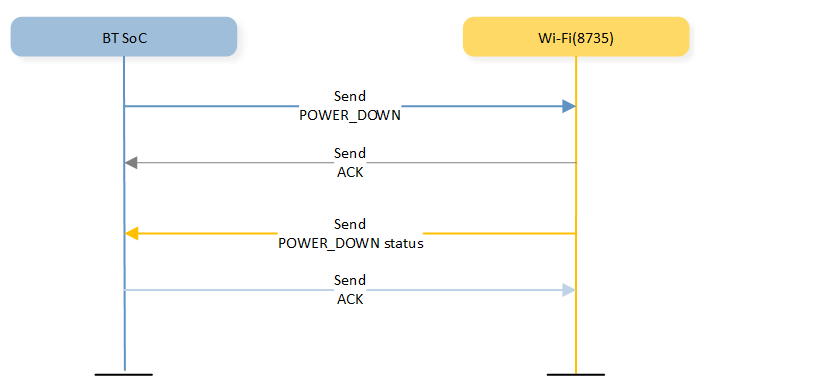
UART Public API reference
1. - Function
int uart_send_packet(uint16_t resp_opcode, uart_params_t *params_head, bool ignore_ack, int timeout);
Description:
This function is responsible for sending a packet over UART while ensuring synchronization, mutex handling, and acknowledgment (ACK) reception if required. It constructs and transmits a packet with parameters and retries if an acknowledgment is not received within a timeout period, unless ignore_ack is set to true.
Parameters:
resp_opcode – The response opcode indicating the type of packet being sent.
params_head – A pointer to a linked list of parameters that need to be sent as part of the UART packet.
ignore_ack – A boolean flag that determines whether to wait for an acknowledgment after sending the packet.
timeout – The time in milliseconds to wait for semaphore locks and acknowledgment before considering the transmission failed.
Return:
UART_OK – Success.
UART_SEND_PACKET_TIMEOUT – Failed due to timeout.
UART_ACK_TIMEOUT – Failed to receive expected acknowledgment (if ignore_ack is false).
Key Call:
Semaphore Handling
xSemaphoreTake(tx_resp_mutex, timeout): – Locks the response mutex for exclusive access.
xSemaphoreTake(tx_pkt_sema, timeout): – Locks the packet semaphore to prevent simultaneous transmissions.
xSemaphoreTake(tx_ack_mutex, timeout): – Waits for acknowledgment if ignore_ack is false.
xSemaphoreGive(tx_pkt_sema): – Releases the packet semaphore after sending data.
xSemaphoreGive(tx_resp_mutex): – Releases the response mutex after completing transmission.
xSemaphoreGive(tx_ack_mutex): – Releases the acknowledgment mutex once ACK is received.
Packet Construction & Sending
get_expected_tx_seq_number(): – Retrieves the expected transmission sequence number.
CalculateChecksum(): – Computes a checksum for error detection.
uart_send_buffer(&srobj.sobj, data, length, flag): – Sends data over UART in chunks.
Acknowledgment Handling & Retransmission (if ignore_ack is false)
xQueueReceive(rx_uart_ack_tmp_recycle, (void *)&ack_packet, 0): – Checks for old acknowledgment packets before waiting for a new one.
xQueueReceive(rx_uart_ack_ready, (void *)&ack_packet, timeout / 3): – Receives acknowledgment from the queue.
xQueueSend(rx_uart_ack_tmp_recycle, (void *)&ack_packet, 0): – Recycles received acknowledgment packets.
Retry logic: – If acknowledgment is not received within the timeout, the function retries sending the packet based on retry_time count.
Acknowledgment validation: – Ensures the received acknowledgment matches the expected opcode before proceeding.
2. - Function
void uart_service_send_pwron_cmd(void);
Description:
This function sends a power-on command (UART_OPC_RESP_POWER_ON) over UART if the UART service is initialized. The command contains a single byte indicating the power status.
Parameters:
NA
Return:
NA
Key Call:
Checks UART Initialization:
If srobj.uart_init is true, it proceeds to send command.
if srobj.uart_init is false, it send a warning message.
Creates a UART Parameter Packet structure with the parmeters
Calls uart_send_packet to Send the Command:
Sends UART_OPC_RESP_POWER_ON with the created parameter packet.
Uses a timeout of 2000 ms for the operation.
3. - Function
int uart_service_init(PinName tx_pin, PinName rx_pin, int baudrate);
Description:
This function initializes a UART service by configuring the hardware, creating necessary queues and semaphores, and launching multiple FreeRTOS tasks for UART communication.
Parameters:
tx_pin – The UART transmit (TX) pin.
rx_pin – The UART receive (RX) pin.
baudrate – The baud rate for UART communication.
Return:
UART_OK – Successful initialization.
UART_SERVICE_INIT_FAIL – If initialization fails at any stage.
Key Call:
UART Initialization:
Initializes the UART hardware with the specified TX and RX pins.
Configures the UART baud rate.
Sets the UART format to 8 data bits, no parity, and 1 stop bit.
Registers an interrupt handler for UART events.
Sets the send completion handler for UART transmissions.
Stream Buffer Creation:
Creates a stream buffer for UART reception.
Queue Creation:
xSemaphoreCreateBinary() – Creates binary semaphores for transmission control.
xSemaphoreCreateMutex() – Creates mutexes for synchronizing access to shared resources.
xSemaphoreGive() – Releases semaphores to their initial state.
Task Creation:
Creates threads for processing UART commands.
Creates a thread for handling critical UART operations.
Creates a thread for handling UART acknowledgments.
Creates a thread for receiving UART data.
Final Initialization Flag:
Set srobj.uart_init = 1;
4. - Function
int uart_service_rx_cmd_reg(uint16_t uart_cmd_type, Callback_t uart_cmd_fun);
Description:
This function registers a callback function for a specific UART command type. It stores the command type and its associated callback function in a lookup table, allowing the system to execute the corresponding function when the command is received.
Parameters:
uart_cmd_type – The command identifier/name for the UART message.
uart_cmd_fun – The callback function to be executed when the specified command is received.
Return:
UART_OK – If the callback is successfully registered.
UART_REG_CALLBACK_FAIL – If the command type is invalid.
Key Call:
IS_VALID_UART_CMD(uart_cmd_type)
A macro or function that checks if uart_cmd_type falls within a valid range.
Callback Registration:
Stores the command type in the uartcmdcb_table lookup table.
Store the callback function in the uartcmdcb_table lookup table, executed when the command is received.
5. - Function
int uart_service_start(int send_power_start);
Description:
This function enables UART receive (Rx) and transmit (Tx) interrupts and optionally sends a power-on command when starting the UART service.
Parameters:
send_power_start – A flag that determines whether to send a power-on command (1 to send, 0 to skip).
Return:
UART_OK – If the service starts successfully.
UART_START_FAIL – If the UART service is not initialized.
Key Call:
Checks UART Initialization:
If srobj.uart_init is true, it proceeds to enable interrupts.
if srobj.uart_init is false, it returns UART_START_FAIL.
Enabling Interrupts:
serial_irq_set(&(srobj.sobj), RxIrq, 1);

serial_irq_set(&(srobj.sobj), TxIrq, 1);
Sending Power-On Command (Optional):
If send_power_start = 1, the function calls uart_service_send_pwron_cmd() to send a power-on command.
6. - Function
void uart_service_poweroff(void);
Description:
This function deinitializes the UART interface if it has been initialized. It is typically used during system shutdown or when UART communication is no longer needed.
Parameters:
NA
Return:
NA
Key Call:
serial_free(&(srobj.sobj))
Releases resources and deinitializing the UART hardware.
7. - Function
void uart_service_deinit(void);
Description:
This function deinitializes the UART service, stopping related tasks and freeing allocated resources. This function ensures that all associated tasks, semaphores, and buffers are properly deleted before shutdown.
Parameters:
NA
Return:
NA
Key Call:
UART Dinitialization:
uart_service_poweroff() – Calls uart_service_poweroff to dinitialize UART hardware.
vTaskDelete(uartcmdtask[i]) – Deletes UART command handling tasks.
vTaskDelete(uartcrticaltask) – Deletes the UART critical command task.
vTaskDelete(uartacktask) – Deletes the UART acknowledgment task.
vTaskDelete(uartrecvtask) – Deletes the UART receive task.
vStreamBufferDelete(uart_rx_stream) – Deletes the UART receive stream buffer.
free_rx_uart_queue() – Frees the RX queue used for UART communication.
free_tx_uart_queue() – Frees the TX queue used for UART communication.
vSemaphoreDelete(uart_tx_free_sema) – Deletes the UART TX semaphore.
vSemaphoreDelete(tx_resp_mutex) – Deletes the TX response mutex.
vSemaphoreDelete(tx_pkt_sema) – Deletes the TX packet semaphore.
vSemaphoreDelete(tx_ack_mutex) – Deletes the TX acknowledgment mutex.
8. - Function
int uart_service_add_new_rx_opcode(rxopc_item_t *new);
Description:
Registers a new UART receive opcode callback in the internal opcode table. The function calculates the table index based on the opcode value and whether it belongs to the user region, then inserts the new callback into the linked list at that index.
Parameters:
new: Pointer to an rxopc_item_t structure containing:
opcode - the receive opcode to register.
node - linked-list node for internal table insertion.
Callback function and other metadata as defined in rxopc_item_t.
Return:
UART_OK - successfully added the opcode callback.
UART_REG_CALLBACK_FAIL - failed to add callback (e.g., table not initialized).
Key Call:
Determines if the opcode belongs to the user region.
Inserts the new item into the linked list at the calculated index.
UART_SRV_WARN - Logs a warning if the table is not initialized.
9. - Function
int uart_service_add_table(rxopc_item_t *tbl, int len);
Description:
Registers an array of UART receive opcode callbacks by iteratively calling uart_service_add_new_rx_opcode for each item in the table.
Parameters:
tbl: Pointer to an array of rxopc_item_t structures.
len: Number of items in the array.
Return:
UART_OK - all callbacks successfully registered.
UART_REG_CALLBACK_FAIL - registration failed for any single callback; process stops.
Key Call:
Adds each callback individually.
Returns immediately if any addition fails, ensuring atomicity per item.
10. - Function
int uart_service_set_buff_size(uint16_t buff_size);
Description:
Sets the UART buffer size used for receiving or transmitting data. If the provided size is invalid, the buffer size defaults to the maximum allowed (UART_MAX_BUF_SIZE).
Parameters:
buff_size: Desired UART buffer size in bytes.
Return:
UART_OK - Buffer size successfully set.
UART_START_FAIL - Invalid size; buffer set to UART_MAX_BUF_SIZE.
Key Call:
Checks if the buffer size is within allowed limits.
11. - Function
uint16_t uart_service_get_buff_size(void);
Description:
Returns the current UART buffer size.
Parameters:
NA
Return:
Current uart_buff_size value.
Key Call:
NA
12. - Function
int uart_service_set_pic_size(uint16_t pic_size);
Description:
Sets the UART picture transmission size for sending images. If the provided size is invalid, the picture size defaults to the maximum allowed (UART_MAX_PIC_SIZE).
Parameters:
pic_size: Desired picture size in bytes.
Return:
UART_OK - Picture size successfully set.
UART_START_FAIL - Invalid size; picture size set to UART_MAX_PIC_SIZE.
Key Call:
Validates the requested picture size.
13. - Function
uint16_t uart_service_get_pic_size(void);
Description:
Returns the current UART picture size setting.
Parameters:
NA
Return:
Current uart_pic_size value.
Key Call:
NA
14. - Function
int uart_service_set_protocal_version(uint8_t protocal_version);
Description:
Sets the UART protocol version used by the system.
Parameters:
protocal_version - Protocol version number.
Return:
UART_OK - Protocol version successfully set.
Key Call:
NA
15. - Function
uint8_t uart_service_get_protocal_version(void);
Description:
Retrieves the current UART protocol version.
Parameters:
NA
Return:
Current uart_protocal_version.
Key Call:
NA
16. - Function
int uart_service_set_wifi_ic_type(uint8_t wifi_ic_type);
Description:
Sets the WiFi IC type used by the UART service.
Parameters:
wifi_ic_type: Identifier for the WiFi IC.
Return:
UART_OK: WiFi IC type successfully set.
Key Call:
NA
17. - Function
uint8_t uart_service_get_wifi_ic_type(void);
Description:
Retrieves the WiFi IC type currently set in the UART service.
Parameters:
NA
Return:
Current uart_wifi_ic_type.
Key Call:
NA
18. - Function
int uart_service_set_bt_role(uint8_t bt_role);
Description:
Sets the Bluetooth role used by the UART service.
Parameters:
bt_role: Role identifier (e.g., master/slave depending on system definition).
Return:
UART_OK- Bluetooth role successfully set.
Key Call:
NA
19. - Function
uint8_t uart_service_get_bt_role(void);
Description:
Retrieves the Bluetooth role currently set in the UART service.
Parameters:
NA
Return:
Current uart_bt_role.
Key Call:
NA
Over-the-Air (OTA) Firmware Update
Over-the-air updates allow developers to update the firmware without physically connecting the UART of the 8735 to a PC. Users can select the type of firmware to upgrade directly from the APP.
Available firmware update options:
Type of OTA Flow |
Mode |
|---|---|
Wi-Fi firmware update only |
0x02 |
Bootloader and Wi-Fi firmware update |
0x03 |
BT firmware update only |
0x04 |
NN model and Wi-Fi firmware update |
0x0A |
Bootloader, NN model and Wi-Fi firmware update |
0x0B |
Isp_iq and Wi-Fi firmware update |
0x12 |
Bootloader, Isp_iq and Wi-Fi firmware update |
0x13 |
NN model, Isp_iq and Wi-Fi firmware update |
0x1A |
Bootloader, NN model, Isp_iq and Wi-Fi firmware update |
0x1B |
Note
Updating only the bootloader firmware of the 8735B via the APP is not supported.
OTA Process:
The APP transfers the OTA file(s) to the storage of the Wi-Fi SoC (8735 HEAP).
The APP sends the UART_TX_OPC_CMD_TRANSFER_UPGRADE_DATA command (8430) to start the OTA process, which uses the saved files for the update.
After the firmware update is complete, the binary files are deleted from the HEAP memory.
For more detailed information on each process, please refer to the AI Glass CMD Specifications document.
OTA Public API reference
1. - Function
int heap_update_ota(uint8_t *buffer, uint32_t length);
Description:
This function updates the WiFi OTA firmware retrieved from the HEAP memory.
Parameters:
buffer – pointer to the firmware data located in HEAP memory.
length – size (in bytes) of the firmware data to be written.
Return:
ret – returns 0 if success, returns negative value if fail.
Key Call:
UART_TX_OPC_CMD_TRANSFER_UPGRADE_DATA (8430)
This UART command triggers the update process to load the Wi-Fi OTA firmware from HEAP memory into the device.
2. - Function
int heap_update_boot_ota(uint8_t *buffer, uint32_t length);
Description:
This function updates the Wi-Fi bootloader OTA firmware using data stored in HEAP memory.
Parameters:
buffer – pointer to the bootloader firmware data located in HEAP memory.
length – size (in bytes) of the bootloader firmware data to be written.
Return:
ret – returns 0 if success, returns negative value if fail.
Key Call:
UART_TX_OPC_CMD_TRANSFER_UPGRADE_DATA (8430)
This UART command triggers the update process to load the Wi-Fi bootloader firmware from HEAP memory into the device.
3. - Function
int heap_update_nn_ota(uint8_t *buffer, uint32_t length);
Description:
This function updates the Wi-Fi NN model OTA firmware using data stored in HEAP memory.
Parameters:
buffer – pointer to the NN firmware data located in HEAP memory.
length – size (in bytes) of the NN firmware data to be written.
Return:
ret – returns 0 if success, returns negative value if fail.
Key Call:
UART_TX_OPC_CMD_TRANSFER_UPGRADE_DATA (8430)
This UART command triggers the update process to load the Wi-Fi NN firmware from HEAP memory into the device.
4. - Function
int heap_update_isp_iq_ota(uint8_t *buffer, uint32_t length);
Description:
This function updates the Wi-Fi ISP IQ OTA firmware using data stored in HEAP memory.
Parameters:
buffer – pointer to the NN firmware data located in HEAP memory.
length – size (in bytes) of the NN firmware data to be written.
Return:
ret – returns 0 if success, returns negative value if fail.
Key Call:
UART_TX_OPC_CMD_TRANSFER_UPGRADE_DATA (8430)
This UART command triggers the update process to load the Wi-Fi ISP IQ firmware from HEAP memory into the device.
Configuration in AI Wearable Glass Scenario
This section outlines key configuration parameters and their default values across various files.
main.c
UART_LOG_BAUDRATE: UART baud rate for the debug log (default: 3000000). Note: This baud rate significantly influences processing time.
ai_glass_media.h
FLASH_AI_SNAPSHOT_DATA: Flash location to store AI snapshot parameters.
FLASH_RECORD_DATA: Flash location to store lifetime recording parameters.
FLASH_SNAPSHOT_DATA: Flash location to store lifetime snapshot parameters.
DEFAULT_RECORD_WIDTH: Default width for sensor.
DEFAULT_RECORD_HEIGHT: Default Height for sensor.
DEFAULT_LIFESNAP_WIDTH: Default width for sensor.
ENABLE_MEDIA_UPDATE_FLASH: Enables media parameter update to flash (default: 0).
BURST_MODE_MAX_COUNT: Activates burst mode (default: 1).
ai_glass_initialize.c
ENABLE_TEST_CMD: Enables test command for the scenario (default: 1).
ENABLE_DISK_MASS_STORAGE: Allows the tester to access the EMMC disk via USB mass storage (default: 0).
ENABLE_VIDEO_SEND_LATER: Defers sending the video end command; requires both ENABLE_TEST_CMD and ENABLE_DISK_MASS_STORAGE (default: 0). When enabled, the process blocks after recording or a lifetime snapshot. Users need to issue the “SENDVIDEOEND” command.
DISK_PLATFORM: External platform to store lifetime snapshots or recordings (default: VFS_INF_EMMC).
UART_TX: UART TX pin for communication with another SoC (default: PA_2).
UART_RX: UART RX pin for communication with another SoC (default: PA_3).
UART_BAUDRATE: UART baud rate for communication with another SoC (default: 2000000). Note: This baud rate significantly influences processing time.
ai_glass_initialize.h
EXTDISK_LOG: Enables save log to eMMC (default: 0).
lifetime_recording_initialize.c
AUDIO_SAMPLE_RATE: Audio sample rate (default: 16000).
AUDIO_SRC: Audio interface during recording (default: I2S_INTERFACE).
AUDIO_I2S_ROLE: I2S role when using the I2S interface (default: I2S_MASTER).
wlan_scenario.h
AI_GLASS_AP_IP_ADDRx: IP address in AP mode for 8735 (default: 192.168.43.1).
AI_GLASS_AP_NETMASK_ADDRx: Netmask for AP mode (default: 255.255.255.0).
AI_GLASS_AP_GW_ADDR: Gateway address in AP mode (default: 192.168.43.1).
AI_GLASS_AP_SSID: SSID for AP mode (default: AI_GLASS_AP).
AI_GLASS_AP_PASSWORD: Password for AP mode (default: 12345678).
AI_GLASS_AP_CHANNEL: Channel for AP mode (default: 6).
AI_GLASS_AP_PORT: Port number used for AP mode (default: 8080).
wlan_scenario.c
USE_HTTPS: Activate HTTPS protocal (default: 1).
HTTPS_PORT: HTTPS Used port (default: 8080).
MULTI_THREAD_WIFI_SEND_PIC_DATA: Activate HTTPS multi thread send and read picture data (default: 1).
gyrosensor\gyrosensor_api.h
ENABLE_GET_GSENSOR_INFO: Activates gyro sensor data capture during lifetime recording (default: 1).
IGN_ACC_DATA: Ignore the accelerometer data from g-sensor (default: 1).
AI_DEMO_MPU6050 / AI_DEMO_ICM42670P: Compile-time selection of the g-sensor model. Only one should be defined at a time. The driver and default I2C pins are tied to the chosen model (default: AI_DEMO_ICM42670P).
GYROSENSOR_I2C_MTR_SDA / GYROSENSOR_I2C_MTR_SCL: I2C interface pins for the g-sensor. These default values depend on the selected model:
If
AI_DEMO_MPU6050is defined:
GYROSENSOR_I2C_MTR_SDA= PF_2
GYROSENSOR_I2C_MTR_SCL= PF_1If
AI_DEMO_ICM42670Pis defined:
GYROSENSOR_I2C_MTR_SDA= PE_4
GYROSENSOR_I2C_MTR_SCL= PE_5
Note
The default pin assignments above are based on the reference hardware design. If your board routes the g-sensor to different I2C pins, update these macros to match the actual hardware connection. Always ensure the pin definitions follow the physical wiring of the built-in g-sensor.
media_filesystem.c
ENABLE_FILE_TIME_FUNCTION: Updates file timestamps using the get_fattime function in media_filesystem.c.
component\soc\8735b\misc\platform\ota_8735b.h
UPDATE_UPGRADE_PROGRESS_TO_8773: This define flag toggles sending of the WiFi OTA upgrade status back to BT SOC. Change to 0 to switch it off. (default: 1)
IQ Bin Update Timestamp
Date |
Commit SHA |
Commit Detail |
Commit Link |
|---|---|---|---|
12-11-2025 |
827533e508f87f9d6796031d334d7e62eb35f9a1 |
Add |
|
03-12-2025 |
0f3b83addf9ca4f3822f910ed018a90ad315dd59 |
Update |
|
09-01-2026 |
3fb241d324bdda139388b21fd8c07c0ce3ebf44d |
Update |
|
19-01-2026 |
7d0beccabb23e97c581dc73e6bd3508171a1eacd |
Update |
|
02-02-2026 |
a48618c6677cc4fe2dadfbed5560f3d05bf5156f |
Update |
|
05-03-2026 |
4c6295c7a7ddb2fdcbfb10aaf446bceee87fc0f7 |
Update |
|
11-03-2026 |
d75923e18f04866dcd6fd5f5b207727778e3bfeb |
Update |
|
01-04-2026 |
d4a72de7603df4976805e04bbf80744218e7a73c |
Update |
|
13-04-2026 |
7f8e0edc53819086feea924a9d6a307f4334e076 |
Update |
|
15-04-2026 |
4a194bb8f1d6de7266913e4aacd3eb15f1598eb5 |
Update |
|
24-04-2026 |
356246a4f47d50843767a976acc03c4659b22b7b |
Update |
|
29-04-2026 |
e19f3667575887175499d152ff2bfa7e5af9f3ee |
Update |